Windows 7 Forums


Windows 7: svchost.exe uses 99 % CPU !

24 Jan 2013   #1

Windows 7 64 bit home premium
Netherlands
 
 
svchost.exe uses 99 % CPU !

Helo guys, so now i got a kind of a weird problem..

i realised my pc was getting realy slow, so i opened taskmanager and i discovered something..
i hope someone can help me!


Screenshot:
Attached Thumbnails
svchost.exe uses 99 % CPU !-naamloos.png  
My System SpecsSystem Spec

24 Jan 2013   #2

Windows 7 Ultimate x64
The Cyberverse


Hi since your computer is running very slow i would update your anti-virus definitions to the latest signature and then run a thorough virus scan as one of the reasons a computer can run slow is thru being infected.

Please let us know how it goes.
My System SpecsSystem Spec
24 Jan 2013   #3

Windows 7 Home Premium 64-bit
Scotland


I had a similar problem, start by understanding why svchost is running and take it from there.....

What is svchost.exe And Why Is It Running? - How-To Geek
My System SpecsSystem Spec
.


24 Jan 2013   #4
whs

Vista, Windows7, Mint Mate, Zorin, Windows 8
Florida in winter, Black Forest/Germany


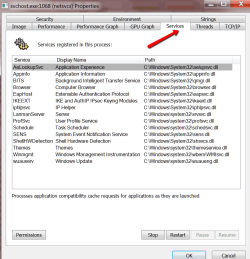
svchost.exe can run any .dll process. We'll have to find out which are the processes running under that svchost.exe.

Get Process Explorer and look for this particular svchost.exe - best by looking into the CPU column. Then either hover over that one or even better look into the properties of that svchost.exe. Under the services tab you should see something like the picture (could be less or more processes). Open the little window such that all processes are visible and make a snip picture like mine. Post that here and we'll have a look.
Attached Thumbnails
svchost.exe uses 99 % CPU !-2013-01-24_1918.png  
My System SpecsSystem Spec
25 Jan 2013   #5

Windows 7 64 bit home premium
Netherlands


Its all fixed! i scanned the whole pc it was a virus.

Thanks everyone!
My System SpecsSystem Spec
25 Jan 2013   #6

Windows 7 Home Premium 64-bit
Scotland


Please mark the problem as solved.
My System SpecsSystem Spec
25 Jan 2013   #7

Windows 7 Ultimate x64
The Cyberverse


Viruses are one of the most common cause of a computer running slow. I would now schedule weekly virus scans to help keep your machine clean.

You are welcome.

This guide may help you with the basics of internet and network security.

http://2xgjeuelsdome.wordpress.com/2...ity/#comment-2

Last edited by TheCyberMan; 25 Jan 2013 at 04:20 PM.. Reason: Add link to guide
My System SpecsSystem Spec
Reply

 svchost.exe uses 99 % CPU ! problems?


Thread Tools


Similar help and support threads for: svchost.exe uses 99 % CPU !
Thread Forum
SVCHOST.exe BSOD Help and Support
svchost.exe BSOD Help and Support
svchost.exe//other help//cmd.exe BSOD Help and Support
svchost.exe General Discussion
svchost.exe Software


All times are GMT -5. The time now is 08:29 AM.


Seven Forums Android App Seven Forums IOS App Follow us on Facebook

Windows 7 Forums is an independent web site and has not been authorized,
sponsored, or otherwise approved by Microsoft Corporation.
"Windows 7" and related materials are trademarks of Microsoft Corp.
© Designer Media Ltd
  

1 2 3 4 5 6 7 8 9 10 11 12 13 14 15 16 17 18 19 20 21 22 23 24 25 26 27 28 29 30 31 32