Windows 7 Forums


Windows 7: WD my passport not initializing

25 Jan 2013  
Rashmanadon

Win 7 Home Premium 64bit
27 posts
 
 
WD my passport not initializing

Hey guys,

I know there's about a thousand of these threads around, but none of the solutions seem to be working.

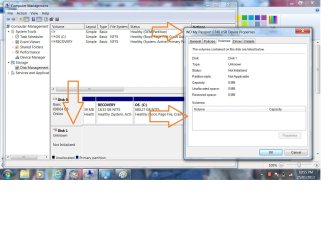
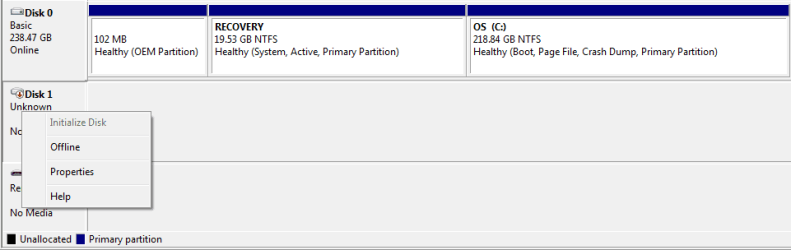
The drive doesn't show up in my computer, but when I go to the disk manager tool, it's there, recognized as WD my passport, 500gb and says it needs to be initialized.

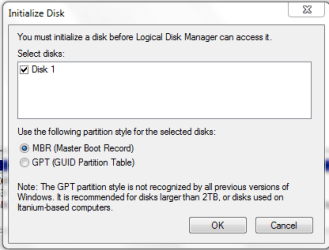
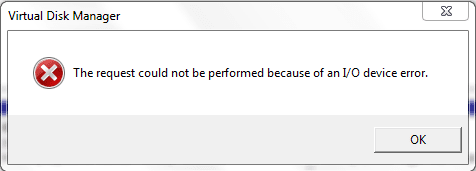
I click "initialize" and it tries to do something, then comes up with "The operation could not be performed due to an I/o error" or words to that effect.

I've run the WD diagnostics, and it says the capacity is 0gb and it doesn't pass the test. I've tried writing all 0's to it to reformat it using the WD tool, and again it says "The firmware on your device drive does not support the changing of block size of your WD external hard drive"

So I tried the Firmware updater, and that says "Update firmware to V 1.019"
Click yes

and it says "Update failed on specified drive. Please click "exit" then close all other open applications and then run the WD firmware updater again"

But - no other applications are open when doing it?!

So basically - it doesn't show up in my computer, I can't assign it a letter, I can't initialize the disk, and I can't partition it that I'm aware of.

Any other suggestions besides return it?

Running Windows 7 Home premium 64 bit

My System SpecsSystem Spec

25 Jan 2013  
ICit2lol

Desk1 7 Home Prem / Desk2 7 Home Prem / Laptop 7 Pro all 64bit
6,543 posts


Hello Rashmandon mate as you seemed to have tried all else personally I would try the tutorial from whs - SSD Alignment I know it says SSD but I do this for all the drives I put in or on my machines not that I have had the problem you have but what have you got to lose except your sanity

Having said that please don't go ahead if you think it isn't right the choice is yours I am only saying what I would try.
My System SpecsSystem Spec
25 Jan 2013  
braddersz

Windows 7 Home Premium 64 Bit
427 posts
Manchester, England


Can you format it? Try plugging it in another machine with a different OS.
My System SpecsSystem Spec
.


25 Jan 2013  
ICit2lol

Desk1 7 Home Prem / Desk2 7 Home Prem / Laptop 7 Pro all 64bit
6,543 posts


Quote   Quote: Originally Posted by braddersz View Post
Can you format it? Try plugging it in another machine with a different OS.
That is just what that tutorial is about Brad
My System SpecsSystem Spec
25 Jan 2013  
braddersz

Windows 7 Home Premium 64 Bit
427 posts
Manchester, England


Quote   Quote: Originally Posted by ICit2lol View Post
Quote   Quote: Originally Posted by braddersz View Post
Can you format it? Try plugging it in another machine with a different OS.
That is just what that tutorial is about Brad
MY bad. Thanks for pointing that out. I've not managed to have a read through it yet.
My System SpecsSystem Spec
25 Jan 2013  
ICit2lol

Desk1 7 Home Prem / Desk2 7 Home Prem / Laptop 7 Pro all 64bit
6,543 posts


Quote   Quote: Originally Posted by braddersz View Post
Quote   Quote: Originally Posted by ICit2lol View Post
Quote   Quote: Originally Posted by braddersz View Post
Can you format it? Try plugging it in another machine with a different OS.
That is just what that tutorial is about Brad
MY bad. Thanks for pointing that out. I've not managed to have a read through it yet.
No probs Brad it is quite essential for SSD's but i just use it for everything.

Now for you and Rashamnaodon my favourite tutorial is Optimize Windows 7[2]=Performance Maintenance - if you don't mind losing some of the "bling" it will speed the system up and optimise it.

Rashamanodon please let us know how you go
My System SpecsSystem Spec
25 Jan 2013  
Rashmanadon

Win 7 Home Premium 64bit
27 posts


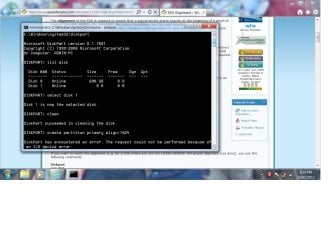
Thanks for the reply, running through the SSD formatting method, it has the same I/o error message as before :S
My System SpecsSystem Spec
25 Jan 2013  
Rashmanadon

Win 7 Home Premium 64bit
27 posts


Attached a ss of the error
Attached Thumbnails
WD my passport not initializing-wdhdd.jpg  
My System SpecsSystem Spec
25 Jan 2013  
braddersz

Windows 7 Home Premium 64 Bit
427 posts
Manchester, England


Have you got another device with the same Drive Letter assigned as the WD.
My System SpecsSystem Spec
25 Jan 2013  
Rashmanadon

Win 7 Home Premium 64bit
27 posts


the HDD doesn't have a letter assigned to it, just Disk 1 (both in disk manager, and disk list) but they both show up as 0gb, even though if I remove the external hard drive, there's no disk 1 =/
My System SpecsSystem Spec
Reply

 WD my passport not initializing problems?


Thread Tools


Similar help and support threads for: WD my passport not initializing
Thread Forum
system restore is always initializing Backup and Restore
Solved which is best hard drive . My passport or my passport essential se ? Hardware & Devices
Max Payne 3 Initializing? Gaming
RAID drives not initializing. Hardware & Devices


All times are GMT -5. The time now is 02:30 AM.


Windows 7 Forums is an independent web site and has not been authorized,
sponsored, or otherwise approved by Microsoft Corporation.
"Windows 7" and related materials are trademarks of Microsoft Corp.
© Designer Media Ltd