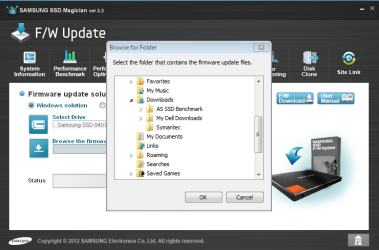
How do I install the latest Samsung SSD firmware update (DXM04B0Q)? The Magician software is supposed to do it, but when I open up the download folder where the firmware update download is located, the Magician software doesn't see it. I've downloaded the firmware in many different locations, but still, the Magician software doesn't see it. Any Ideas? See snips to see firmare update download location and what Magician software sees. The firmware update (DXM04B0Q) is right below the Symantic folder.
Couple of things you can try.
- Move the DXM04B0Q folder to your desktop. Does the Samsung Magician see it?
- If still no joy, try letting the Magician download the firmware. Verify it downloaded the correct version.
Couple of things you can try.
- Move the DXM04B0Q folder to your desktop. Does the Samsung Magician see it?
- If still no joy, try letting the Magician download the firmware. Verify it downloaded the correct version.
Thank you for the guide. This is the best one that I've seen.
I've tried using both IE and Firefox for the firmware update. I've let the Magician download the software. I've downloaded the firmware to the desktop and to different folders that the Magician showed. In all cases, the Magician doesn't see the software. Any ideas?
My Computer
Computer Manufacturer/Model Number
Dell 17R N7110 Inspiron laptop
OS
Windows 7 Ultimate (x64) Service Pack 1 (build 7601)
CPU
Intel(R) Core(TM) i5-2450M CPU @ 2.50GHz
Motherboard
Dell Inc. 0YH79Y A00
Memory
8 GB
Graphics Card(s)
Intel HD Graphics 3000 with up to 1.6GB dynamic video memory
Sound Card
SRS Premium Sound - (1) Realtek High Definition Audio
When I open them up, there are two .enc downloads that Windows doesn't know how to open. See snip of opened latest firmware download. For some reason, the Magician software doesn't see download.
Attachments
Capture .enc firmware 1_29_13.PNG
59.9 KB
· Views: 7
My Computer
Computer Manufacturer/Model Number
Dell 17R N7110 Inspiron laptop
OS
Windows 7 Ultimate (x64) Service Pack 1 (build 7601)
CPU
Intel(R) Core(TM) i5-2450M CPU @ 2.50GHz
Motherboard
Dell Inc. 0YH79Y A00
Memory
8 GB
Graphics Card(s)
Intel HD Graphics 3000 with up to 1.6GB dynamic video memory
Sound Card
SRS Premium Sound - (1) Realtek High Definition Audio
Have you actually extracted those files somewhere from the .zip file or are you just opening the folder? Right-click the .zip file and extract to a location, and THEN point the software to that spot and see if it will pick it up.
Have you actually extracted those files somewhere from the .zip file or are you just opening the folder? Right-click the .zip file and extract to a location, and THEN point the software to that spot and see if it will pick it up.
This was the trick. I extracted the files and they were left in the folder. Then I clicked on downloads where the folder is and the Magician software saw them. I was able to safely install the firmware. Thanks a bunch!!
My Computer
Computer Manufacturer/Model Number
Dell 17R N7110 Inspiron laptop
OS
Windows 7 Ultimate (x64) Service Pack 1 (build 7601)
CPU
Intel(R) Core(TM) i5-2450M CPU @ 2.50GHz
Motherboard
Dell Inc. 0YH79Y A00
Memory
8 GB
Graphics Card(s)
Intel HD Graphics 3000 with up to 1.6GB dynamic video memory
Sound Card
SRS Premium Sound - (1) Realtek High Definition Audio
This was the trick. I extracted the files and they were left in the folder. Then I clicked on downloads where the folder is and the Magician software saw them. I was able to safely install the firmware. Thanks a bunch!!
Guys, thank you so much for helping me with this. it had me stumped. I had tried extracting the files, but I didn't try looking for the folder with the extracted files afterwards for some reason. Thanks a bunch!
My Computer
Computer Manufacturer/Model Number
Dell 17R N7110 Inspiron laptop
OS
Windows 7 Ultimate (x64) Service Pack 1 (build 7601)
CPU
Intel(R) Core(TM) i5-2450M CPU @ 2.50GHz
Motherboard
Dell Inc. 0YH79Y A00
Memory
8 GB
Graphics Card(s)
Intel HD Graphics 3000 with up to 1.6GB dynamic video memory
Sound Card
SRS Premium Sound - (1) Realtek High Definition Audio