
Solved Changed PSU,when connected 24pin,no power

Tsunamijhoe

New member
Member
Local time
4:16 AM
Messages
98
Hey guys
I exchanged psu's in my computers due to cable needs,and i have replaced a 500w antec with a 500w northq (NQ-4775-500s), now,i tested the psu with a multimeter,and all is a-ok across the board, however,whenever i plug the psu into the motherboard (Gigabyte GA-H55-UD3H), 24pin and 4pin 12v atx nothing happens, no fans start spinning,no light on mb,nothing. I can get fans spinning and everything if i short out the power and ground on the 24pin connector,but when same is connected to mb,nothing happens.

Now,this motherboard worked absolutly fine with the antec psu. The antec had a 8pin 12v atx i needed on another pc,and this gigabyte mb only need a 4pin 12v atx,so it should be a perfect fit.

Anyone have any ideas? Other than the mb suddenly is fried or something
 

My Computer My Computer

At a glance

Windows 7 Ultimate SP1 64bitCore I3 2100T/Core I5 750/Core I3 21202x4GB 1600mhz/2x4GB 1600hmhz/2x4GB 1333mhzonboard/onboard/ASUS HD7850-DC2-2GD5-V2
Computer type
PC/Desktop
Computer Manufacturer/Model Number
custom
OS
Windows 7 Ultimate SP1 64bit
CPU
Core I3 2100T/Core I5 750/Core I3 2120
Motherboard
ASRock Z77 Extreme4/Gigabyte GA-H55-UD3H/Asrock H61DEL
Memory
2x4GB 1600mhz/2x4GB 1600hmhz/2x4GB 1333mhz
Graphics Card(s)
onboard/onboard/ASUS HD7850-DC2-2GD5-V2
Sound Card
not active/onboard/onboard
Monitor(s) Displays
Philips 42"
Screen Resolution
1920x1080
Hard Drives
WD Red WD30EFRX
WD20EARX
WD20EARS
WD20EACS
PSU
Corsair GS700/Antec 500w Earth watts/Corsair TX650 V2
Case
Antec Twelve Hundred V3/2xAntec Sonata Elite
Cooling
generic
Keyboard
2xMS natural Ergonomic
Mouse
MS Wireless/logitech laser/steelseries Xai
Internet Speed
20/2mbit
Other Info
2x IBM serveraid 1015M IT Flashed 8xPort SATA
4x X-case 5in1 drive cages (norco rebranded)
Are you sure you wired the front panel connectors properly? Does your motherboard have a powerswitch?
Have you tried with the OLD psu again and see if the computer starts?
 

My Computer My Computer

At a glance

Windows 7 professional X64AMD A10-5800K OC@ 4.4Ghz.8GB Kingston HyperX Blu 1333mhzXFX HD7870 2GB Core Edition
Computer type
PC/Desktop
OS
Windows 7 professional X64
CPU
AMD A10-5800K OC@ 4.4Ghz.
Motherboard
Gigabyte F2A85X-UP4
Memory
8GB Kingston HyperX Blu 1333mhz
Graphics Card(s)
XFX HD7870 2GB Core Edition
Monitor(s) Displays
Acer AL2216W
Screen Resolution
1680x1050
Hard Drives
Seagate Barracuda 500gb 7200rpm
Seagate Barracuda 1.5TB 7200rpm
PSU
Cooler Master Silent Pro M 850W
Case
Thermaltake Commander MS-I
Cooling
Cooler Master N520
Mouse
Logitech M504
Internet Speed
10Mbps
Are you sure you wired the front panel connectors properly? Does your motherboard have a powerswitch?
Have you tried with the OLD psu again and see if the computer starts?


If he just pulled out the Psu the front panel pwr reset buttons should be in tact

are you sure your 8 or 4 pin connection is in tight on the MB sometimes those tend to be hard to lock in

double check all connections and switches and make sure your board is grounded that would make you also think you have to juice
 

My Computer My Computer

At a glance

Windows 10 Home Premium 64bit sp1Intel I7-6700K @ 4.6 Ghz 1.344 volts everyday OC32GB G-Skill TridentZ 3200mhz 16-18-18-38 DDR4Sli Gigabyte Windforce GTX 980 G1
Computer type
PC/Desktop
Computer Manufacturer/Model Number
CoreI7-6700K MrFingerIII Special Builds
OS
Windows 10 Home Premium 64bit sp1
CPU
Intel I7-6700K @ 4.6 Ghz 1.344 volts everyday OC
Motherboard
Asrock Fatality K6 Z170 Socket 1151
Memory
32GB G-Skill TridentZ 3200mhz 16-18-18-38 DDR4
Graphics Card(s)
Sli Gigabyte Windforce GTX 980 G1
Sound Card
AC97 Creative Rage Tactic 3D Headphones Bluetooth
Monitor(s) Displays
27" Asus ROG Swift PG278Q G-Sync 48" Vizio Smart HD TV
Screen Resolution
2560x1440p 27"- 48" Currently Gaming at 2560x1440p Res 2K
Hard Drives
250GB Samsung Evo840SSD Seagate baracuda 500 GB WD Mybook 500Gb 1TB Seagate Barracuda
PSU
HX1050w Corsair Silver 80plus certified crosfire/sli
Case
Enthod Pro Full Tower
Cooling
Corsair H110i GT 280 mm High Performance WaterBlock
Keyboard
Logitech wireless keyboard
Mouse
Logitech wireless mouse
Internet Speed
Cox Cable 100+ mb
Antivirus
WebRoot Spysweeper with Antivirus
Browser
IE-10, Chrome, Opera
Other Info
My Other Rig is a AMD FX8320E @4.6Ghz 16GB Ballistic Sport Ram
Mobo Asrock Fatality 990FX 120GB OCZ SSD 1TB Seagate Barracuda Corsair H75 Cooling PSU Corsair CX750
GPU GTX Gigabyte 970G1
Everything is 100% connected correctly and firmly in place,i cant even get power shorting out the mb power switch connectors,it is as if no power gets through the 24 pin connector.
There is no light on the mb either,and the other psu is powering another system,so i havent tried putting it back in,although it shouldnt matter,as all my psu work fine,all connectors deliver the rated volts continuously,and that leaves the mainboard,cpu,ram.

Will the mb power on (mb light at least) if no cpu and ram is in it?
 

My Computer My Computer

At a glance

Windows 7 Ultimate SP1 64bitCore I3 2100T/Core I5 750/Core I3 21202x4GB 1600mhz/2x4GB 1600hmhz/2x4GB 1333mhzonboard/onboard/ASUS HD7850-DC2-2GD5-V2
Computer type
PC/Desktop
Computer Manufacturer/Model Number
custom
OS
Windows 7 Ultimate SP1 64bit
CPU
Core I3 2100T/Core I5 750/Core I3 2120
Motherboard
ASRock Z77 Extreme4/Gigabyte GA-H55-UD3H/Asrock H61DEL
Memory
2x4GB 1600mhz/2x4GB 1600hmhz/2x4GB 1333mhz
Graphics Card(s)
onboard/onboard/ASUS HD7850-DC2-2GD5-V2
Sound Card
not active/onboard/onboard
Monitor(s) Displays
Philips 42"
Screen Resolution
1920x1080
Hard Drives
WD Red WD30EFRX
WD20EARX
WD20EARS
WD20EACS
PSU
Corsair GS700/Antec 500w Earth watts/Corsair TX650 V2
Case
Antec Twelve Hundred V3/2xAntec Sonata Elite
Cooling
generic
Keyboard
2xMS natural Ergonomic
Mouse
MS Wireless/logitech laser/steelseries Xai
Internet Speed
20/2mbit
Other Info
2x IBM serveraid 1015M IT Flashed 8xPort SATA
4x X-case 5in1 drive cages (norco rebranded)
Are you sure you wired the front panel connectors properly? Does your motherboard have a powerswitch?
Have you tried with the OLD psu again and see if the computer starts?


If he just pulled out the Psu the front panel pwr reset buttons should be in tact

are you sure your 8 or 4 pin connection is in tight on the MB sometimes those tend to be hard to lock in

double check all connections and switches and make sure your board is grounded that would make you also think you have to juice

Well some people like to clean the inside of their computer throughly when swapping components.
But then again it may be just be me :D
 

My Computer My Computer

At a glance

Windows 7 professional X64AMD A10-5800K OC@ 4.4Ghz.8GB Kingston HyperX Blu 1333mhzXFX HD7870 2GB Core Edition
Computer type
PC/Desktop
OS
Windows 7 professional X64
CPU
AMD A10-5800K OC@ 4.4Ghz.
Motherboard
Gigabyte F2A85X-UP4
Memory
8GB Kingston HyperX Blu 1333mhz
Graphics Card(s)
XFX HD7870 2GB Core Edition
Monitor(s) Displays
Acer AL2216W
Screen Resolution
1680x1050
Hard Drives
Seagate Barracuda 500gb 7200rpm
Seagate Barracuda 1.5TB 7200rpm
PSU
Cooler Master Silent Pro M 850W
Case
Thermaltake Commander MS-I
Cooling
Cooler Master N520
Mouse
Logitech M504
Internet Speed
10Mbps
Everything is 100% connected correctly and firmly in place,i cant even get power shorting out the mb power switch connectors,it is as if no power gets through the 24 pin connector.
There is no light on the mb either,and the other psu is powering another system,so i havent tried putting it back in,although it shouldnt matter,as all my psu work fine,all connectors deliver the rated volts continuously,and that leaves the mainboard,cpu,ram.

Will the mb power on (mb light at least) if no cpu and ram is in it?

No, you need to have at least CPU and one stick of ram.

I recommended you to try the other PSU to check if it might be the motherboard.
 

My Computer My Computer

At a glance

Windows 7 professional X64AMD A10-5800K OC@ 4.4Ghz.8GB Kingston HyperX Blu 1333mhzXFX HD7870 2GB Core Edition
Computer type
PC/Desktop
OS
Windows 7 professional X64
CPU
AMD A10-5800K OC@ 4.4Ghz.
Motherboard
Gigabyte F2A85X-UP4
Memory
8GB Kingston HyperX Blu 1333mhz
Graphics Card(s)
XFX HD7870 2GB Core Edition
Monitor(s) Displays
Acer AL2216W
Screen Resolution
1680x1050
Hard Drives
Seagate Barracuda 500gb 7200rpm
Seagate Barracuda 1.5TB 7200rpm
PSU
Cooler Master Silent Pro M 850W
Case
Thermaltake Commander MS-I
Cooling
Cooler Master N520
Mouse
Logitech M504
Internet Speed
10Mbps
Have you checked the back of the psu for an off/on switch?

along with the 24pin,

there should be a 4-8 pin connector, usully top left of motherboard.
 

My Computer My Computer

At a glance

Windows 7 Home Premium 64 BitCore I7 1155 3.4GHZ8GB DDR 1600
Computer Manufacturer/Model Number
Cooler Master
OS
Windows 7 Home Premium 64 Bit
CPU
Core I7 1155 3.4GHZ
Memory
8GB DDR 1600
Hard Drives
64 GB SSD - OS
1TB - DATA
PSU
340 Watt Corsair
Case
Cooler Master
Cooling
Cooler Master
Have you checked the back of the psu for an off/on switch?

along with the 24pin,

there should be a 4-8 pin connector, usully top left of motherboard.

Dude, please read posts before answering. Ofcourse both the 12v 4pin connector, and the 24pin are attached, as well as the power switch on the psu is on.

Please check my above post for addition to this conundrum
 
Last edited:

My Computer My Computer

At a glance

Windows 7 Ultimate SP1 64bitCore I3 2100T/Core I5 750/Core I3 21202x4GB 1600mhz/2x4GB 1600hmhz/2x4GB 1333mhzonboard/onboard/ASUS HD7850-DC2-2GD5-V2
Computer type
PC/Desktop
Computer Manufacturer/Model Number
custom
OS
Windows 7 Ultimate SP1 64bit
CPU
Core I3 2100T/Core I5 750/Core I3 2120
Motherboard
ASRock Z77 Extreme4/Gigabyte GA-H55-UD3H/Asrock H61DEL
Memory
2x4GB 1600mhz/2x4GB 1600hmhz/2x4GB 1333mhz
Graphics Card(s)
onboard/onboard/ASUS HD7850-DC2-2GD5-V2
Sound Card
not active/onboard/onboard
Monitor(s) Displays
Philips 42"
Screen Resolution
1920x1080
Hard Drives
WD Red WD30EFRX
WD20EARX
WD20EARS
WD20EACS
PSU
Corsair GS700/Antec 500w Earth watts/Corsair TX650 V2
Case
Antec Twelve Hundred V3/2xAntec Sonata Elite
Cooling
generic
Keyboard
2xMS natural Ergonomic
Mouse
MS Wireless/logitech laser/steelseries Xai
Internet Speed
20/2mbit
Other Info
2x IBM serveraid 1015M IT Flashed 8xPort SATA
4x X-case 5in1 drive cages (norco rebranded)
The Motherboard in question should atleast admit a beep of some sort when it has power
if there was no beep there is something wrong the connections are secure the next step he can try it in another rig

and see if he can get it started if not i would think the PSU doesn't have enough power and he needs to replace it with something that can
 

My Computer My Computer

At a glance

Windows 10 Home Premium 64bit sp1Intel I7-6700K @ 4.6 Ghz 1.344 volts everyday OC32GB G-Skill TridentZ 3200mhz 16-18-18-38 DDR4Sli Gigabyte Windforce GTX 980 G1
Computer type
PC/Desktop
Computer Manufacturer/Model Number
CoreI7-6700K MrFingerIII Special Builds
OS
Windows 10 Home Premium 64bit sp1
CPU
Intel I7-6700K @ 4.6 Ghz 1.344 volts everyday OC
Motherboard
Asrock Fatality K6 Z170 Socket 1151
Memory
32GB G-Skill TridentZ 3200mhz 16-18-18-38 DDR4
Graphics Card(s)
Sli Gigabyte Windforce GTX 980 G1
Sound Card
AC97 Creative Rage Tactic 3D Headphones Bluetooth
Monitor(s) Displays
27" Asus ROG Swift PG278Q G-Sync 48" Vizio Smart HD TV
Screen Resolution
2560x1440p 27"- 48" Currently Gaming at 2560x1440p Res 2K
Hard Drives
250GB Samsung Evo840SSD Seagate baracuda 500 GB WD Mybook 500Gb 1TB Seagate Barracuda
PSU
HX1050w Corsair Silver 80plus certified crosfire/sli
Case
Enthod Pro Full Tower
Cooling
Corsair H110i GT 280 mm High Performance WaterBlock
Keyboard
Logitech wireless keyboard
Mouse
Logitech wireless mouse
Internet Speed
Cox Cable 100+ mb
Antivirus
WebRoot Spysweeper with Antivirus
Browser
IE-10, Chrome, Opera
Other Info
My Other Rig is a AMD FX8320E @4.6Ghz 16GB Ballistic Sport Ram
Mobo Asrock Fatality 990FX 120GB OCZ SSD 1TB Seagate Barracuda Corsair H75 Cooling PSU Corsair CX750
GPU GTX Gigabyte 970G1
The first thing to do would be to check (and double check) all motherboard connectors, especially the front panel ones. Once you have ascertained that everything is as it should be, try again. If still no go, you can (as a last resort) momentarily bridge the appropriate terminals directly on the main ATX power connector. The terminals to bridge are PS_ON# (Green wire) and one of the COM (Black wire). See image below:

ATX POWER SUPPLY PINOUT.gif
 

My Computer My Computer

At a glance

Windows 8.1 Pro RTM x64Intel Core-i5-3570K 4-core @ 3.4GHz (Ivy Brid...4 x 4GB DDR3-1600 Corsair Vengeance CMZ8GX3M2...MSI GeForce GTX770 Gaming OC 2GB
Computer type
PC/Desktop
Computer Manufacturer/Model Number
Dwarf Dwf/11/2012 r09/2013
OS
Windows 8.1 Pro RTM x64
CPU
Intel Core-i5-3570K 4-core @ 3.4GHz (Ivy Bridge) (OC 4.4GHz)
Motherboard
ASRock Z77 Extreme4-M
Memory
4 x 4GB DDR3-1600 Corsair Vengeance CMZ8GX3M2A1600C9B (16GB)
Graphics Card(s)
MSI GeForce GTX770 Gaming OC 2GB
Sound Card
Realtek High Definition on board solution (ALC 898)
Monitor(s) Displays
ViewSonic VA1912w Widescreen (VGA)
Screen Resolution
1440x900
Hard Drives
OCZ Agility 3 SSD 120GB SATA III x2 (RAID 0)
Samsung HD501LJ 500GB SATA II x2
Hitachi HDS721010CLA332 1TB SATA II
Iomega 1.5TB Ext USB 2.0
WD 2.0TB Ext USB 3.0
PSU
XFX Pro Series 850W Semi-Modular
Case
Gigabyte IF233
Cooling
1 x 120mm Front Inlet 1 x 120mm Rear Exhaust
Keyboard
Microsoft Comfort Curve Keyboard 3000 (USB)
Mouse
Microsoft Comfort Mouse 3000 for Business (USB)
Internet Speed
NetGear DG834Gv3 ADSL Modem/Router (Ethernet) ~4.0 Mb/s (O2)
Antivirus
Avast! 8.0.1497
Browser
IE 11
Other Info
Optical Drive: HL-DT-ST BD-RE BH10LS30 SATA Bluray
Lexmark S305 Printer/Scanner/Copier (USB)
WEI Score: 8.1/8.1/8.5/8.5/8.25
Asus Eee PC 1011PX Netbook (Windows 7 x86 Starter)
The Motherboard in question should atleast admit a beep of some sort when it has power
if there was no beep there is something wrong the connections are secure the next step he can try it in another rig

and see if he can get it started if not i would think the PSU doesn't have enough power and he needs to replace it with something that can

OK,if you would just read my previous posts instead of only reading the very last post,you would understand the predicament,and not suggest something that has been tried and testet.

Please understand, there is NOTHING wrong with the psu,the psu works on 2 other computers,it works when tested with multimeter. The psu in question does however NOT work with the gigabyte mainboard,which is why i am confused,as it should work fine unless mainboard is fried.

I can get psu fans and everything to spin if i short pin9 and a groundwire,but as soon as 4pin 12v atx and 24pin power is connected to mainboard nothing happens,not a single beep or anything
 

My Computer My Computer

At a glance

Windows 7 Ultimate SP1 64bitCore I3 2100T/Core I5 750/Core I3 21202x4GB 1600mhz/2x4GB 1600hmhz/2x4GB 1333mhzonboard/onboard/ASUS HD7850-DC2-2GD5-V2
Computer type
PC/Desktop
Computer Manufacturer/Model Number
custom
OS
Windows 7 Ultimate SP1 64bit
CPU
Core I3 2100T/Core I5 750/Core I3 2120
Motherboard
ASRock Z77 Extreme4/Gigabyte GA-H55-UD3H/Asrock H61DEL
Memory
2x4GB 1600mhz/2x4GB 1600hmhz/2x4GB 1333mhz
Graphics Card(s)
onboard/onboard/ASUS HD7850-DC2-2GD5-V2
Sound Card
not active/onboard/onboard
Monitor(s) Displays
Philips 42"
Screen Resolution
1920x1080
Hard Drives
WD Red WD30EFRX
WD20EARX
WD20EARS
WD20EACS
PSU
Corsair GS700/Antec 500w Earth watts/Corsair TX650 V2
Case
Antec Twelve Hundred V3/2xAntec Sonata Elite
Cooling
generic
Keyboard
2xMS natural Ergonomic
Mouse
MS Wireless/logitech laser/steelseries Xai
Internet Speed
20/2mbit
Other Info
2x IBM serveraid 1015M IT Flashed 8xPort SATA
4x X-case 5in1 drive cages (norco rebranded)
Have you tried bridging the ATX terminals whilst the connector is plugged in, as I described above? Another thing to try is to disconnect the reset switch from the front panel header, just in case there is a fault with it and it is constantly holding the motherboard's reset line to ground.
 

My Computer My Computer

At a glance

Windows 8.1 Pro RTM x64Intel Core-i5-3570K 4-core @ 3.4GHz (Ivy Brid...4 x 4GB DDR3-1600 Corsair Vengeance CMZ8GX3M2...MSI GeForce GTX770 Gaming OC 2GB
Computer type
PC/Desktop
Computer Manufacturer/Model Number
Dwarf Dwf/11/2012 r09/2013
OS
Windows 8.1 Pro RTM x64
CPU
Intel Core-i5-3570K 4-core @ 3.4GHz (Ivy Bridge) (OC 4.4GHz)
Motherboard
ASRock Z77 Extreme4-M
Memory
4 x 4GB DDR3-1600 Corsair Vengeance CMZ8GX3M2A1600C9B (16GB)
Graphics Card(s)
MSI GeForce GTX770 Gaming OC 2GB
Sound Card
Realtek High Definition on board solution (ALC 898)
Monitor(s) Displays
ViewSonic VA1912w Widescreen (VGA)
Screen Resolution
1440x900
Hard Drives
OCZ Agility 3 SSD 120GB SATA III x2 (RAID 0)
Samsung HD501LJ 500GB SATA II x2
Hitachi HDS721010CLA332 1TB SATA II
Iomega 1.5TB Ext USB 2.0
WD 2.0TB Ext USB 3.0
PSU
XFX Pro Series 850W Semi-Modular
Case
Gigabyte IF233
Cooling
1 x 120mm Front Inlet 1 x 120mm Rear Exhaust
Keyboard
Microsoft Comfort Curve Keyboard 3000 (USB)
Mouse
Microsoft Comfort Mouse 3000 for Business (USB)
Internet Speed
NetGear DG834Gv3 ADSL Modem/Router (Ethernet) ~4.0 Mb/s (O2)
Antivirus
Avast! 8.0.1497
Browser
IE 11
Other Info
Optical Drive: HL-DT-ST BD-RE BH10LS30 SATA Bluray
Lexmark S305 Printer/Scanner/Copier (USB)
WEI Score: 8.1/8.1/8.5/8.5/8.25
Asus Eee PC 1011PX Netbook (Windows 7 x86 Starter)
Have you tried bridging the ATX terminals whilst the connector is plugged in, as I described above? Another thing to try is to disconnect the reset switch from the front panel header, just in case there is a fault with it and it is constantly holding the motherboard's reset line to ground.

OK, this is beginning to freak me out. I pulled the mainboard (gigabyte),hooked it up to my brand new corsair 750GS,and mainboard lit up like a xmas tree,cpu fan began spinning,and so on,so mainboard works.

However, if i connect the same board to the northq psu,nothing again happens.

Now, if i bridge pin 9 and a black ground,i get psu fan spinning. If is use a multimeter and test the cables,i get 5v where 5v should be,i get 12v where 12v should be,i get -12v volt,i 3,5v , so why the hell doesnt this psu work with my gigabyte board?
I have no front cables attached,i tried to short the mb pins manually to simulate power button,nothing happens, but this worked on the corsair psu,so something is definitly wrong..

Also,if i connect the "faulty" psu back to the asus mainboard the asus work fine,you see why i am confused?
It is very strange.

*UPDATE*

AHA,i tried your suggestion with the bridge over green to black while connector is attached to mainboard,and it worked, motherboard lighted up,cpu fan began spinning,and fan on psu also spun.

So,what is wrong,and how can i fix it?
 

My Computer My Computer

At a glance

Windows 7 Ultimate SP1 64bitCore I3 2100T/Core I5 750/Core I3 21202x4GB 1600mhz/2x4GB 1600hmhz/2x4GB 1333mhzonboard/onboard/ASUS HD7850-DC2-2GD5-V2
Computer type
PC/Desktop
Computer Manufacturer/Model Number
custom
OS
Windows 7 Ultimate SP1 64bit
CPU
Core I3 2100T/Core I5 750/Core I3 2120
Motherboard
ASRock Z77 Extreme4/Gigabyte GA-H55-UD3H/Asrock H61DEL
Memory
2x4GB 1600mhz/2x4GB 1600hmhz/2x4GB 1333mhz
Graphics Card(s)
onboard/onboard/ASUS HD7850-DC2-2GD5-V2
Sound Card
not active/onboard/onboard
Monitor(s) Displays
Philips 42"
Screen Resolution
1920x1080
Hard Drives
WD Red WD30EFRX
WD20EARX
WD20EARS
WD20EACS
PSU
Corsair GS700/Antec 500w Earth watts/Corsair TX650 V2
Case
Antec Twelve Hundred V3/2xAntec Sonata Elite
Cooling
generic
Keyboard
2xMS natural Ergonomic
Mouse
MS Wireless/logitech laser/steelseries Xai
Internet Speed
20/2mbit
Other Info
2x IBM serveraid 1015M IT Flashed 8xPort SATA
4x X-case 5in1 drive cages (norco rebranded)
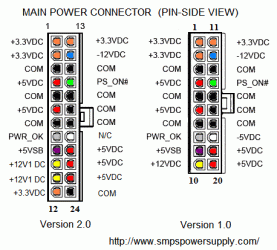
I have found that some power supplies just don't work with some motherboards. Good PSU.....good motherboard........but they just won't work together. It happens, and I wouldn't try to make it work, just put another psu on that motherboard and make sure you make a mental note about them not working together.
 

My Computer My Computer

At a glance

Windows 7 Professional 64bit SP1Intel Core i5-3570K @ 4.5GHzCorsair Vengeance 16GB (4x4) @1866MHz CL 9-9-...EVGA GTX 750 Ti FTW
Computer type
PC/Desktop
Computer Manufacturer/Model Number
Custom Built
OS
Windows 7 Professional 64bit SP1
CPU
Intel Core i5-3570K @ 4.5GHz
Motherboard
Asus Sabertooth Z77
Memory
Corsair Vengeance 16GB (4x4) @1866MHz CL 9-9-9-24 1T
Graphics Card(s)
EVGA GTX 750 Ti FTW
Sound Card
Onboard Audio
Monitor(s) Displays
Dell S2309W
Screen Resolution
1920x1080
Hard Drives
Samsung 830 128GB SSD - OS
(4) Seagate 5TB HDD
(1) Seagate 2TB HDD
PSU
Seasonic X750 80+ Gold Full Modular
Case
Antec Eleven Hundred Super Mid Tower
Cooling
Intel Liquid Cooler
Keyboard
Max Nighthawk X8 Mechanical keyboard
Mouse
Mionix Naos 7000
Internet Speed
50 Mbps Down / 10 Mbps Up
Antivirus
Microsoft Security Essentials/Malwarebytes Anti-Malware
Browser
Chrome/Firefox
Other Info
Klipsch ProMedia 2.1's
Asus RT-N66R Wireless Router
Sounds like a faulty plug on the PSU. Personally I've never heard of that brand and wouldn't use it. I would send it back and get one from the top 5 makers.
 

My Computer My Computer

At a glance

Windows 7 Ultimate 64 bitAMD Phenom II X4 965 Black EditionGSkill 4 X 2 GB PC 8500XFX Radeon HD 6790 D
Computer Manufacturer/Model Number
Custom built
OS
Windows 7 Ultimate 64 bit
CPU
AMD Phenom II X4 965 Black Edition
Motherboard
Gigabyte GA-MA790X-DS4
Memory
GSkill 4 X 2 GB PC 8500
Graphics Card(s)
XFX Radeon HD 6790 D
Sound Card
On board RealTek HD
Monitor(s) Displays
Dual monitors:Samsung SyncMaster S20B300
Screen Resolution
1600 X 900
Hard Drives
Seagate Barracuda 1TB (primary)
Seagate Barracuda 2 X 320 GB
PSU
Ultra X4 750 watt fully modular
Case
Thermaltake Overseer RX 1 full tower
Cooling
Core-Contact 92 mm CPU Cooler
Keyboard
Logitech G510
Mouse
Razor DeathAdder
Internet Speed
50/5 Mbps UL/DL
Other Info
Optical: Super Muliti DVD burner w/lightscribe, Hauppauge WinTV HVR-1800
I have found that some power supplies just don't work with some motherboards. Good PSU.....good motherboard........but they just won't work together. It happens, and I wouldn't try to make it work, just put another psu on that motherboard and make sure you make a mental note about them not working together.

Really? That sounds kinda strange. This psu provides ALL the designed power to the correct connectors,so that makes no sense it shouldnt work, that is like saying it is the will of god,which i refuse to believe :-).. Anything has an explanation, you just have to look hard enough.

And by your logic,there is no guarentee a new psu would work anyhow,which is what standards are for,to make sure stuff fit together

Sounds like a faulty plug on the PSU. Personally I've never heard of that brand and wouldn't use it. I would send it back and get one from the top 5 makers.

then why have this psu worked flawlessly with 2 asus boards?

But, something is clearly going on with this psu, i just would like to know what,and why
 

My Computer My Computer

At a glance

Windows 7 Ultimate SP1 64bitCore I3 2100T/Core I5 750/Core I3 21202x4GB 1600mhz/2x4GB 1600hmhz/2x4GB 1333mhzonboard/onboard/ASUS HD7850-DC2-2GD5-V2
Computer type
PC/Desktop
Computer Manufacturer/Model Number
custom
OS
Windows 7 Ultimate SP1 64bit
CPU
Core I3 2100T/Core I5 750/Core I3 2120
Motherboard
ASRock Z77 Extreme4/Gigabyte GA-H55-UD3H/Asrock H61DEL
Memory
2x4GB 1600mhz/2x4GB 1600hmhz/2x4GB 1333mhz
Graphics Card(s)
onboard/onboard/ASUS HD7850-DC2-2GD5-V2
Sound Card
not active/onboard/onboard
Monitor(s) Displays
Philips 42"
Screen Resolution
1920x1080
Hard Drives
WD Red WD30EFRX
WD20EARX
WD20EARS
WD20EACS
PSU
Corsair GS700/Antec 500w Earth watts/Corsair TX650 V2
Case
Antec Twelve Hundred V3/2xAntec Sonata Elite
Cooling
generic
Keyboard
2xMS natural Ergonomic
Mouse
MS Wireless/logitech laser/steelseries Xai
Internet Speed
20/2mbit
Other Info
2x IBM serveraid 1015M IT Flashed 8xPort SATA
4x X-case 5in1 drive cages (norco rebranded)
*UPDATE*

AHA,i tried your suggestion with the bridge over green to black while connector is attached to mainboard,and it worked, motherboard lighted up,cpu fan began spinning,and fan on psu also spun.

So,what is wrong,and how can i fix it?
I wonder if those terminals aren't making good contact with each other (that is, the PS_ON# terminal in the PSU connector and the corresponding pin in the motherboard socket. What happens if you try turning the computer on with the normal power switch whilst waggling the green wire?
 

My Computer My Computer

At a glance

Windows 8.1 Pro RTM x64Intel Core-i5-3570K 4-core @ 3.4GHz (Ivy Brid...4 x 4GB DDR3-1600 Corsair Vengeance CMZ8GX3M2...MSI GeForce GTX770 Gaming OC 2GB
Computer type
PC/Desktop
Computer Manufacturer/Model Number
Dwarf Dwf/11/2012 r09/2013
OS
Windows 8.1 Pro RTM x64
CPU
Intel Core-i5-3570K 4-core @ 3.4GHz (Ivy Bridge) (OC 4.4GHz)
Motherboard
ASRock Z77 Extreme4-M
Memory
4 x 4GB DDR3-1600 Corsair Vengeance CMZ8GX3M2A1600C9B (16GB)
Graphics Card(s)
MSI GeForce GTX770 Gaming OC 2GB
Sound Card
Realtek High Definition on board solution (ALC 898)
Monitor(s) Displays
ViewSonic VA1912w Widescreen (VGA)
Screen Resolution
1440x900
Hard Drives
OCZ Agility 3 SSD 120GB SATA III x2 (RAID 0)
Samsung HD501LJ 500GB SATA II x2
Hitachi HDS721010CLA332 1TB SATA II
Iomega 1.5TB Ext USB 2.0
WD 2.0TB Ext USB 3.0
PSU
XFX Pro Series 850W Semi-Modular
Case
Gigabyte IF233
Cooling
1 x 120mm Front Inlet 1 x 120mm Rear Exhaust
Keyboard
Microsoft Comfort Curve Keyboard 3000 (USB)
Mouse
Microsoft Comfort Mouse 3000 for Business (USB)
Internet Speed
NetGear DG834Gv3 ADSL Modem/Router (Ethernet) ~4.0 Mb/s (O2)
Antivirus
Avast! 8.0.1497
Browser
IE 11
Other Info
Optical Drive: HL-DT-ST BD-RE BH10LS30 SATA Bluray
Lexmark S305 Printer/Scanner/Copier (USB)
WEI Score: 8.1/8.1/8.5/8.5/8.25
Asus Eee PC 1011PX Netbook (Windows 7 x86 Starter)
*UPDATE*

AHA,i tried your suggestion with the bridge over green to black while connector is attached to mainboard,and it worked, motherboard lighted up,cpu fan began spinning,and fan on psu also spun.

So,what is wrong,and how can i fix it?
I wonder if those terminals aren't making good contact with each other (that is, the PS_ON# terminal in the PSU connector and the corresponding pin in the motherboard socket. What happens if you try turning the computer on with the normal power switch whilst waggling the green wire?

I cant "jimmy" the start sequence,i have tried. i tried manually shorting the front header power switch connectors while fiddling with the 24pin connector,and every wire seperatly,i cant get it to start..

Should i just take this as a "loss" and throw this thing out,and buy a new one?

I am still curious though as to why this doesnt work
 

My Computer My Computer

At a glance

Windows 7 Ultimate SP1 64bitCore I3 2100T/Core I5 750/Core I3 21202x4GB 1600mhz/2x4GB 1600hmhz/2x4GB 1333mhzonboard/onboard/ASUS HD7850-DC2-2GD5-V2
Computer type
PC/Desktop
Computer Manufacturer/Model Number
custom
OS
Windows 7 Ultimate SP1 64bit
CPU
Core I3 2100T/Core I5 750/Core I3 2120
Motherboard
ASRock Z77 Extreme4/Gigabyte GA-H55-UD3H/Asrock H61DEL
Memory
2x4GB 1600mhz/2x4GB 1600hmhz/2x4GB 1333mhz
Graphics Card(s)
onboard/onboard/ASUS HD7850-DC2-2GD5-V2
Sound Card
not active/onboard/onboard
Monitor(s) Displays
Philips 42"
Screen Resolution
1920x1080
Hard Drives
WD Red WD30EFRX
WD20EARX
WD20EARS
WD20EACS
PSU
Corsair GS700/Antec 500w Earth watts/Corsair TX650 V2
Case
Antec Twelve Hundred V3/2xAntec Sonata Elite
Cooling
generic
Keyboard
2xMS natural Ergonomic
Mouse
MS Wireless/logitech laser/steelseries Xai
Internet Speed
20/2mbit
Other Info
2x IBM serveraid 1015M IT Flashed 8xPort SATA
4x X-case 5in1 drive cages (norco rebranded)
The Motherboard in question should atleast admit a beep of some sort when it has power
if there was no beep there is something wrong the connections are secure the next step he can try it in another rig

and see if he can get it started if not i would think the PSU doesn't have enough power and he needs to replace it with something that can

OK,if you would just read my previous posts instead of only reading the very last post,you would understand the predicament,and not suggest something that has been tried and testet.

Please understand, there is NOTHING wrong with the psu,the psu works on 2 other computers,it works when tested with multimeter. The psu in question does however NOT work with the gigabyte mainboard,which is why i am confused,as it should work fine unless mainboard is fried.

I can get psu fans and everything to spin if i short pin9 and a groundwire,but as soon as 4pin 12v atx and 24pin power is connected to mainboard nothing happens,not a single beep or anything

If you do not know if the mainboard is fried, I cannot understand why won't you test another PSU on the motherboard, NOT the PSU, test the motherboard with another PSU. I don't get why that is so hard to understand.
 

My Computer My Computer

At a glance

Windows 7 professional X64AMD A10-5800K OC@ 4.4Ghz.8GB Kingston HyperX Blu 1333mhzXFX HD7870 2GB Core Edition
Computer type
PC/Desktop
OS
Windows 7 professional X64
CPU
AMD A10-5800K OC@ 4.4Ghz.
Motherboard
Gigabyte F2A85X-UP4
Memory
8GB Kingston HyperX Blu 1333mhz
Graphics Card(s)
XFX HD7870 2GB Core Edition
Monitor(s) Displays
Acer AL2216W
Screen Resolution
1680x1050
Hard Drives
Seagate Barracuda 500gb 7200rpm
Seagate Barracuda 1.5TB 7200rpm
PSU
Cooler Master Silent Pro M 850W
Case
Thermaltake Commander MS-I
Cooling
Cooler Master N520
Mouse
Logitech M504
Internet Speed
10Mbps
The Motherboard in question should atleast admit a beep of some sort when it has power
if there was no beep there is something wrong the connections are secure the next step he can try it in another rig

and see if he can get it started if not i would think the PSU doesn't have enough power and he needs to replace it with something that can

OK,if you would just read my previous posts instead of only reading the very last post,you would understand the predicament,and not suggest something that has been tried and testet.

Please understand, there is NOTHING wrong with the psu,the psu works on 2 other computers,it works when tested with multimeter. The psu in question does however NOT work with the gigabyte mainboard,which is why i am confused,as it should work fine unless mainboard is fried.

I can get psu fans and everything to spin if i short pin9 and a groundwire,but as soon as 4pin 12v atx and 24pin power is connected to mainboard nothing happens,not a single beep or anything

If you do not know if the mainboard is fried, I cannot understand why won't you test another PSU on the motherboard, NOT the PSU, test the motherboard with another PSU. I don't get why that is so hard to understand.

I DID ALREADY,with my corsair GS700,mainboard works fine
 

My Computer My Computer

At a glance

Windows 7 Ultimate SP1 64bitCore I3 2100T/Core I5 750/Core I3 21202x4GB 1600mhz/2x4GB 1600hmhz/2x4GB 1333mhzonboard/onboard/ASUS HD7850-DC2-2GD5-V2
Computer type
PC/Desktop
Computer Manufacturer/Model Number
custom
OS
Windows 7 Ultimate SP1 64bit
CPU
Core I3 2100T/Core I5 750/Core I3 2120
Motherboard
ASRock Z77 Extreme4/Gigabyte GA-H55-UD3H/Asrock H61DEL
Memory
2x4GB 1600mhz/2x4GB 1600hmhz/2x4GB 1333mhz
Graphics Card(s)
onboard/onboard/ASUS HD7850-DC2-2GD5-V2
Sound Card
not active/onboard/onboard
Monitor(s) Displays
Philips 42"
Screen Resolution
1920x1080
Hard Drives
WD Red WD30EFRX
WD20EARX
WD20EARS
WD20EACS
PSU
Corsair GS700/Antec 500w Earth watts/Corsair TX650 V2
Case
Antec Twelve Hundred V3/2xAntec Sonata Elite
Cooling
generic
Keyboard
2xMS natural Ergonomic
Mouse
MS Wireless/logitech laser/steelseries Xai
Internet Speed
20/2mbit
Other Info
2x IBM serveraid 1015M IT Flashed 8xPort SATA
4x X-case 5in1 drive cages (norco rebranded)
Back
Top