| Windows 7: I unplugged my external hard drive without "Safely Remove" Can this da |
02 Feb 2013
|
#1 | | Windows 7 Home Premium 64 bit |
I unplugged my external hard drive without "Safely Remove" Can this da After I finished transferred some files across from external hard drive to laptop and I used a picture from external hard drive as my background desktop but when I tried to click "Safely "remove it said there were programs running yet I have nothing transferring/connecting from external hard drive to laptop then I unplugged the USB device.
I did noticed when I removed the external hard drive my background picture was gone when I went to change themes, I'm worried so Can this damage to the laptop/external hard drive or corrupt software
Last edited by Koolman511; 02 Feb 2013 at 05:48 AM..
| My System Specs |
| OS Windows 7 Home Premium 64 bit |
02 Feb 2013
|
#2 | | Windows 7 Ultimate x64 SP1 Buenos Aires, Argentina |
That thing about programs using the drive happens a lot with my Toshiba lappy.
Unless you've changed any of the default hardware policies for the external drive (most of them won't even allow you to), unplugging without ejecting should not be a problem. Nevertheless, whenever you are unable to eject, it is better to wait till you turn off the computer before unplugging.
Hope this helps.
Cheers,
J | My System Specs | | Computer type PC/Desktop System Manufacturer/Model Number Custom built OS Windows 7 Ultimate x64 SP1 CPU AMD FX 8320 4.8GHz, 1.475V Motherboard ASUS Crosshair V Formula-Z Memory 4 x GSkill Ripjaws Z 4GB 1600 CL8 Graphics Card 2 x ASUS HD7870 2GB DirectCu II Sound Card M-Audio Firewire 410 Monitor(s) Displays 2 x Samsung Syncmaster SA300 Screen Resolution 1600x900 Keyboard Corsair Vengeance 650 Mouse Elephant Leviathan 3200 DPI PSU Corsair TX850M Case NZXT Switch 810 Cooling Custom Water. XSPC Raystorm, Laing DDC 3.2T PWM, 360+120 rad Hard Drives 1 x Seagate Barracuda 2TB, 7200 rpm, 64 mb cache - Kingston HyperX 3K 120GB (OS) - Corsair FORCE Series 180GB (Games & Apps) Internet Speed Too slow |
02 Feb 2013
|
#3 | | Microsoft Windows 7 Home Premium 64-bit 7600 cornwall UK |
the external needs to be on to show the picture you set as an background,
chances are there is no damage to the picture. .
if you want to continue using the picture with the external off then copy the pic over to the computers hardrive perhaps create a wallpaper folder in your users folder. | My System Specs | | System Manufacturer/Model Number Hewlett packard/p6512uk OS Microsoft Windows 7 Home Premium 64-bit 7600 CPU IIx4 amd athelon 635 processor Motherboard FOXCONN 2AA9 Memory 2x2gb Graphics Card ati radeon HD 5450 Sound Card (1) Realtek High Definition Audio (2) AMD High Definition Monitor(s) Displays samsung lcd tv 32" Screen Resolution 1360x 768 Keyboard wireless hp Mouse wireless Hp,optical PSU ? Cooling air! Hard Drives (1) WDC WD10 01FAES-60Z2A0 SATA Disk Device (2) Maxtor OneTouch USB Device (3) ST310003 33AS USB Device (4) WD My Book 1111 USB Device Internet Speed 1.10mb/s Antivirus MSE Browser Firefox |
02 Feb 2013
|
#4 | | Windows 7 Home Premium 64 bit |
I'm just really worried if it can damage/harm laptop/external hard drive or corrupt anything | My System Specs | | OS Windows 7 Home Premium 64 bit |
02 Feb 2013
|
#5 | | Microsoft Windows 7 Home Premium 64-bit 7600 cornwall UK |
it should be fine.
the only thing that could corrupt is the image that was connected to the desktop, as you have nothing else running from the external hardrive.
test it by looking at the image that you had set as a background.
if it wont open then it may be corrupt.
unlikely though.
like i said before if you dont want the hardrive on constantly then copy over the pics you want as backgrounds. | My System Specs | | System Manufacturer/Model Number Hewlett packard/p6512uk OS Microsoft Windows 7 Home Premium 64-bit 7600 CPU IIx4 amd athelon 635 processor Motherboard FOXCONN 2AA9 Memory 2x2gb Graphics Card ati radeon HD 5450 Sound Card (1) Realtek High Definition Audio (2) AMD High Definition Monitor(s) Displays samsung lcd tv 32" Screen Resolution 1360x 768 Keyboard wireless hp Mouse wireless Hp,optical PSU ? Cooling air! Hard Drives (1) WDC WD10 01FAES-60Z2A0 SATA Disk Device (2) Maxtor OneTouch USB Device (3) ST310003 33AS USB Device (4) WD My Book 1111 USB Device Internet Speed 1.10mb/s Antivirus MSE Browser Firefox |
02 Feb 2013
|
#6 | | Windows 7 Home Premium 32 bit |

Quote: Originally Posted by boohbah it should be fine.
the only thing that could corrupt is the image that was connected to the desktop, as you have nothing else running from the external hardrive..... IMO,This is definitely not a correct statement.
Removing an external USB device when it is in the read/write process can corrupt the partition table in the drive and make it RAW. While it is not the only reason why a drive turns RAW, in most cases it is. True, it may not happen everytime when one does it but the fact is it can happen and it has happened.
It can also happen when power to the dektop is suddenly interrupted or the battery in a laptop runs down and the system shuts down abruptly. Instances abound.
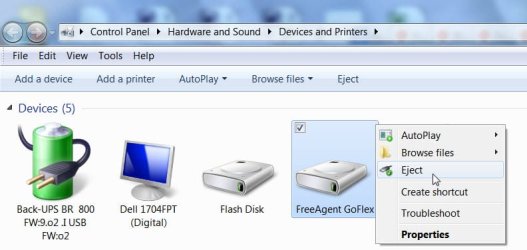
It is always recommended that these drives are safely ejected. If it says the drive is still in use try to eject it by right clicking on the drive icon in My Computer - where and if eject is available in the Menu or use a program like Unlocker to kill all the running processes or wait till you shut down the computer. Better to be safe than sorry.
Last edited by jumanji; 02 Feb 2013 at 09:25 AM..
| My System Specs | | OS Windows 7 Home Premium 32 bit |
02 Feb 2013
|
#7 | | Windows 7 Ultimate x64 SP1 Buenos Aires, Argentina |
If policies are set to quick removal for the drive, which is mos likely the case for a USB external drive, boobbah is most certainly right. If write-through caching is enabled it is highly unlikely that anything would happen to the drive by unplugging without ejecting.
"Quick removal
This option is usually the best choice for devices that you are likely to remove from the system frequently, such as USB flash drives, SD, MMC, Compact Flash, or similar memory cards, and other externally attached storage.
"When you select the Quick Removal option, Windows manages commands sent to the device using a method called write-through caching. In write-through caching, the device operates on write commands as if there were no cache. The cache may still provide a small performance benefit, but the emphasis is on treating the data as safely as possible by getting the commands to the principal storage. The main benefit is that you can remove the storage device from the system quickly without risking data loss. For example, if a flash drive were to be accidentally pulled out of its port, the data being written to it is much less likely to be lost." From windows help.
Hope this is useful.
Cheers,
J
Last edited by Bungee18; 07 Feb 2013 at 03:54 AM..
| My System Specs | | Computer type PC/Desktop System Manufacturer/Model Number Custom built OS Windows 7 Ultimate x64 SP1 CPU AMD FX 8320 4.8GHz, 1.475V Motherboard ASUS Crosshair V Formula-Z Memory 4 x GSkill Ripjaws Z 4GB 1600 CL8 Graphics Card 2 x ASUS HD7870 2GB DirectCu II Sound Card M-Audio Firewire 410 Monitor(s) Displays 2 x Samsung Syncmaster SA300 Screen Resolution 1600x900 Keyboard Corsair Vengeance 650 Mouse Elephant Leviathan 3200 DPI PSU Corsair TX850M Case NZXT Switch 810 Cooling Custom Water. XSPC Raystorm, Laing DDC 3.2T PWM, 360+120 rad Hard Drives 1 x Seagate Barracuda 2TB, 7200 rpm, 64 mb cache - Kingston HyperX 3K 120GB (OS) - Corsair FORCE Series 180GB (Games & Apps) Internet Speed Too slow |
02 Feb 2013
|
#8 | | Microsoft Windows 7 Home Premium 64-bit 7600 cornwall UK |

Quote: Originally Posted by jumanji 
Quote: Originally Posted by boohbah it should be fine.
the only thing that could corrupt is the image that was connected to the desktop, as you have nothing else running from the external hardrive..... IMO,This is definitely not a correct statement.
Removing an external USB device when it is in the read/write process can corrupt the partition table in the drive and make it RAW. While it is not the only reason why a drive turns RAW, in most cases it is. True, it may not happen everytime when one does it but the fact is it can happen and it has happened.
It can also happen when power to the dektop is suddenly interrupted or the battery in a laptop runs down and the system shuts down abruptly. Instances abound.
It is always recommended that these drives are safely ejected. If it says the drive is still in use try to eject it by right clicking on the drive icon in My Computer - where and if eject is available in the Menu or use a program like Unlocker to kill all the running processes or wait till you shut down the computer. Better to be safe than sorry.  i was refering to it in an idle state. my interpretation ,idle state=nothing running. hence not reading or writing. | My System Specs | | System Manufacturer/Model Number Hewlett packard/p6512uk OS Microsoft Windows 7 Home Premium 64-bit 7600 CPU IIx4 amd athelon 635 processor Motherboard FOXCONN 2AA9 Memory 2x2gb Graphics Card ati radeon HD 5450 Sound Card (1) Realtek High Definition Audio (2) AMD High Definition Monitor(s) Displays samsung lcd tv 32" Screen Resolution 1360x 768 Keyboard wireless hp Mouse wireless Hp,optical PSU ? Cooling air! Hard Drives (1) WDC WD10 01FAES-60Z2A0 SATA Disk Device (2) Maxtor OneTouch USB Device (3) ST310003 33AS USB Device (4) WD My Book 1111 USB Device Internet Speed 1.10mb/s Antivirus MSE Browser Firefox |
02 Feb 2013
|
#9 | | Windows 7 Home Premium 32 bit |
Just a brief and final reply before I hit the sack. Not theory but practical user experiences.
When Windows proclaimed the device is still in use and the users pulled it out, many have found many files corrupted. hmmm... they were not reading or writing anything. According to them it was idle.
Again I have to emphasise, it may not happen all the time and to everybody. It depends on what processes are running in the background - not only the Window's processes but also the processes initiated by other installed programs, many of which do not close down even after closing the programs. Those may still be reading if not writing. And then even a virus can be reading and writing.
It is always safer to use any workarounds to close all running processes and safely remove the devices rather than taking a chance.
Good night and Good day - as applicable. | My System Specs | | OS Windows 7 Home Premium 32 bit |
02 Feb 2013
|
#10 | | Win 7 Ultimate 64 bit At home. |

Quote: Originally Posted by jumanji Just a brief and final reply before I hit the sack. Not theory but practical user experiences.
When Windows proclaimed the device is still in use and the users pulled it out, many have found many files corrupted. hmmm... they were not reading or writing anything. According to them it was idle.
Again I have to emphasise, it may not happen all the time and to everybody. It depends on what processes are running in the background - not only the Window's processes but also the processes initiated by other installed programs, many of which do not close down even after closing the programs. Those may still be reading if not writing. And then even a virus can be reading and writing.
It is always safer to use any workarounds to close all running processes and safely remove the devices rather than taking a chance.
Good night and Good day - as applicable. Excellent advice! | My System Specs | | Computer type PC/Desktop System Manufacturer/Model Number Custom Build OS Win 7 Ultimate 64 bit CPU Intel i7-3930K Motherboard ASUS P9X79 WS Memory Kingston HyperX Genesis 32GB Kit (8x4GB Modules) 1600MHz DDR Graphics Card MSI R7850 Twin Frozr 2GD5/OC Radeon HD 7850 2GB 256-bit GDDR Sound Card On board Realtek HD Monitor(s) Displays HP w2207h Screen Resolution 1680 x 1050 Keyboard Logitech G110 Mouse Logitech M525 (two in use) PSU Corsair HX750w Case Antec Two Hundred v2 Cooling Cooler Master GeminII S524 120mm (fan replaced with a 140mm) Hard Drives Samsun 128GB 840 Pro
Western Digital WD Black WD2002FAEX 2TB
Western Digital WD Black WD2002FAEX 2TB Internet Speed fair to middlin' Antivirus AVAST!, MBAM, SAS, Spybot S&D (all but MBAM free) Browser IE9 Other Info LSI 9211-8i SATA III controller card (eight more SATA III ports), 2.5" & 3.5" Hot Swap Bays, HooToo HT-CR001 PCI-E to USB 3.0 Internal Combo - 3 Ports USB 3.0 Hub + 6 Slot Card Reader, and LG Model CH12LS28 BD-ROM Combo Optical Drive. Also, ScanSnap S1500 ADF duplexing scanner, Canon 9000F flat bed scanner, Logitech 5.1 speaker system, Samsung CLP 415nw laser color printer, I unplugged my external hard drive without "Safely Remove" Can this da problems? All times are GMT -5. The time now is 08:53 PM. | |