Windows 7 Forums Search
Welcome to Windows 7 Forums. Our forum is dedicated to helping you find solutions with any problems, errors or issues you are experiencing with Windows 7. The Windows 7 forum also covers news and updates and has an extensive Windows 7 tutorial section that covers a wide range of tips and tricks.


Windows 7 - physX config...

 
01-25-2009   #11


Windows 7 Ultimate Vista Ultimate x64


OK that's fair enough, carry on then!

My System SpecsSystem Spec
01-26-2009   #12


Windows 7 Professional 64-bit


You also want to install the nvidia driver from Windows Update NOT from their website since the WU one is geared towards Windows 7 more.
My System SpecsSystem Spec
01-29-2009   #13


SEVEN x64


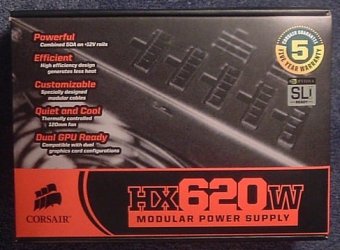
ok, got my new PSU....... its a sexy bit of kit....
physX config...-newpsu.jpg


its in .....Hmm, im now showing a 300 point loss...... i have also ordered ''Mirrors edge'' i will wait to see what this ''fully optimized'' physX game does for my score before i deem physX a failure (in my case anyway)

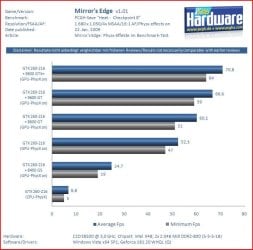
here are some more benches that make me wanna press on with this config
physX config...-sew.jpg

mirrors edge, physX


SK
My System SpecsSystem Spec
.


03-18-2009   #14


XP/win7 x86 build 7127


Quote   Quote: Originally Posted by skunksmash View Post
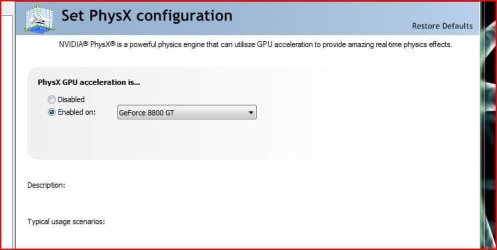
hi all....... after sitting here looking at the 8800GT i had that was spare, i finally decided to chuck it in for physX & see what happens....
Attachment 3510

SK
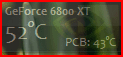
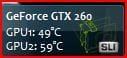
when i first seen this i thought "my god that is high... my temps usually run high @ 44 and 38 respectfully.... which was my case up until 2 hours ago when i visited this here, and had to install the physx. I thought "he cant have that bad of a cooling system, and must have been a shot after playing a game or straining the vid card".... Well, ever since physx installed my temps are now running higher than i have ever seen... currently 52-54 and 43 to 45 respecfully....

coincidence? am i really seeing what i think i'm seeing?
Name:  Capture0.PNG
Views: 556
Size:  17.1 KB
My System SpecsSystem Spec
03-18-2009   #15


Win7 Ultimate x64 on Desktop / Win7 Ultimate x86 on laptop / Win7 x86 Starter on Netbook


Quote   Quote: Originally Posted by skunksmash View Post
ok, got my new PSU....... its a sexy bit of kit....
Attachment 3844


its in .....Hmm, im now showing a 300 point loss...... i have also ordered ''Mirrors edge'' i will wait to see what this ''fully optimized'' physX game does for my score before i deem physX a failure (in my case anyway)

here are some more benches that make me wanna press on with this config
Attachment 3845

mirrors edge, physX SK
I know a good demo game to test the physX capabilities it's called "Warlord"
My System SpecsSystem Spec
03-18-2009   #16
Jac


Windows Seven 7068 x64


I have also got Mirror's Edge on the way but I have only a 9600GT to handle both GFX and PhysX

Let's see what happens.
My System SpecsSystem Spec
03-23-2009   #17


Windows 7 Ultimate 64bit


I made one mistake when I ordered this build! It's an Ati board, but it was the best board I looked up, and I was not planning on sli so I bought a geforce, but with physX I might have to!
My System SpecsSystem Spec
03-25-2009   #18
Jac


Windows Seven 7068 x64


Well I play at 1280x800. Everything high. 4xAA and Physx on and it's nice and smooth. The only time so far I noticed a bit of slow down was when I was in the foyer of a building with many banners suspended from the ceiling and the blues started shooting out the glass office windows.
My System SpecsSystem Spec
04-26-2009   #19


Windows 7 Enterprise (Build# 7600) x64


two points... or rather a point and a question;

while physx is nifty and all, support is still rather sparse in games in general (handful at best) so unless you're running a game at any given time that uses physx, turn it off. sucks up some power (not a whole lot, but still..) and adds to your temps. not using it? not worth it, leave it off. if you do use it? turn it off when you're not in the game(s). save a bit of stress on the guts of your card if nothing else ;o just don't forget to toggle it back on before you play. ^_^


Quote   Quote: Originally Posted by Digger View Post
when i first seen this i thought "my god that is high... my temps usually run high @ 44 and 38 respectfully.... which was my case up until 2 hours ago when i visited this here, and had to install the physx. I thought "he cant have that bad of a cooling system, and must have been a shot after playing a game or straining the vid card".... Well, ever since physx installed my temps are now running higher than i have ever seen... currently 52-54 and 43 to 45 respecfully....

coincidence? am i really seeing what i think i'm seeing?
Attachment 6103

question; what is that? a desktop gadget? small util? me likey me want :O
My System SpecsSystem Spec
05-06-2009   #20


Windows 7 64bit, ubuntu 9, Vista32 Ultimate, Windows XP


Quote   Quote: Originally Posted by kenabi View Post
two points... or rather a point and a question;

while physx is nifty and all, support is still rather sparse in games in general (handful at best)
There are loads of games, more so now that nVidia have taken over Physx.

The issue I have is, I have one of the original Physix cards (non nvidia), and Windows 7 just does not pick it up. Nor does it install with the Physx software.

Vista and XP are both fine. the latest Software installs the drivers... but Windows 7 does not.

Any Ideas? Getting a new card is not an option, as my original Physix excelerator card still out does nvidia's onboard chip.... and that would just pee me of if I had to remove it.
My System SpecsSystem Spec
Reply

 physX config... problems?


Thread Tools


Similar Threads for: physX config...
Thread Forum
Solved Physx on cpu Graphic Cards
Solved physX with an AMD gpu ? Graphic Cards
GTX 460 768 + BFG Physx Graphic Cards
Solved Physx Graphic Cards
Physx Gaming


All times are GMT -5. The time now is 02:00 PM.


Windows 7 Forums is an independent web site and has not been authorized,
sponsored, or otherwise approved by Microsoft Corporation.
"Windows 7" and related materials are trademarks of Microsoft Corp.
© Designer Media Ltd
  

1 2 3 4 5 6 7 8 9 10 11 12 13 14 15 16 17 18 19 20 21 22 23 24 25 26 27 28 29 30