External Hardisk error 'e:\ is not accessible'

bhattkishan9

New member
Hi I have a WD hard disk, recently I was in a busy cyber cafe to print something, the man who was printing pulled the hardisk out without safely removing, now windows asks me to format it and it has become RAW. :cry::cry:
There is also an error saying that it is inaccessible every time I open it in mycomputer or even when I use run.
1.PNG
 

Attachments

  • 1.PNG
    1.PNG
    147 KB · Views: 10

My Computer

Computer type
Laptop
Computer Manufacturer/Model Number
Dell
OS
Windows 7 Ultimate x64
CPU
Intel corei3
Memory
2GB
Screen Resolution
1366x768
Mouse
Logitech
Antivirus
Eset Smart security 6
1. Do not panic. Keep your cool.

2. Do not format that volume/drive.

3. Do not on any count run check disk.

Now you said RAW. Please post a screenshot of how your drive/s look in Disk Management. I want to confirm that it indeed is RAW.

http://www.sevenforums.com/tutorials/274797-disk-management-post-screen-capture-image.html

Once confirmed, you can straightaway head to the topic Recovery with Partition Wizard: SanDisk Cruzer Blade 16GB
in my thread http://www.sevenforums.com/software...ive-turned-raw-partition-wizard-testdisk.html and use the Partiton Recovery Wizard.

Download and install the the latest version of MiniTools Partition Wizard 7.8 from Best Free Partition Manager Freeware and free partition magic for Windows 7, Windows 8, Windows Vista and Windows XP 32 bit & 64 bit. MiniTool Free Partition Manager Software Home Edition. to run the Partition Recovery Wizard in it

But that after confirmation as aforesaid.
 

My Computer

OS
Windows 7 Home Premium 32 bit
Here is the screen shot. Sorry for the late reply
 

Attachments

  • 2.GIF
    2.GIF
    72.4 KB · Views: 13

My Computer

Computer type
Laptop
Computer Manufacturer/Model Number
Dell
OS
Windows 7 Ultimate x64
CPU
Intel corei3
Memory
2GB
Screen Resolution
1366x768
Mouse
Logitech
Antivirus
Eset Smart security 6
Welcome back.

I see your external drive practically empty.

If you have any small files to recover.or even otherwise, go ahead with the recovery process outlined in my post #2 above using the Partition Recovery Wizard which will rebuild the partition table and restore your drive to the former state.
 
Last edited:

My Computer

OS
Windows 7 Home Premium 32 bit
I don't have anything to recover, I just want my drive to work
 

My Computer

Computer type
Laptop
Computer Manufacturer/Model Number
Dell
OS
Windows 7 Ultimate x64
CPU
Intel corei3
Memory
2GB
Screen Resolution
1366x768
Mouse
Logitech
Antivirus
Eset Smart security 6
Then you can happily format it.:)

As I said if Windows falters and refuses to format, then you can format it with Partition Wizard. (Oh! I didn't say that. I wrote it but then deleted it.)

For formatting external drives, I always recommend HP USB Disk Storage Format Tool.(It cannot partition the drive however.)

Can be downloaded from Download HP USB Disk Storage Format Tool 2.2.3 Free - Windows-based Format Utility for HP Drive Key or DiskOnKey USB Device - Softpedia It is small Windows executable not requiring any installation. Simply right click on it and run as administrator.

The redeeming features are that it can recover lost space in a drive - which no other conventional formatting tool can do - and remove tracks of any malicious software.
 
Last edited:

My Computer

OS
Windows 7 Home Premium 32 bit
MiniTool Free Partition Manager Software Home Edition.[/url] to run the Partition Recovery Wizard in it

Should I run quick or full because I have run quick :huh::rolleyes:
 

My Computer

Computer type
Laptop
Computer Manufacturer/Model Number
Dell
OS
Windows 7 Ultimate x64
CPU
Intel corei3
Memory
2GB
Screen Resolution
1366x768
Mouse
Logitech
Antivirus
Eset Smart security 6
Most of the time a quick scan will do. If it does not find the partition, then run a full scan. ( you don't lose anything doing it either way except a full scan may take a little more time. :))

If quick scan found the partition in the external drive, select it and click on Finish.

Follow the topic I had referenced in my post #2 step by step. The screen shots tell you everything.(except in your case it is your external drive.)
 

My Computer

OS
Windows 7 Home Premium 32 bit
By mistake I did not click apply and I shut down now it is not partitioned maybe because later I clicked wipe and there how many times I click on create and ok even after finishing, it doesnot show on mycomputer
 

My Computer

Computer type
Laptop
Computer Manufacturer/Model Number
Dell
OS
Windows 7 Ultimate x64
CPU
Intel corei3
Memory
2GB
Screen Resolution
1366x768
Mouse
Logitech
Antivirus
Eset Smart security 6
Please post a screenshot of how your external drive appears in Partition Wizard as well as Windows Disk Management.

May be you need a step by step walkthrough and I shall try my best peeping in now and then.
 

My Computer

OS
Windows 7 Home Premium 32 bit
Here's what you asked for.
What should I choose when it says 'initialize disk' ?
(My HD is the one showing unalocated)
 

Attachments

  • 23.GIF
    23.GIF
    89.7 KB · Views: 1
  • 24.GIF
    24.GIF
    184.7 KB · Views: 2

My Computer

Computer type
Laptop
Computer Manufacturer/Model Number
Dell
OS
Windows 7 Ultimate x64
CPU
Intel corei3
Memory
2GB
Screen Resolution
1366x768
Mouse
Logitech
Antivirus
Eset Smart security 6
Go with Partition Wizard.

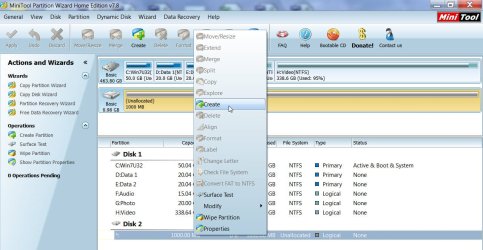
Select/Right click on the unallocated drive, Click on Create, ( give a partition label, create as Primary, file system NTFS, give a drive letter > OK. Apply changes.)

20-03-2013 21-54-46.jpg

( If by chance it does not take a drive letter, then Right click, Change Letter,give a drive letter >OK and then APPLY.)
 

My Computer

OS
Windows 7 Home Premium 32 bit
Back
Top