Windows 7 Forums


Windows 7: Too much memory being used. What can I do?

18 Mar 2013   #11

Windows 7 Home Premium x86 Service Pack 1 - Linux Mint Mate 14 x64
Milton Keynes


Firefox seems to be consuming almost of all of your memory, do you use any extensions/add-ons in Firefox? Try using IE, and then post the same screenshot.

My System SpecsSystem Spec

18 Mar 2013   #12

Windows 7 Home Premium x86 Service Pack 1 - Linux Mint Mate 14 x64
Milton Keynes


Quote:
Add-ons aren’t intrinsically leaky, but the memory team identified dozens of add-ons that were causing huge memory leaks and made significant process improving the experience for Firefox users.
Here's a little info about some the improvements on memory leaks.
My System SpecsSystem Spec
18 Mar 2013   #13

Windows 7 Home Premium 64bit


Quote   Quote: Originally Posted by kbrady1979 View Post
To find out if it's a Java/Firefox issue, you could uninstall all instances of Java in Control Panel> Programs and Features. If that doesn't fix it, you can always reinstall Java.
After deleting Java: 1.61GB
I suppose I should reinstall it? lol
My System SpecsSystem Spec
.


18 Mar 2013   #14

Windows 7 Professional 64bit SP1
Kentucky


It might be the Java Plug-Ins for Firefox........I would try disabling them first.
My System SpecsSystem Spec
18 Mar 2013   #15

Windows 7 Home Premium 64bit


Quote   Quote: Originally Posted by x BlueRobot View Post
Firefox seems to be consuming almost of all of your memory, do you use any extensions/add-ons in Firefox? Try using IE, and then post the same screenshot.
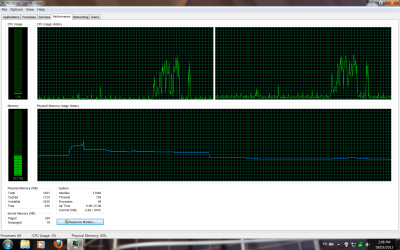
The screenshot of the RAM shows me with Firefox open, closing it, starting up IE, then closing it after a while and going back on Firefox.

The other one is my extensions on Firefox. I deleted a couple of useless ones before the screenshot, and checked the RAM usage again, but it didn't seem to change anything.
Attached Thumbnails
Too much memory being used. What can I do?-memory.jpg   Too much memory being used. What can I do?-extensions.jpg  
My System SpecsSystem Spec
18 Mar 2013   #16

Windows 7 Home Premium 64bit


Quote   Quote: Originally Posted by kbrady1979 View Post
It might be the Java Plug-Ins for Firefox........I would try disabling them first.
It has apparently been disabled the whole time. :/
I posted a screenshot of my extensions and you can see that it is disabled.

EDIT: Nvm, I just saw the plugins.. I will disable it now and see what it does... or should I just post a screenshot of all the plugins and let you experts see what could possibly be wrong?
My System SpecsSystem Spec
18 Mar 2013   #17

Windows 7 Home Premium 64bit


Here are my plugins.. seems like Adobe needs to be updated.
Attached Thumbnails
Too much memory being used. What can I do?-plugins.jpg  
My System SpecsSystem Spec
18 Mar 2013   #18

Windows 7 Home Premium x86 Service Pack 1 - Linux Mint Mate 14 x64
Milton Keynes


Scan for any malware:Do you really need to be running Google Update, Windows Live Photo Gallery and even Java? Many plug-ins and websites do not require Java anymore, it's best to check if the plug-ins, websites or programs you use, require Java, especially with the numerous Java and Adobe Reader security exploits which have occurred.

How to Disable Java:If you only need it for desktop programs, then disable it within your browser.
My System SpecsSystem Spec
18 Mar 2013   #19

Windows 7 Professional 64bit SP1
Kentucky


Disable the Java Plug-In, and give it a reboot. See what the RAM usage is then.
My System SpecsSystem Spec
18 Mar 2013   #20

Windows 7 Home Premium 64bit


I have disabled Java on my browsers and it didn't seem to affect the RAM.. Neither did disabling the other useless plugins.

I will scan for malware later. I need to work. I will be back in not too long. Thanks for your help so far!
Attached Thumbnails
Too much memory being used. What can I do?-memory-2.png   Too much memory being used. What can I do?-plugins-2.png  
My System SpecsSystem Spec
Reply

 Too much memory being used. What can I do? problems?


Thread Tools


Similar help and support threads for: Too much memory being used. What can I do?
Thread Forum
Troubleshooting Excessive Memory Use (Memory Leak?) after playing vid. Performance & Maintenance
LOW Computer Memory- ONLY 90MB or less Free Memory? Soo Slow? Performance & Maintenance
chkdsk high memory usage / memory leak Performance & Maintenance
Solved Windows Memory Diagnostic Reports Memory Problems BSOD Help and Support
'Racetrack' Magnetic Memory could make memory 100,000 times faster News


All times are GMT -5. The time now is 04:03 PM.


Windows 7 Forums is an independent web site and has not been authorized,
sponsored, or otherwise approved by Microsoft Corporation.
"Windows 7" and related materials are trademarks of Microsoft Corp.
© Designer Media Ltd