| Windows 7: Foreign Characters/Characters appearing. |
15 Oct 2009
|
#1 | | |
Foreign Characters/Characters appearing. Hi there. This is an odd problem, whenever certain characters are used ("^ are just some) then a letter is pressed foreign characters appear.
I.E
When I press
" Then O it comes up as Ö, instead of "O, and so on.
Does anyone have any ideas, on how this could be fixed. I've checked in the regional/language settings, and in the G15 control Panel.
Thanks | My System Specs |
| OS Windows 7 RC (x64) CPU Intel E8400 @3.5 Ghz Motherboard Asus P5KC Memory 4GB DDR2 Graphics Card ATI Radeon 4850 Sound Card Auzentech X-FI Prelude Monitor(s) Displays 20" HANNSPREE LCD Screen Resolution 1440X900 Keyboard Logitech G15 Mouse Razer Deathadder |
15 Oct 2009
|
#2 | | Windows 7 x64 Ultimate A Finnish immigrant in Leipzig, Germany |
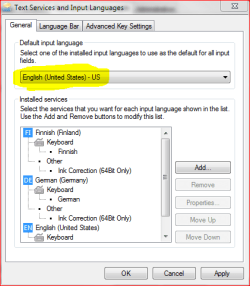
I use English, German and Finnish keyboard layouts on a daily basis. Never had this kind of issue.
Could you please tell which language settings you are using?
Kari | My System Specs | | Computer type Laptop System Manufacturer/Model Number HP ENVY 17-1150eg OS Windows 7 x64 Ultimate CPU 1.6 GHz Intel Core i7-720QM Processor Memory 6 GB Graphics Card ATI Mobility Radeon HD 5850 Graphics Sound Card Beats sound system with integrated subwoofer Monitor(s) Displays 17" laptop display, 22" LCD and 32" Full HD TV through HDMI Screen Resolution 1600*900, 1680*1050 and 1920*1080 Keyboard Logitech diNovo Media Desktop Laser (bluetooth) Mouse Logitech MX1000 Laser (Bluetooth) Hard Drives Internal: 2 x 500 GB SATA Hard Disk Drive 7200 rpm
External: 2TB for backups, 3TB USB3 network drive for media Internet Speed 50/10 Mbps VDSL Antivirus MSE, Windows Defender Browser Maxthon 3.5.2. Other Info Windows 7 Ultimate Retail Full in English, additional Guest-user accounts in Finnish, German and Swedish (Working languages English & Swedish, Family language German, my own language, mother tongue, Finnish. I really need Ultimate to get to use Language Packs!) |
15 Oct 2009
|
#3 | | |
Keyboard is US-Internaional, Everything esle is UK English | My System Specs | | OS Windows 7 RC (x64) CPU Intel E8400 @3.5 Ghz Motherboard Asus P5KC Memory 4GB DDR2 Graphics Card ATI Radeon 4850 Sound Card Auzentech X-FI Prelude Monitor(s) Displays 20" HANNSPREE LCD Screen Resolution 1440X900 Keyboard Logitech G15 Mouse Razer Deathadder |
15 Oct 2009
|
#4 | | Windows 7 x64 Ultimate A Finnish immigrant in Leipzig, Germany |
Weird. I'm writing this using English (United States) kb-layout, I can not reproduce your issue: "O, not Ö. I had to switch to Finnish kb-layout to produce the Ö.
First place to start looking is to check English is you default keyboard layout.
Kari | My System Specs | | Computer type Laptop System Manufacturer/Model Number HP ENVY 17-1150eg OS Windows 7 x64 Ultimate CPU 1.6 GHz Intel Core i7-720QM Processor Memory 6 GB Graphics Card ATI Mobility Radeon HD 5850 Graphics Sound Card Beats sound system with integrated subwoofer Monitor(s) Displays 17" laptop display, 22" LCD and 32" Full HD TV through HDMI Screen Resolution 1600*900, 1680*1050 and 1920*1080 Keyboard Logitech diNovo Media Desktop Laser (bluetooth) Mouse Logitech MX1000 Laser (Bluetooth) Hard Drives Internal: 2 x 500 GB SATA Hard Disk Drive 7200 rpm
External: 2TB for backups, 3TB USB3 network drive for media Internet Speed 50/10 Mbps VDSL Antivirus MSE, Windows Defender Browser Maxthon 3.5.2. Other Info Windows 7 Ultimate Retail Full in English, additional Guest-user accounts in Finnish, German and Swedish (Working languages English & Swedish, Family language German, my own language, mother tongue, Finnish. I really need Ultimate to get to use Language Packs!) |
15 Oct 2009
|
#5 | | |
Yup it's set to US-International, which is the layout of my keyboard, however when I set it to any UK keyboard set, the problem goes away, but obviously that's a complete different layout | My System Specs | | OS Windows 7 RC (x64) CPU Intel E8400 @3.5 Ghz Motherboard Asus P5KC Memory 4GB DDR2 Graphics Card ATI Radeon 4850 Sound Card Auzentech X-FI Prelude Monitor(s) Displays 20" HANNSPREE LCD Screen Resolution 1440X900 Keyboard Logitech G15 Mouse Razer Deathadder |
16 Oct 2009
|
#6 | | |
OK, I just tried setting all my regional settings to US, but that had no effect. Anyone else have any suggestions? | My System Specs | | OS Windows 7 RC (x64) CPU Intel E8400 @3.5 Ghz Motherboard Asus P5KC Memory 4GB DDR2 Graphics Card ATI Radeon 4850 Sound Card Auzentech X-FI Prelude Monitor(s) Displays 20" HANNSPREE LCD Screen Resolution 1440X900 Keyboard Logitech G15 Mouse Razer Deathadder |
16 Oct 2009
|
#7 | | Windows 7 x64 Ultimate A Finnish immigrant in Leipzig, Germany |
Had a busy day at work, no time for SevenForums earlier.
Was just surfing and googling, trying to find an explanation. Only thing I found even remotely connected to your issue is a situation where user doesn't realize the the software (kb-layout) and hardware (keyboard) don't match. Happens to me all the time, my keyboard is German so when I type English and / or Finnish, I have to remember where certain characters really are because the layout don't match with the keyboard I'm using.
Back to topic: I really have no clue. I have tried to reproduce your issue, but it's a no go. Can't make that kind of typo.
I mention this thread to some of the more advanced members, maybe somebody knows something.
Kari | My System Specs | | Computer type Laptop System Manufacturer/Model Number HP ENVY 17-1150eg OS Windows 7 x64 Ultimate CPU 1.6 GHz Intel Core i7-720QM Processor Memory 6 GB Graphics Card ATI Mobility Radeon HD 5850 Graphics Sound Card Beats sound system with integrated subwoofer Monitor(s) Displays 17" laptop display, 22" LCD and 32" Full HD TV through HDMI Screen Resolution 1600*900, 1680*1050 and 1920*1080 Keyboard Logitech diNovo Media Desktop Laser (bluetooth) Mouse Logitech MX1000 Laser (Bluetooth) Hard Drives Internal: 2 x 500 GB SATA Hard Disk Drive 7200 rpm
External: 2TB for backups, 3TB USB3 network drive for media Internet Speed 50/10 Mbps VDSL Antivirus MSE, Windows Defender Browser Maxthon 3.5.2. Other Info Windows 7 Ultimate Retail Full in English, additional Guest-user accounts in Finnish, German and Swedish (Working languages English & Swedish, Family language German, my own language, mother tongue, Finnish. I really need Ultimate to get to use Language Packs!) |
16 Oct 2009
|
#8 | | Win7 Build 7600 x86 Netherlands |

Quote: Originally Posted by Fangus Hi there. This is an odd problem, whenever certain characters are used ("^ are just some) then a letter is pressed foreign characters appear.
I.E
When I press
" Then O it comes up as Ö, instead of "O, and so on.
Does anyone have any ideas, on how this could be fixed. I've checked in the regional/language settings, and in the G15 control Panel.
Thanks Fangus.
That is normal behavior.
ö "o
The ö is made like this:
shift+" then o = ö
shift+" then space, then o = "o
If you want to use the strange signs like " ^ ' etc,
and you don't want ö ô é
then you need to press space after the foreign sign.
greetings | My System Specs | | OS Win7 Build 7600 x86 CPU Pentium II 300MHz Motherboard Asus Memory 32mb EDO RAM Graphics Card Diamond Viper Sound Card Soundblaster 16 Monitor(s) Displays 14" AOC CRT 16K color Screen Resolution 800x600 Keyboard Trust Ergonomic Mouse Generic PSU 110 Watts Cooling Passive Hard Drives 300mb Quantum fireball Internet Speed 256K u 128K d |
16 Oct 2009
|
#9 | | Windows 7 Ultimate x64 + x86 + Windows 8 x64 Newport, South Wales, UK |
Does this issue happen everywhere or only in Word, for example, what appears to be happening is that the software is automatically creating special characters.
This functionality is sometimes available as an option in word processors but I did not think it was available in windows 7 natively | My System Specs | | Computer type PC/Desktop System Manufacturer/Model Number Real World Computing (Me + a little help from Acer) OS Windows 7 Ultimate x64 + x86 + Windows 8 x64 CPU AMD Phenom II X6 1035T 2.6 GHz Motherboard Aspire M3400 Memory 4Gb PC10600 DDR3 1333 MHz Graphics Card NVIDIA GeForce 315 512MB Sound Card OnBoard - Realtek High Definition Audio Monitor(s) Displays Philips 32" HDTV, (HDMI) + 26" TV (VGA) Screen Resolution 1920 x 1080 @60Hz + 1360 x 768 @60Hz Keyboard Microsoft Wireless 800 or Stock Acer, (depends where I sit) Mouse Microsoft Wireless 800 or Stock Acer, (depends where I sit) PSU Stock (400W) Case Acer M3400 Cooling Stock Hard Drives 500 GB Seagate ST3500418AS SATA II
1 TB Hitachi HDS5C1010CLA382 SATAII
1 TB Samsung Spinpoint F1 HD103SI SATA II (external)
Plus various other (client ) HDDs as needed Internet Speed Temporaray 3G Dongle Antivirus Avast Browser Chrome Other Info USB Capture + Webcam(s) Bamboo Digitizer tablet
Also run Acer AspireOne 530h Netbook, Dual Core Atom + 1GB (Win7 Ult x86) Plus various test systems for new projects |
16 Oct 2009
|
#10 | | |

Quote: Originally Posted by Barman58 Does this issue happen everywhere or only in Word, for example, what appears to be happening is that the software is automatically creating special characters.
This functionality is sometimes available as an option in word processors but I did not think it was available in windows 7 natively Yup it happens everywhere. 
Quote: Originally Posted by SquonkSC 
Quote: Originally Posted by Fangus Hi there. This is an odd problem, whenever certain characters are used ("^ are just some) then a letter is pressed foreign characters appear.
I.E
When I press
" Then O it comes up as Ö, instead of "O, and so on.
Does anyone have any ideas, on how this could be fixed. I've checked in the regional/language settings, and in the G15 control Panel.
Thanks Fangus.
That is normal behavior.
ö "o
The ö is made like this:
shift+" then o = ö
shift+" then space, then o = "o
If you want to use the strange signs like " ^ ' etc,
and you don't want ö ô é
then you need to press space after the foreign sign.
greetings Thanks, but this problem wasn't available from the start, and doesnt happen when I switch Keyboard layouts, do you know of anyway to switch it off, as it's annoying. | My System Specs | | OS Windows 7 RC (x64) CPU Intel E8400 @3.5 Ghz Motherboard Asus P5KC Memory 4GB DDR2 Graphics Card ATI Radeon 4850 Sound Card Auzentech X-FI Prelude Monitor(s) Displays 20" HANNSPREE LCD Screen Resolution 1440X900 Keyboard Logitech G15 Mouse Razer Deathadder Foreign Characters/Characters appearing. problems? All times are GMT -5. The time now is 06:19 PM. | |