| Windows 7: Cache Writing - Enable or not to enable? |
31 Oct 2009
|
#1 | | Windows 7 Professional 32 Bit England |
Cache Writing - Enable or not to enable? Hello,
Could anyone tell me the advantages and disadvantages of disabling cache writing on the priming HDD? Thanks in advance | My System Specs |
| System Manufacturer/Model Number Advent 5301 (Laptop) OS Windows 7 Professional 32 Bit CPU Intel Pentium Dual Core @ 1.73GHZ Memory 2GB Graphics Card SIS Mirage 3 Sound Card Realtek High Definition Audio Monitor(s) Displays Sony Bravia 40 inch Screen Resolution 1920 x 1080 Mouse Labtec wired laser Hard Drives 120GB and 500GB Internet Speed 12.02MB Download Other Info Hard Drives:
Toshiba - 120GB
Iomega - 500GB |
31 Oct 2009
|
#2 | | Windows 7 SP1, Home Premium, 64-bit |
I think the default setting is usually to enable it?
I have a dim understand of it from memory. As I recall, enabling it provides slightly faster performance but has a slight risk of data corruption in cases of a bad shutdown--like from a power outage. It can also have consequences when using RAID.
The geekiest thing to do is to enable it, but use a UPS (uninterruptible power supply) to eliminate the risk from power failure.
Me? I've always left it enabled and haven't knowingly suffered any negative consequences. | My System Specs | | System Manufacturer/Model Number Ignatz Special; 4 speed manual gearbox; factory air conditioning; one of one OS Windows 7 SP1, Home Premium, 64-bit CPU Intel Sandy Bridge i5-2500, not overclocked Motherboard Gigabyte H67A-UD3H-B3, full ATX Memory 4 GB Crucial DDR3-1333 Graphics Card none; graphics are integrated on CPU Sound Card onboard: Realtek ALC892; external: USB Behringer UF0-202 Monitor(s) Displays NEC 90GX2-BK 19" LCD Screen Resolution 800 x 640 Keyboard Leopold Tenkeyless with Cherry Blue switches, USB Mouse Logitech or Microsoft optical wired; either USB or PS 2 PSU Seasonic SS-560KM, modular Case Antec Solo II Cooling CPU: Scythe Big Shuriken; Case: Scythe Slipstream 800 & 500 Hard Drives System: Intel 320 Series SSD, 80 GB;
Data: Samsung Spinpoint 103SJ, 1 TB;
Backup: WD Caviar Green WD15EADS-00P8B0, 1.5TB Other Info Power consumption of this system, including monitor: 68 watts at idle; 144 watts at full load |
31 Oct 2009
|
#3 | | Windows 7 Professional 32 Bit England |
Thanks for your help, I guess the best thing to do then is to keep it enabled. I had read somewhere though, that it helped performance? | My System Specs | | System Manufacturer/Model Number Advent 5301 (Laptop) OS Windows 7 Professional 32 Bit CPU Intel Pentium Dual Core @ 1.73GHZ Memory 2GB Graphics Card SIS Mirage 3 Sound Card Realtek High Definition Audio Monitor(s) Displays Sony Bravia 40 inch Screen Resolution 1920 x 1080 Mouse Labtec wired laser Hard Drives 120GB and 500GB Internet Speed 12.02MB Download Other Info Hard Drives:
Toshiba - 120GB
Iomega - 500GB |
31 Oct 2009
|
#4 | | Windows 7 SP1, Home Premium, 64-bit |
Yeah, it is supposed to help performance. How much, I don't know.
If you disable it, caching is not used, and you don't take the risk of losing or corrupting data on a bad shutdown. I think that means that if disabled. all write operations go directly to the disk (not to the cache). Since they go to the disk directly, you don't have the risk of corruption. If enabled, and you had a bad shutdown, the data sitting in the cache has not yet been written to disk and could be lost. That's my feeble attempt at understanding.
You could easily download HD Tune and do some tests with it off and on to see how much difference it makes. Matter of fact, I might try that myself. | My System Specs | | System Manufacturer/Model Number Ignatz Special; 4 speed manual gearbox; factory air conditioning; one of one OS Windows 7 SP1, Home Premium, 64-bit CPU Intel Sandy Bridge i5-2500, not overclocked Motherboard Gigabyte H67A-UD3H-B3, full ATX Memory 4 GB Crucial DDR3-1333 Graphics Card none; graphics are integrated on CPU Sound Card onboard: Realtek ALC892; external: USB Behringer UF0-202 Monitor(s) Displays NEC 90GX2-BK 19" LCD Screen Resolution 800 x 640 Keyboard Leopold Tenkeyless with Cherry Blue switches, USB Mouse Logitech or Microsoft optical wired; either USB or PS 2 PSU Seasonic SS-560KM, modular Case Antec Solo II Cooling CPU: Scythe Big Shuriken; Case: Scythe Slipstream 800 & 500 Hard Drives System: Intel 320 Series SSD, 80 GB;
Data: Samsung Spinpoint 103SJ, 1 TB;
Backup: WD Caviar Green WD15EADS-00P8B0, 1.5TB Other Info Power consumption of this system, including monitor: 68 watts at idle; 144 watts at full load |
31 Oct 2009
|
#5 | | Windows 7 SP1, Home Premium, 64-bit |
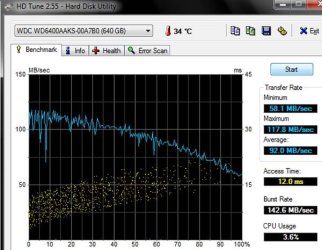
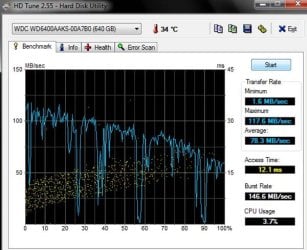
Here ya go. These results are for my boot drive, a WD Caviar SE16 WD6400AAKS 640GB HD.
The first graph is cache writing enabled. The second graph is cache writing disabled.
Note that the transfer rates are negatively affected when caching is off--more of the blue line is in lower territory. The maximum is the same, but the minimums and averages are different. The burst rate and access times are unaffected.
This is the result of one test only, but should be representative, at least of my drive. A hard drive engineer may well laugh at these tests and maybe correctly so--I don't know how much reliance to put on these results as they apply to the real world. | My System Specs | | System Manufacturer/Model Number Ignatz Special; 4 speed manual gearbox; factory air conditioning; one of one OS Windows 7 SP1, Home Premium, 64-bit CPU Intel Sandy Bridge i5-2500, not overclocked Motherboard Gigabyte H67A-UD3H-B3, full ATX Memory 4 GB Crucial DDR3-1333 Graphics Card none; graphics are integrated on CPU Sound Card onboard: Realtek ALC892; external: USB Behringer UF0-202 Monitor(s) Displays NEC 90GX2-BK 19" LCD Screen Resolution 800 x 640 Keyboard Leopold Tenkeyless with Cherry Blue switches, USB Mouse Logitech or Microsoft optical wired; either USB or PS 2 PSU Seasonic SS-560KM, modular Case Antec Solo II Cooling CPU: Scythe Big Shuriken; Case: Scythe Slipstream 800 & 500 Hard Drives System: Intel 320 Series SSD, 80 GB;
Data: Samsung Spinpoint 103SJ, 1 TB;
Backup: WD Caviar Green WD15EADS-00P8B0, 1.5TB Other Info Power consumption of this system, including monitor: 68 watts at idle; 144 watts at full load |
31 Oct 2009
|
#6 | | Windows 7 Professional 32 Bit England |
That is extremely helpful and I thank you for your efforts 
I might have a play around with it now! | My System Specs | | System Manufacturer/Model Number Advent 5301 (Laptop) OS Windows 7 Professional 32 Bit CPU Intel Pentium Dual Core @ 1.73GHZ Memory 2GB Graphics Card SIS Mirage 3 Sound Card Realtek High Definition Audio Monitor(s) Displays Sony Bravia 40 inch Screen Resolution 1920 x 1080 Mouse Labtec wired laser Hard Drives 120GB and 500GB Internet Speed 12.02MB Download Other Info Hard Drives:
Toshiba - 120GB
Iomega - 500GB |
31 Oct 2009
|
#7 | | Windows 7 Professional 32 Bit England |
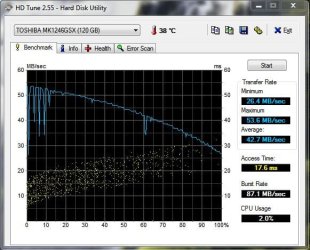
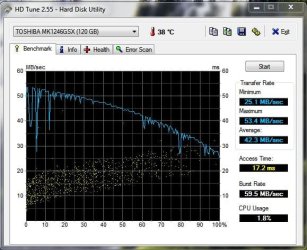
I can see your point now. On mine, the enabled writing cache seems to be the fastest on average, I'll keep that enabled from now on. | My System Specs | | System Manufacturer/Model Number Advent 5301 (Laptop) OS Windows 7 Professional 32 Bit CPU Intel Pentium Dual Core @ 1.73GHZ Memory 2GB Graphics Card SIS Mirage 3 Sound Card Realtek High Definition Audio Monitor(s) Displays Sony Bravia 40 inch Screen Resolution 1920 x 1080 Mouse Labtec wired laser Hard Drives 120GB and 500GB Internet Speed 12.02MB Download Other Info Hard Drives:
Toshiba - 120GB
Iomega - 500GB |
31 Oct 2009
|
#8 | | Windows 7 SP1, Home Premium, 64-bit |
Looks like caching helps you very little on your drive. Maybe because the drive is relatively slow by itself and has only a small cache?? You might be a candidate for leaving it off--you might never know the difference and wouldn't have any corruption risk? | My System Specs | | System Manufacturer/Model Number Ignatz Special; 4 speed manual gearbox; factory air conditioning; one of one OS Windows 7 SP1, Home Premium, 64-bit CPU Intel Sandy Bridge i5-2500, not overclocked Motherboard Gigabyte H67A-UD3H-B3, full ATX Memory 4 GB Crucial DDR3-1333 Graphics Card none; graphics are integrated on CPU Sound Card onboard: Realtek ALC892; external: USB Behringer UF0-202 Monitor(s) Displays NEC 90GX2-BK 19" LCD Screen Resolution 800 x 640 Keyboard Leopold Tenkeyless with Cherry Blue switches, USB Mouse Logitech or Microsoft optical wired; either USB or PS 2 PSU Seasonic SS-560KM, modular Case Antec Solo II Cooling CPU: Scythe Big Shuriken; Case: Scythe Slipstream 800 & 500 Hard Drives System: Intel 320 Series SSD, 80 GB;
Data: Samsung Spinpoint 103SJ, 1 TB;
Backup: WD Caviar Green WD15EADS-00P8B0, 1.5TB Other Info Power consumption of this system, including monitor: 68 watts at idle; 144 watts at full load |
31 Oct 2009
|
#9 | | W7 X-64 RTM,SUSE 11.1, XP PRO SP3 as a VM, VMware ESXi Hafnarfjörður IS |
Hi there
In (I hope) plain English
Caching come into its own when you've been using an application for a while (or when the system has learned how you usually use your computer).
What it does is saves often used data into a specially fast memory area (not in RAM but in the disk controllers OWN memory area) so that if you need to access this data the disk contoller can supply it straight from the cache instead of having to create a set of I/O instructions to find the correct sector on Disk, position the drive and do the data transfer - both READ amd WRITE.
On a new computer the system will need to do some form of learning before the cache is effectively used.
Some better algorithms even do a "Data Pre-fetch" which reads data before you actually need it - based on your previous usage of the computer --it does this whilst the computer is idle so it won't degrade the performance at all.
Successful caching algorithms (very tricky to write) can ENORMOUSLY speed up a computer - especially when data bases are being accessed with similar queries.
You'll also find that a disk with a larger cache costs quite a bit more than a similar capacity drive with a smaller or no cache.
(This is why you should also "Quiesce" a USB external drive before unplugging it -- the system will need to write any remaining / pending I/O requests from the cache back to the drive).
Cheers
jimbo | My System Specs | | System Manufacturer/Model Number Custom built OS W7 X-64 RTM,SUSE 11.1, XP PRO SP3 as a VM, VMware ESXi CPU Q9400 QUAD Motherboard P5QL-CM Memory 8GB Graphics Card On Motherborad Sound Card Realtek HD audio Monitor(s) Displays Apple Cinema display Mouse Toshiba wireless laser Hard Drives 4 X 1TB SATA Internet Speed > 20MB up |
31 Oct 2009
|
#10 | | Windows 7 Professional 32 Bit England |
So in the long term, it is better to enable caching? | My System Specs | | System Manufacturer/Model Number Advent 5301 (Laptop) OS Windows 7 Professional 32 Bit CPU Intel Pentium Dual Core @ 1.73GHZ Memory 2GB Graphics Card SIS Mirage 3 Sound Card Realtek High Definition Audio Monitor(s) Displays Sony Bravia 40 inch Screen Resolution 1920 x 1080 Mouse Labtec wired laser Hard Drives 120GB and 500GB Internet Speed 12.02MB Download Other Info Hard Drives:
Toshiba - 120GB
Iomega - 500GB Cache Writing - Enable or not to enable? problems? All times are GMT -5. The time now is 12:30 PM. | |