| Windows 7: Netgear wn311b install |
06 Nov 2009
|
#1 | | |
Netgear wn311b install Hi.
Bear with me, I am new to this forum thing.
I am running windows 7 64-bit on a brand new pc, Intel core duo E7500, 2.93ghz, 4.00gb Ram.
My problem is getting a Netgear wn311b pci wireless card to work. I have tried installing it with Netgear's instructions followed to the letter. when I try and start the Smart Wizard app It does absolutely nothing. So I tried starting it in XP compatibility mode, ah! now it tells me that,"Netgear Wn311b wireless adaptor is not inserted". checking in device manager it seems Windows has found a Broadcom driver and installed it. Looking In Network and sharing centre, there it is "Broadcom 802.11N Network adaptor" Not connected, and it will not connect when asked, not even showing as recognising any networks. I uninstalled everything. Re installed without Netgear's software and let Windows find the drivers. Same result, shows up as there but doesn't do anything.
Help!! Please, If anyone can, I would be so gratefull, I am pulling my hair out here.
Andy.
Oh, I tried installing it all in an old XP machine and away it goes,absolutely perfect,so I know the hardware is ok. | My System Specs |
| System Manufacturer/Model Number Pc Specialist OS 7 CPU Intel Core Duo (tm)2 E7500 2.93ghz Motherboard ASUS P5QL/EPU Memory 4.00gb Graphics Card NVIDIA Geforce GTS 250 Sound Card VIA HD Aucio Monitor(s) Displays LG 1440x900 Hard Drives Seagate 500Gb |
06 Nov 2009
|
#2 | | Win 8 Release candidate 8400 |

Quote: Originally Posted by awilsonlee Hi.
Bear with me, I am new to this forum thing.
I am running windows 7 64-bit on a brand new pc, Intel core duo E7500, 2.93ghz, 4.00gb Ram.
My problem is getting a Netgear wn311b pci wireless card to work. I have tried installing it with Netgear's instructions followed to the letter. when I try and start the Smart Wizard app It does absolutely nothing. So I tried starting it in XP compatibility mode, ah! now it tells me that,"Netgear Wn311b wireless adaptor is not inserted". checking in device manager it seems Windows has found a Broadcom driver and installed it. Looking In Network and sharing centre, there it is "Broadcom 802.11N Network adaptor" Not connected, and it will not connect when asked, not even showing as recognising any networks. I uninstalled everything. Re installed without Netgear's software and let Windows find the drivers. Same result, shows up as there but doesn't do anything.
Help!! Please, If anyone can, I would be so gratefull, I am pulling my hair out here.
Andy.
Oh, I tried installing it all in an old XP machine and away it goes,absolutely perfect,so I know the hardware is ok. Hi and welcome to sevenforums
can you go into device mgr and find the driver version number?
Another thing to check. see if there are errors in event viewer relating to this device
type event viewer in search>windows logs>application tab. Errors have red in left hand column. look for any that have device source
Hope this helps
Ken J | My System Specs | | System Manufacturer/Model Number HP Pavillion dv-7 1005 Tx OS Win 8 Release candidate 8400 CPU 2@2.4 Memory 4 gigs Graphics Card Nvidia 9600M Sound Card HD built-in Monitor(s) Displays 17" Wxga Screen Resolution 1440x900 Cooling none Internet Speed 45Mb down 5Mb up |
07 Nov 2009
|
#3 | | |
Netgear Adaptor Hi.
Thanks for your response. I checked the Driver,5.30.21.0. Checked the error logs.there was nothing related to the problem. I have however eventually had a response from the Netgear support team. They tell me that the Application is not compatible with 7 yet, but they are working on it. But that the card should work ok with the drivers that allegedly come with Windows 7.
Andy. | My System Specs | | System Manufacturer/Model Number Pc Specialist OS 7 CPU Intel Core Duo (tm)2 E7500 2.93ghz Motherboard ASUS P5QL/EPU Memory 4.00gb Graphics Card NVIDIA Geforce GTS 250 Sound Card VIA HD Aucio Monitor(s) Displays LG 1440x900 Hard Drives Seagate 500Gb |
07 Nov 2009
|
#4 | | Windows 7 7600 1 X64 Lake Buena Vista The Magic Kingdom |
Andy, welcome. If I may, I would like to suggest the following: - Follow the pasted link, download the driver.
- Answer
- Find the driver/executible and point your mouse to it.
- Right click your mouse and you will see a drop down menu
- In the middle of the menu you will see compatability, there you will see "Vista 32-64 compatability mode, click on the appropriate mode.
- Come up to Administrator, left click on this and begin the installation
- After the install reboot.
If this works alls well, if not we will need to remove the card and re-connect and re-install.
Adrian | My System Specs | | System Manufacturer/Model Number Custom Build OS Windows 7 7600 1 X64 CPU AMD PHENOM II X 550 PROCESSOR 3.1 ghz Motherboard ASUS M4A78-TE Memory Corsair 4 gig ddr 3 Graphics Card ati radeon 3300 Sound Card ati hd Monitor(s) Displays syncmaster 2033sw Screen Resolution 1600X900 60 hz refresh PSU antec_550 watt Case cooler master GLite Cooling stock_heat sink Hard Drives twin_seagates SATA's 1 TB & 500 Gig, hitachi_slimline 160 gig Internet Speed 20mbs up/ 1.5mbs down Other Info favorite child "stewie"
favorite dog "brian" |
07 Nov 2009
|
#5 | | |
same exact problem I'm having the same problem. I've run all the updates and tried different drivers, but can't seem to get windows 7 to recognize the card. | My System Specs | | System Manufacturer/Model Number asus OS Windows 7 |
08 Nov 2009
|
#6 | | |
Hi Adrian.
Thanks for that. I can't seem to get to the .exe file in the download. It's just a package not a folder. Anyway, right click on the package then "troubleshoot compatibility" I would assume does the same job?
I Installed it in Vista compatability mode. After install the program will only run when I right click, "run as administrator" and then it reverts to the original problem. "wireless adaptor not inserted".
I did try removing the card and ran the install as per Netgears instructions. Still the same.
Andy. | My System Specs | | System Manufacturer/Model Number Pc Specialist OS 7 CPU Intel Core Duo (tm)2 E7500 2.93ghz Motherboard ASUS P5QL/EPU Memory 4.00gb Graphics Card NVIDIA Geforce GTS 250 Sound Card VIA HD Aucio Monitor(s) Displays LG 1440x900 Hard Drives Seagate 500Gb |
08 Nov 2009
|
#7 | | Windows 7 7600 1 X64 Lake Buena Vista The Magic Kingdom |
Good morning Andy, welcome back.
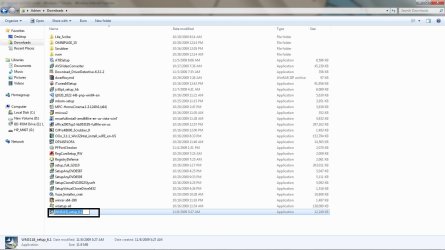
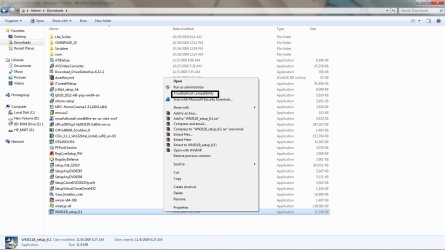
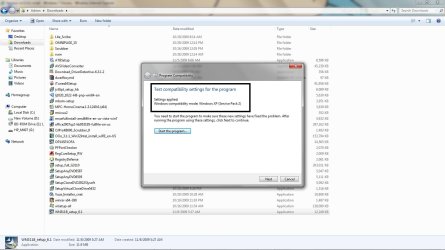
I was able to download the netgear update and I tried running a few things. I'll show you the screen shots.
The first pix shows you the location of the netgear app.
The second pix shows you that I'm looking for compatability mode
3rd. Is troubleshoot compatability, it looks like windows wants to use xp mode and etc. CHeck it out and try it again. | My System Specs | | System Manufacturer/Model Number Custom Build OS Windows 7 7600 1 X64 CPU AMD PHENOM II X 550 PROCESSOR 3.1 ghz Motherboard ASUS M4A78-TE Memory Corsair 4 gig ddr 3 Graphics Card ati radeon 3300 Sound Card ati hd Monitor(s) Displays syncmaster 2033sw Screen Resolution 1600X900 60 hz refresh PSU antec_550 watt Case cooler master GLite Cooling stock_heat sink Hard Drives twin_seagates SATA's 1 TB & 500 Gig, hitachi_slimline 160 gig Internet Speed 20mbs up/ 1.5mbs down Other Info favorite child "stewie"
favorite dog "brian" |
08 Nov 2009
|
#8 | | |
Hi Adrian.
That's exactly how I did it, except I downloaded it to the desktop. I have now tried it in Vista and XP compatibility mode and still the app doesn't see it so will not run. The driver seems to install ok, and as I said the shortcut shows up in Network Connections. It just doesn't want to detect any Network, it's almost as if the radio is turned off. It has installed the driver as a Broadcom 802.11n adaptor not Netgear, so I guess it's just seeing the chip.
Andy. | My System Specs | | System Manufacturer/Model Number Pc Specialist OS 7 CPU Intel Core Duo (tm)2 E7500 2.93ghz Motherboard ASUS P5QL/EPU Memory 4.00gb Graphics Card NVIDIA Geforce GTS 250 Sound Card VIA HD Aucio Monitor(s) Displays LG 1440x900 Hard Drives Seagate 500Gb |
08 Nov 2009
|
#9 | | |
Netgear wireless issues with 7 We tried the netgear USB adapter and the adapter that you install in the computer which both said they were compatible with Windows 7 but was not able to get the computer to recognize that the device was there. Out of frustration we returned both to BestBuy and got a Linksys USB adapter and it is actually compatible and it actually works. I don't know if this is an option for you but you might want to consider switching to Linkysis. | My System Specs | | System Manufacturer/Model Number asus OS Windows 7 |
08 Nov 2009
|
#10 | | Windows 7 7600 1 X64 Lake Buena Vista The Magic Kingdom |

Quote: Originally Posted by awilsonlee Hi Adrian.
That's exactly how I did it, except I downloaded it to the desktop. I have now tried it in Vista and XP compatibility mode and still the app doesn't see it so will not run. The driver seems to install ok, and as I said the shortcut shows up in Network Connections. It just doesn't want to detect any Network, it's almost as if the radio is turned off. It has installed the driver as a Broadcom 802.11n adaptor not Netgear, so I guess it's just seeing the chip.
Andy. Can you reset your router back to the original settings. | My System Specs | | System Manufacturer/Model Number Custom Build OS Windows 7 7600 1 X64 CPU AMD PHENOM II X 550 PROCESSOR 3.1 ghz Motherboard ASUS M4A78-TE Memory Corsair 4 gig ddr 3 Graphics Card ati radeon 3300 Sound Card ati hd Monitor(s) Displays syncmaster 2033sw Screen Resolution 1600X900 60 hz refresh PSU antec_550 watt Case cooler master GLite Cooling stock_heat sink Hard Drives twin_seagates SATA's 1 TB & 500 Gig, hitachi_slimline 160 gig Internet Speed 20mbs up/ 1.5mbs down Other Info favorite child "stewie"
favorite dog "brian" Netgear wn311b install problems? All times are GMT -5. The time now is 02:03 PM. | |