HELP DVD drive will not eject after intalling windows 7

icu

New member
hi, i recently installed windows 7 on my Packard bell iextreme 9610. i re-installed the drivers and everything else, but my DVD RW drive will not eject using the eject button, but will when i right click the drive and select eject......any ideas??

thanks

James
 

My Computer

Computer Manufacturer/Model Number
Packard ell
OS
windows 7 ultimate
Motherboard
Intel® Core 2 Quad Q8200 processor (2.33GHz, 1333MHz FSB
Memory
600GB
Graphics Card(s)
768MB NVIDIA GeForce 9600 GS
Press F8 key when your computer starts, in the Advanced boot options, select Safe mode and hit Enter. Once the system is fully booted into safe mode, try ejecting the drive with the button.
 

My Computer

Computer Manufacturer/Model Number
Samsung NP530U4B-S02IN
OS
Windows® 8 Pro (64-bit)
CPU
Intel® Core™ i5 Processor 2467M (1.60GHz, 3MB L3 Cache)
Motherboard
Samsung Electronics
Memory
6GB DDR3 System Memory at 1,333MHz (on BD 4GB + 2GB x 1)
Graphics Card(s)
AMD Radeon™ HD7550M 1GB DDR3 (Ext. Graphic)
Sound Card
Realtek High Definition Audio
Monitor(s) Displays
35.56cm (14.0) SuperBright 300nit HD LED Display
Screen Resolution
1366x768
Hard Drives
1TB S-ATA II Hard Drive (5400RPM) with ExpressCache 16GB SSD
Internet Speed
sucks
Antivirus
Microsoft Security Essentials
Browser
Google Chrome (Sync enabled)
May have a faulty eject button switch.
 

My Computer

Computer Manufacturer/Model Number
Self Built
OS
Windows 7 ultimate 64 bit / XP Home sp3
CPU
intel Core 2 Duo E8400 3.0ghz
Motherboard
Asus P5ND bios 1401
Memory
8 gigs 1066 OCZ Fata1ty
Graphics Card(s)
EVGA GTX 580 Call of Duty Black Ops Edition
Sound Card
Creative Soundblaster Audigy 2zs
Monitor(s) Displays
Asus 24in LCD's 2MS X2
Screen Resolution
1920x1080p @60Hz
Hard Drives
WD Caviar 500 Black/ WD Caviar 200 Blue
PSU
OCZ 700W GameXtreme
Case
NZXT Apollo
Cooling
Corsair H50 CPU/120mm x3 /60mm x2 /Corsair Dominator Ram
Keyboard
Logitech Bluetooth Wireless MX5000
Mouse
Logitech Bluetooth Wireless MX1000
Internet Speed
Download 19.83 Upload 0.97
Other Info
Logitech Z2300 Speakers/ Bose Noise Cancelling Headphones/Avermedia PCI-e Hybrid TV Bravo/Epson NX415 all in one/ 4 Port Powered USB Hub/ LG 10x Bluray Burner /TSST Corp DVDRW External
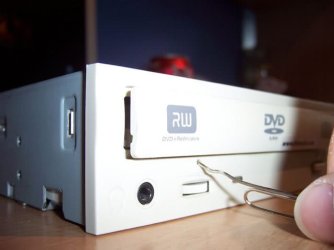
You can also try inserting a pin in the emergency eject hole to see if the drive comes out.
2.jpg
 

My Computer

Computer Manufacturer/Model Number
Samsung NP530U4B-S02IN
OS
Windows® 8 Pro (64-bit)
CPU
Intel® Core™ i5 Processor 2467M (1.60GHz, 3MB L3 Cache)
Motherboard
Samsung Electronics
Memory
6GB DDR3 System Memory at 1,333MHz (on BD 4GB + 2GB x 1)
Graphics Card(s)
AMD Radeon™ HD7550M 1GB DDR3 (Ext. Graphic)
Sound Card
Realtek High Definition Audio
Monitor(s) Displays
35.56cm (14.0) SuperBright 300nit HD LED Display
Screen Resolution
1366x768
Hard Drives
1TB S-ATA II Hard Drive (5400RPM) with ExpressCache 16GB SSD
Internet Speed
sucks
Antivirus
Microsoft Security Essentials
Browser
Google Chrome (Sync enabled)
thanks for all the quick replies.

first off i ran it in safe mode and still no joy. i then tried ejecting it using the button on the actual drive, other then the one on the tower and it worked. so the problem is that the button on the tower is the problem. it work before the installation of windows 7 so im 100% sure its not a fault with the button.
 

Attachments

  • packard bell.jpg
    packard bell.jpg
    27.5 KB · Views: 122

My Computer

Computer Manufacturer/Model Number
Packard ell
OS
windows 7 ultimate
Motherboard
Intel® Core 2 Quad Q8200 processor (2.33GHz, 1333MHz FSB
Memory
600GB
Graphics Card(s)
768MB NVIDIA GeForce 9600 GS
Cd DVD ejecting

I too just now installed windows 7 and I know my button to eject dvd's worked. Now it does not an only by going to the explorer window and selecting the drive -right clicking and selecting eject will the drive work. Any ideas on fixing it would be entertained. I don't like this work around.
 

My Computer

Computer Manufacturer/Model Number
Dell Optiplex 775
OS
Windows 7
CPU
duo 2.40ghz
Memory
4 gigs
Graphics Card(s)
ATI Radeon HD 4650
Sound Card
onboard
Monitor(s) Displays
two
Hard Drives
250 gigs
Try updating your keyboard drivers.
 

My Computer

Computer Manufacturer/Model Number
Custom
OS
Windows 7 Professional x64
CPU
Intel i7 2600K OC'd @ 4620 MHz
Motherboard
Asus P8Z68-V Pro
Memory
16GB GSkill Sniper 2133 Mhz (4x4GB)
Graphics Card(s)
EVGA GeForce GTX 480 SuperClocked+
Sound Card
Realtek High Definition Audio
Monitor(s) Displays
2x Acer S273HLbmii 27"
Screen Resolution
2 x 1920x1080
Hard Drives
64GB Crucial M4 SSD

Storage: Hitachi 1TB 5400RPM, Samsung 1.5TB 5400RPM
PSU
Corsair HW Series 750w (modular)
Case
Cooler Master HAF 932 Advanced Blue Edition
Cooling
CM Hyper 212+ CPU cooler, 3x 230mm + 1x 140mm case fans
Keyboard
Logitech MK320 (wireless)
Mouse
Logitech MK320 (wireless)
Internet Speed
30 Mb/s : 2 Mb/s
Isn't this related to the EULA? One installation per machine? Once the OS is installed, Windows eats up the disk and slowly digests it to prevent privacy.
 

My Computer

Computer Manufacturer/Model Number
SevenForums
OS
7 Prof
CPU
Q9550
Motherboard
Maximus II Formula
Memory
2x2 Mushkin Ascent 8500
Graphics Card(s)
4870X2
Sound Card
X-Fi Xtreme Gamer
Monitor(s) Displays
LN32A550
Screen Resolution
1920x1080
Hard Drives
Intel G2 80GB
5x1TB
PSU
Corsair 1000
Case
Cosmos
Cooling
Yates^13
Keyboard
G15v1
Mouse
MX518
Internet Speed
6Mbps
The Answer

I had the same problem, I think it is a problem with Packard Bell drivers for the case.
You can download some sofware (see link) so that you are able to eject from the desktop. Or you can try the Packard Bell updater software on their site.
Application - CD/DVD eject button control - 7602700000 - Downloads&
This works for me I hope it woks for you.
P.S You have a Mozart chassis.
 
Last edited:

My Computer

Computer Manufacturer/Model Number
Packard Bell I-Xtreme 9610
OS
Windows 7
Hi bullitt659

I downloaded that link u provided but it still does not work, i have to eject via my computer everytime i want to open/close the drive.

P.S im now having problem with my USB.
Everytime i connect my ipod or blackberry to the pc and try to upload data onto my devices it would stop copying and then devices would disappear from my computer. If i try to reconnect the USB i would get an error message "Device not recognized".

All software/drivers for the devices are installed,
if anyone is experiencing similiar problems please advise on how you solved the problem.

Thanks
 

My Computer

Computer Manufacturer/Model Number
packard bell iXtreme 9610
OS
windows 7
CPU
intel quad core Q8200 2.33GHz
Motherboard
Diego S Motherboard
Memory
4GB
Graphics Card(s)
9600GS
Win 7 eject

Hi not sure if you have sorted this or not but I will try to help if I can.
Let me get this straight you downloaded the program I told you about & installed it but it does not work?
Do you have graphical eject buttons on your desk top screen?
If so use these instead of trying to push your eject buttons on your case as they no longer work.
This system works well you just have to train yourself to use them.
As for your USB problems I would do the following.
1. Remove all other USB devices
2. Plug the offending devices (1 at a time) directly in to the USB ports on the back of your case & see if they now work with out any trouble.
3. If they work this way you probably have a USB conflict with another device & the only way to sort this out is by using Device manager.
3.1. Start reconnecting your other devices & monitor for any problems.
4. Check all your drivers are up to date by (I found using Driver Detective useful you get a free scan but would need to purchase if you want to download the drivers using this application)
5. Update any out of date drivers.

See how you get on I will try to get back to you sooner if you still need help.

:D
 
Last edited:

My Computer

Computer Manufacturer/Model Number
Packard Bell I-Xtreme 9610
OS
Windows 7

My Computer

Computer Manufacturer/Model Number
Custom
OS
Win 7 Ultimate 64 Bit
CPU
Pentium Quad Core
Motherboard
Gigabtye
Memory
4GB DDR2 667
Graphics Card(s)
Nvidia 9800GTX+
Sound Card
Onboard
Monitor(s) Displays
V7 22" Widescreen
Hard Drives
2 X Samsung Spinpoint 1TB in Raid
PSU
OCZ 700W
Case
Thermaltake lanbox lite
Cooling
Fan / Stock
Keyboard
Logitech G15 V2
Mouse
Hp Voodoodna
Internet Speed
50MB/s Cable
hello i have the prob but cant find the driver
 

My Computer

Computer Manufacturer/Model Number
packard bell IXTREME M5722
OS
Operating System : Windows 7 Home Premium Edition 6.01.7600 SP1 (x64)
CPU
Processor : Intel Core 2 Quad Q8300 @ 2500 MHz
Motherboard
Mainboard : Packard Bell (Acer EG43M )
Memory
Physical Memory :8GB Corsair4x 2GB 800MHz C5 DDR2
Graphics Card(s)
Video Card : XFX 6700 AMD
Monitor(s) Displays
Maestro 234DL - BenQ V2220 - BenQ VW2420H
Screen Resolution
Current Display :1920x1080p pixels at 60 Hz in HD LED
Hard Drives
Hard Disks : WDC (1000 GB)
Drive C: (Hard Disk) : 428 GB available on 491 GB
Drive D: (Hard Disk) : 426 GB available on 492 GB
SAMSUNG spinpoint HD103SJ 1000.2 GB
(X 2) KINGSTON SSD NOW V 30GB
PSU
XFX ProSeries 550W PSU
Case
PACKARD BELL IXTREME
Cooling
System Blower Current: 150mA Air Flow16CFM ;Akasa 90mm rear
Keyboard
Gigabyte Aivia K8100
Mouse
TRUST-Wireless Laser Mouse - Carbon edition MI-7770C
Internet Speed
TP-LINK > TL-WN951N / AV500 Gigabit Powerline Adapters
Browser
chrome dev
Other Info
EXTRA COOLING>(FAN CONTROLLER) PC Bay Cooler 3 x 40mm fans; Akasa AK-HD-BL Blue hard drive cooler 2 x 40 mm fan 4500 rpm 29.7 dBA
Bios> American Megatrends Inc.
Version : P01-A1
Date : 08/31/2009
Back
Top