Windows 7 Forums


Windows 7: DVD drive is not working!

13 Nov 2009   #1

Windows 7 Ultimate x86
Sydney
 
 
DVD drive is not working!

Hi, i recently installed the Windows 7 Ultimate x32 and my DVD drive has not responded, it has an error after a while of attempts to load with a location error. This problem has also prevented me from burning DVD's as Burnaware does not recognise a writable driver or device.


I installed it on a Acer Aspire 5738G. I have installed seven once before and the dvd drive then was laggy and slow to read my cds/dvds. But once reformatting with Vista, the hardware responded well as it works fine. Whereas this second reformat has caused my dvd to become faulty again.

Thanks for the comments and help, much appreciated!

PS: if there is no help i shall revert back to vista so much pain
My System SpecsSystem Spec

13 Nov 2009   #2

7600.20510 x86


Try to fix with this >> ForceASPI v1.7 (freeware)
My System SpecsSystem Spec
13 Nov 2009   #3

Windows 7 Ultimate x86
Sydney


Hey thanks for the reply, it actually WORKED! It is now running regularly but reading DVDs proficiently. Dude i am so happy, haha thought i'd have to revert abck to vista. THANKS HEAPS man

i'll update you if it can't burn things because i havent't installed a burning program

Cheers
My System SpecsSystem Spec
.


13 Nov 2009   #4

Win7 Enterprise, Win7 x86 (Ult 7600), Win7 x64 Ult 7600, TechNet RTM on AMD x64 (2.8Ghz)
SomeWhere in the HOT Arizona Desert !


Quote   Quote: Originally Posted by francocois View Post
Hey thanks for the reply, it actually WORKED! It is now running regularly but reading DVDs proficiently. Dude i am so happy, haha thought i'd have to revert abck to vista. THANKS HEAPS man

i'll update you if it can't burn things because i havent't installed a burning program

Cheers

Congrats

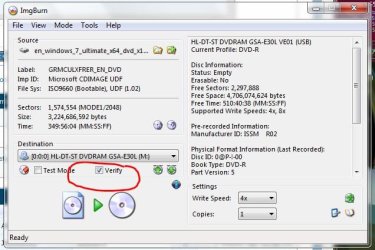
Try ImgBurn (FreeWare)
Attached Thumbnails
DVD drive is not working!-imgburn.jpg   DVD drive is not working!-imgburn_verify.jpg  
My System SpecsSystem Spec
13 Nov 2009   #5

Windows 7 Ultimate x86
Sydney


Hey I retreat my comment from above, the drive has returned to its original state after reading two dvds in succession. Im not sure what the problem still is but with Vista it was completely functional yet with the change from 7 twice, it's gone haywire. Would it be related to a OS problem with 7 and not my dvd drive?

That's the error that i'm receiving.

PS I've installed ImgBurn and it has been taking a while to search for SCSI/ATAPI device then it tells me device is not connected
PSS The CD drive only works for a certain amount of time after restarting or starting up then just dies out .... now after putting in another dvd it worked and imgburn recognised it
Attached Thumbnails
DVD drive is not working!-error.png  

Last edited by francocois; 13 Nov 2009 at 07:54 PM..
My System SpecsSystem Spec
14 Nov 2009   #6

XP, Vista, W7 64bit Home Premium


I've just been to your laptops website, and noticed a sata AHCI driver (intel matrix storage manager) - when its enabled in the bios which it would be - Windows 7 will automatically install the intel driver during installation, however for proper functionality you also need to install the latest intel matrix storage manager software - this will cause problems with your DVD Player unless it's installed.

You will find it at the intel site - http://downloadcenter.intel.com/default.aspx
Select chipsets - chipset software - intel(R) matrix storage manager - Select Operating System - select Windows 7 (64bit OR 32 bit) - select drivers - select intel(R) matrix storage manager 8.9.0.1023 - download and install.
(make sure you don't download the floppy configuration utility by mistake) - it will show up if you select utilities.
My System SpecsSystem Spec
14 Nov 2009   #7

Windows 7 Ultimate x86
Sydney


Mate you are a legend, it's working fine now but i will update you in a few days!
THANKS
My System SpecsSystem Spec
16 Dec 2009   #8

Windows 7 (64-bit


whest, as francocois said, you are totally a LEGEND in my folklore too! I was absolutely sure that my CD/DVD drive was not working properly and was going to send it to a service in another town, just too few days before I leave my country, so all I was seeing was dark. You brought light to my day again! Thanks again mate!
My System SpecsSystem Spec
Reply

 DVD drive is not working! problems?


Thread Tools


Similar help and support threads for: DVD drive is not working!
Thread Forum
Help! DVD drive not working Hardware & Devices
dvd drive is not working Hardware & Devices
DVD Drive Not Working Hardware & Devices
Dvd drive not working Hardware & Devices
Help required, USB flash drive/Pen drive not working! Drivers


All times are GMT -5. The time now is 10:29 AM.


Seven Forums Android App Seven Forums IOS App Follow us on Facebook

Windows 7 Forums is an independent web site and has not been authorized,
sponsored, or otherwise approved by Microsoft Corporation.
"Windows 7" and related materials are trademarks of Microsoft Corp.
© Designer Media Ltd
  

1 2 3 4 5 6 7 8 9 10 11 12 13 14 15 16 17 18 19 20 21 22 23 24 25 26 27 28 29 30 31 32