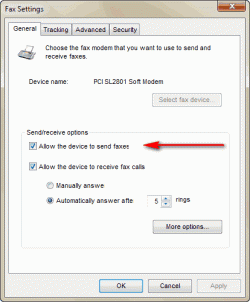
This a copy of the help supplied with W7 and some extra it maybe of some use.
If you're planning to send and receive faxes at home, you first need to outfit your PC with a fax modem.
A fax modem is a relatively inexpensive piece of add-on hardware that allows your computer to communicate with a fax machine over a standard phone line. The devices are sold at major computer stores and come in two varieties: internal and external.
Internal fax modems plug directly into your computer motherboard, similar to a video or sound card. External fax modems are small devices that connect to the serial or USB ports.
If you're at work, another option is to see if your employer has a fax server—a dedicated computer equipped with multiple fax modems. Sending a fax using a fax server doesn't require you to add any special hardware to your PC. You just set up a connection with the fax server and go.
How to Fax Over Broadband | eHow.com
Step1 Make sure your broadband is ready to go. Check your connections and your firewall setting and ensure that everything is working properly. More often than not, broadband Internet issues can be traced to a bad connection.
Step 2 Download the appropriate software. You'll need to pick the software that works for you, such as FaxBin or MyFax. For my faxing needs I use eFax, which allows for some free fax services, lets you receive faxes in an email, and offers expanded options for a monthly fee.
Step 3 Install the software. Follow the instructions as outlined in the software's installation guide.
Step 4 Select your document. Most fax software services will let you fax any of the typical document types, such as PDF and DOC files. If you have a scanner, some software will even let you fax your document directly from the machine.
Step 5 Fax away. Try to send a test fax first, to make sure everything is working properly, either to a friend or even to your job.
Once you've picked up a fax modem or found a fax server, you still need to do a little setting up.
To set up a fax modem
Before you begin, make sure that you've properly installed your fax modem, and that it's plugged in to a standard analog phone line.
Click the Start button , click All Programs, and then click Windows Fax and Scan.
At the bottom of the left pane, click Fax, and then click New Fax on the toolbar to launch the Fax Setup wizard.
Click Connect to a fax modem and follow the instructions.
Note
To set up your computer to send faxes only, click I'll choose later; I want to create a fax now in the Fax Setup wizard. Keep in mind that by choosing this option, you'll be able to send faxes but not receive them.
To set up a fax server
Before you begin, make sure your computer is connected to the network and you know the network address of the fax server (for example,
\\mycompanyfaxserver).
Click the Start button , click All Programs, and then click Windows Fax and Scan.
To use Fax view, click Fax at the bottom of the left pane.
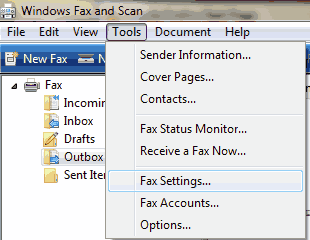
Click the Tools menu, and then click Fax Accounts.
Click Add, and then, in the Fax Setup wizard, click Connect to a fax server on my network and follow the instructions.
Note
To connect to a fax server, you might need permission from the system administrator.