Hi i have been experiencing something strange with my cpu and windows 7. latelly i noticed my games lagging since i installed windows 7 professional. This was strange considering i had no problem running these games on my windows xp. so i decided to check task manager and while in game only one core is extensivelly used! core 0 or the left one is at about 100% load while the other core is almost idle! im not sure what to do as i have never experienced anything like this before. can anyone help me solve this?
btw my cpu is a E6550 overclocked @ 3Ghz
motherboard is the MSI G33M
Video Car is the 8800GT
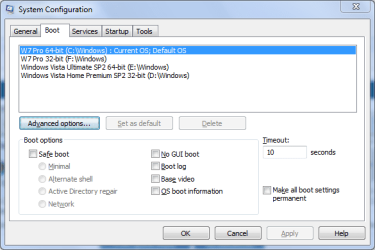
rb: :ar: Type msconfig into the search box and press Enter/Return. You will need to provide administrative credentials.
Select the Boot tab and click on Advanced options...
Uncheck Number of processors: and then click OK twice.
To apply any changes, click on Restart. You can, of course, choose to Exit without restart, in which case changes will take place when you next reboot your system.
4 x 4GB DDR3-1600 Corsair Vengeance CMZ8GX3M2A1600C9B (16GB)
Graphics Card(s)
MSI GeForce GTX770 Gaming OC 2GB
Sound Card
Realtek High Definition on board solution (ALC 898)
Monitor(s) Displays
ViewSonic VA1912w Widescreen (VGA)
Screen Resolution
1440x900
Hard Drives
OCZ Agility 3 SSD 120GB SATA III x2 (RAID 0)
Samsung HD501LJ 500GB SATA II x2
Hitachi HDS721010CLA332 1TB SATA II
Iomega 1.5TB Ext USB 2.0
WD 2.0TB Ext USB 3.0
thanks for the prompt reply dwarf but i already tried that and it was unchecked from the beginning. Im starting to feel that this is a compatibility issue with windows 7 itself and nothing related to hardware or software. i used realtemp to torture test and i noticed that only 50% cpu power is used. however when i used prime95 torture test, it managed to use both cores at 100% power. This is really wierd and possibly a windows 7 related flaw. Im not sure what to do. could anyone please test realtemp xs benchmarking and report their results?
btw here is the screenshot of cpu usage while in game (NO overclocking):
here is another screenshot while using real temp benchmarking. i also see another post about this issue so im not the only one then with this problem.



 rb: :ar: Type msconfig into the search box and press Enter/Return. You will need to provide administrative credentials.