| Windows 7: Show us your hard drive performance |
14 Jan 2012
|
#641 | | |
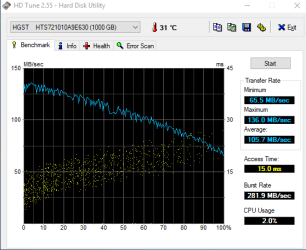
Here's my Raid 0 array  . | My System Specs |
| System Manufacturer/Model Number Asus EEE PC 900HD OS Windows XP CPU Intel Celeron ULV (max 900 mhz; set to 630 mhz) Memory 1 GB DDR2 Graphics Card Intel GMA 900 64 MB Sound Card Realtek HD Audio Monitor(s) Displays 8.9 inch LED backlight display Screen Resolution 1024 by 600 Keyboard just fine Mouse multi-touch touchpad PSU 35 watt Hard Drives 160 GB Internet Speed slow Other Info Using a netbook currently for travel. Also own a Dell 755 and a T500 and a Toshiba P105. |
14 Jan 2012
|
#642 | | Windows 7 Ultimate SP1 x64 Macedonia |
| My System Specs | | OS Windows 7 Ultimate SP1 x64 CPU Intel Pentium G630 @2.7GHz 3MB Motherboard Asus P8H61-M LX3 PLUS Memory Corsair 4GB DDR3 / 1066MHz 9-9-9-24 2T Graphics Card Intel HD Graphics Sound Card Integrated Monitor(s) Displays Philips 192EL Screen Resolution 1366 x 768 Keyboard Delux K5108 Mouse Genius PSU Hantol 500W Case Delux costumized... Cooling 120mm Hantol, Spire 80mm Hard Drives WD Caviar Blue 500GB / 16MB Internet Speed 15 Mbit Other Info Genius SW-2.1 355 Speakers,Camera,Joystick
Asus K55VJ(i5 3210, GT635M / 2GB, 8GB DDR3, 500GB HDD) |
15 Jan 2012
|
#643 | | Windows 7 Ultimate Scotland |
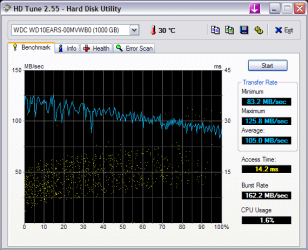
Is there any way to boost my performance and speed up my access time? | My System Specs | | System Manufacturer/Model Number HP OS Windows 7 Ultimate CPU DualCore Intel Pentium D 930, 3000 MHz (15 x 200) Motherboard Asus P5LP-LE (Emery) Memory 3x512MB DDR2 Graphics Card NVIDIA GeForce 7800 GTX Sound Card Realtek ALC882/D/M @ Intel 82801GB ICH7 Monitor(s) Displays Iiyama ProLite E2407HDS Screen Resolution 1920 x 1080 70 Hz Keyboard Hewlett Packard Wireless Ergo Mouse Logitech USB Wheel Mouse Hard Drives WDC WD10EARS-00Y5B1 ATA Device Internet Speed 10mbps Download - 1mbps Upload |
15 Jan 2012
|
#644 | | Windows 7 Ultimate SP1 X64/ linux in VM NW Florida |

Quote: Originally Posted by jloc Is there any way to boost my performance and speed up my access time? An SSD will do that dramatically. | My System Specs | | Computer type PC/Desktop System Manufacturer/Model Number Home Built- Always under construction OS Windows 7 Ultimate SP1 X64/ linux in VM CPU Intel i7-3770K Motherboard Asus Maximus V Extreme Z77 Memory 8GB G.Skill Ripjaws Z DDR3-2400 (2X4GB) Graphics Card EVGA GTX 670 SC 4GB Sound Card On Board Monitor(s) Displays Asus 24" LCD Screen Resolution 1920X1080 Keyboard Logitech G510 Mouse Logitech G500 PSU CORSAIR AX850 Case Cooler Master HAF X Cooling Custom Water Cooling Hard Drives Samsung 840 Pro 256 GB, Samsung 840 Pro 256 GB, Samsung 830 256GB, Samsung HD103SJ 1TB . External HD- Black X dock esata 1TB Samsung Spinpoint, Rosewill USB 3.0 dock 1TB Samsung Spinpoint Internet Speed carrier pigeon speed Antivirus MSE/MBAM Browser ie8 Other Info 2nd Rig,Windows 7 Ultimate SP1 X64, i7-2600K, Asrock P67 Extreme 4, 8GB DDR3-2133, HAF XM case, Noctua NH-D14, Gigabyte HD6950 OC 1GB, 2 X Crucial M4 128GB, Asus 24" LED.
Laptop- Samsung RF711-SO1 17" i5-2310M, 8GB DDR3-1333, Crucial M4 and OCZ vertex2, Nvidia GT540M.Win 7 HP X64 SP1. |
15 Jan 2012
|
#645 | | Windows 7 Ult x64 - SP1/ Windows 8 Pro x64 Wanderer |

Quote: Originally Posted by jloc Is there any way to boost my performance and speed up my access time? Best performance upgrade you can do is a SSD. | My System Specs | | Computer type PC/Desktop System Manufacturer/Model Number 76~2.0 OS Windows 7 Ult x64 - SP1/ Windows 8 Pro x64 CPU Intel Core i5-3570K 4.6GHz Motherboard Gigabyte GA-Z77X UD3H, f18 Memory 8GB (2X4GB) DDR3 1600 Corsair Vengeance CL8 1.5v Graphics Card Sapphire HD 7770 Vapor-X OC 1GB DDR5 Sound Card Onboard VIA VT2021 Monitor(s) Displays 22" LCD Dell Screen Resolution 1680x1050 Keyboard Logitech Wave Mouse CM Sentinel PSU Corsair HX650W Case Cooler Master Storm Scout Cooling Corsair H80 2x12cm Noctua NF P12 , 2x14cm case fans Hard Drives Samsung 840Pro 128GB SSD,
Seagate Barracuda 500GB SATA2 7200rpm 32MB cache, Seagate Barracuda 1TB SATA2 7200rpm 32MB cache, Internet Speed Dismal Antivirus Avast Browser Opera Next Other Info eSATA ports,
External eSATA Seagate 500GB SATA2 7200rpm,
External USB WD 500GB |
17 Jan 2012
|
#646 | | |
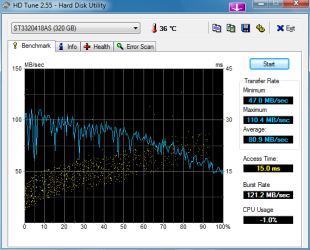
Here is my WD Scorpio Black 3200EKT that I have in my Laptop. | My System Specs | | System Manufacturer/Model Number Sony Vaio VGN-NW120J/S OS Windows 7 CPU Intel Core 2 T6500 / 2.10 Ghz Memory 4gb Graphics Card Mobile Intel Graphics Media Accelerator 4500MHD Monitor(s) Displays 15.5 / 1366x768 Hard Drives Western Digital Scorpio Black WD3200BEKT |
04 Feb 2012
|
#647 | | Windows 7 Ultimate x64 Southern California |
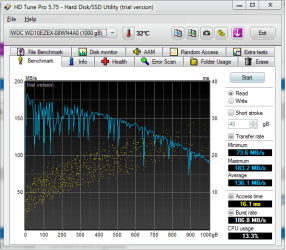
After finally realizing one of my data drives was acting goofy for some time, I redid my system with new data drives and a new motherboard keeping my i7-970 CPU and memory sticks. So I set up a RAID 0 with two Hitachi drives for my data, and still have my good WD C: drive. Here's how they do their thing:
Bye.
PS. The ancient HD Tune 2.55 doesn't know about 4 TB virtual drives. | My System Specs | | System Manufacturer/Model Number Home Brew OS Windows 7 Ultimate x64 CPU i7 970 Motherboard ASUS Rampage III GENE Memory 9 GB Graphics Card 9600GT Monitor(s) Displays dual 24" Samsung Screen Resolution 1920x1200 PSU Thermaltake toughpower W0104RU 650W Case Thermaltake LANBOX Lite Hard Drives VelociRaptor and 4TB of Hitachi RAID 0 Internet Speed 30 Mbps Download 1 Mbps Upload (Speedtest.com) |
04 Feb 2012
|
#648 | | Vista, Windows7, Mint Mate, Zorin, Windows 8 Florida in winter, Black Forest/Germany |
Not bad for spinners. Nice for the data (if you move big chunks). But for the OS, I would go with an SSD. The access time on a spinner is just too slow. | My System Specs | | System Manufacturer/Model Number HP, Dell, Gateway, Toshiba - 4 laptops and 2 desktops OS Vista, Windows7, Mint Mate, Zorin, Windows 8 CPU from 1.6GHz Duo to i7 Monitor(s) Displays 2x HP w2207 Keyboard with trackball - no mices Mouse Trackball mice Hard Drives 5x HDD, 7x SSD, 12x Externals Internet Speed DSL 6000 |
06 Feb 2012
|
#649 | | Windows 7 Ultimate x64 Southern California |
When a 500GB SSD of good performance sells for $250, I will give it serious consideration. I've put small SSDs in my laptop and notebook with good results. I have a HTPC with a Z68 chip-set that supports using a small SSD as a smart cache for the HDD, which gives a bit of a boost, and SSDs are still too expensive for my desktop machine in my opinion. I say that as someone who once had their employer pay $1500 for a full-size 5.25" 80 MB HDD. That's MB, not GB. Yes, I'm that old.
Bye. 
Quote: Originally Posted by whs Not bad for spinners. Nice for the data (if you move big chunks). But for the OS, I would go with an SSD. The access time on a spinner is just too slow. | My System Specs | | System Manufacturer/Model Number Home Brew OS Windows 7 Ultimate x64 CPU i7 970 Motherboard ASUS Rampage III GENE Memory 9 GB Graphics Card 9600GT Monitor(s) Displays dual 24" Samsung Screen Resolution 1920x1200 PSU Thermaltake toughpower W0104RU 650W Case Thermaltake LANBOX Lite Hard Drives VelociRaptor and 4TB of Hitachi RAID 0 Internet Speed 30 Mbps Download 1 Mbps Upload (Speedtest.com) |
06 Feb 2012
|
#650 | | Vista, Windows7, Mint Mate, Zorin, Windows 8 Florida in winter, Black Forest/Germany |

Quote: Originally Posted by Crunchy Doodle When a 500GB SSD of good performance sells for $250, I will give it serious consideration. I've put small SSDs in my laptop and notebook with good results. I have a HTPC with a Z68 chip-set that supports using a small SSD as a smart cache for the HDD, which gives a bit of a boost, and SSDs are still too expensive for my desktop machine in my opinion. I say that as someone who once had their employer pay $1500 for a full-size 5.25" 80 MB HDD. That's MB, not GB. Yes, I'm that old.
Bye. 
Quote: Originally Posted by whs Not bad for spinners. Nice for the data (if you move big chunks). But for the OS, I would go with an SSD. The access time on a spinner is just too slow. I don't know what you are trying to do. On desktops, a 60GB SSD is ample for the OS.
None of my SSDs have more than 30GBs used for the OS. But, of course, I moved the user data to the HDDs. But on the SSDs I have the total system (less the hiberfile) all programs (and I have about 50 extra programs - but no games) and the pagefile I reduce to 2GBs.
Using an SSD as a HDD cache seems to be a waste for me.
On my laptops I use 80 and 90GB SSDs plus a big 32GB stick for the overflow data. Works fine too. | My System Specs | | System Manufacturer/Model Number HP, Dell, Gateway, Toshiba - 4 laptops and 2 desktops OS Vista, Windows7, Mint Mate, Zorin, Windows 8 CPU from 1.6GHz Duo to i7 Monitor(s) Displays 2x HP w2207 Keyboard with trackball - no mices Mouse Trackball mice Hard Drives 5x HDD, 7x SSD, 12x Externals Internet Speed DSL 6000 Show us your hard drive performance problems? All times are GMT -5. The time now is 06:42 AM. | |