Windows 7 Forums Search
Welcome to Windows 7 Forums. Our forum is dedicated to helping you find solutions with any problems, errors or issues you are experiencing with Windows 7. The Windows 7 forum also covers news and updates and has an extensive Windows 7 tutorial section that covers a wide range of tips and tricks.


Windows 7 - Show us your hard drive performance

 
02-06-2012   #651


Windows 7 Ultimate x64


It's a matter of working style - the ease of use - a balance of performance and storage usage. Currently, my C: drive has about 200 GB used, and my H: drive has about 1.2TB used - mostly video and photos.

I do appreciate what you are doing. I do get it. However, I'm more interested in convenience than you are. When I'm editing HD video, an SSD would not give me that much. The real work is rendering, which is CPU intensive. My electromechanical spinners never break a sweat. My biggest problem is keeping the chips cool.

The business with the Z68 chip-set and the SSD cache is an Intel thing to bridge the gap between HDD and SSD by providing a good sized most-used cache for the HDD in hardware. It does cut boot up time in half and the often used applications jump to life very quickly, just like it would with a full SSD, but with a 2TB capacity, in my case. Since this is a dedicated HTPC, it works out pretty well for way less money than full SSD.

It won't be long for SSDs to be the normal type of mass storage, with electromechanical HDD just something you could tell your grandchildren about. Then we'll be debating the virtues of biological computers verses photon based machines.

Bye.

Quote   Quote: Originally Posted by whs View Post
Quote   Quote: Originally Posted by Crunchy Doodle View Post
When a 500GB SSD of good performance sells for $250, I will give it serious consideration. I've put small SSDs in my laptop and notebook with good results. I have a HTPC with a Z68 chip-set that supports using a small SSD as a smart cache for the HDD, which gives a bit of a boost, and SSDs are still too expensive for my desktop machine in my opinion. I say that as someone who once had their employer pay $1500 for a full-size 5.25" 80 MB HDD. That's MB, not GB. Yes, I'm that old.

Bye.

Quote   Quote: Originally Posted by whs View Post
Not bad for spinners. Nice for the data (if you move big chunks). But for the OS, I would go with an SSD. The access time on a spinner is just too slow.
I don't know what you are trying to do. On desktops, a 60GB SSD is ample for the OS.

None of my SSDs have more than 30GBs used for the OS. But, of course, I moved the user data to the HDDs. But on the SSDs I have the total system (less the hiberfile) all programs (and I have about 50 extra programs - but no games) and the pagefile I reduce to 2GBs.

Using an SSD as a HDD cache seems to be a waste for me.

On my laptops I use 80 and 90GB SSDs plus a big 32GB stick for the overflow data. Works fine too.


My System SpecsSystem Spec
02-06-2012   #652
whs


Vista and Windows7, sometimes Ubuntu and Fedora


Crunchy, what can I say. If that strange setup suits you that is just as well. I would not want to work like that - and I do a lot of video editing too. But as you said, that is mostely CPU bound and the disk speed is a minor component.
My System SpecsSystem Spec
02-06-2012   #653
4wd


W7 Ultimate 32bit


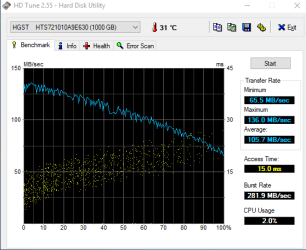
Just fitted this new Hitachi 320 (7200 7mm) in my old (but still going strong) hp 6735b laptop. Am happy with the results, and it's a quiet drive with zero vibrations.
Attached Thumbnails
Show us your hard drive performance-capture.png  
My System SpecsSystem Spec
.


02-15-2012   #654


windows 7 home premium x64 ;win7ultimate x64 ;win7 home premium X64


here's my :488GB Seagate ST950032 5AS SATA Disk Device
Attached Thumbnails
Show us your hard drive performance-knipsel.png  
My System SpecsSystem Spec
02-19-2012   #655


Windows 7 Home Premium 64 bit SP1


Intel ssdsa2mh160g2r5 x25m 160gb sata 3.0 ssd
Attached Thumbnails
Show us your hard drive performance-hd-read.png   Show us your hard drive performance-random-access.png  
My System SpecsSystem Spec
02-19-2012   #656


Windows 7 Ult x64 - SP1/ Windows 8 CP x64


This thread is for hard drives, you've already posted this in the SSD performance thread

Last edited by Dave76; 02-19-2012 at 11:02 PM..
My System SpecsSystem Spec
03-05-2012   #657


Windows 7 Home Premium x64


My Seagate Barracuda

Show us your hard drive performance-1.jpg
My System SpecsSystem Spec
4 Weeks Ago   #658


Windows 7 Professional 64 bit


Hi,

not that happy with my 2 months old Tecra R840 500 GB hard drive!
Lots of vibration (you feel it all over the case) and the performance for a 7200rpm is kind of "bad" (?).
There is any way to improve it?
Regards,
paulo
Attached Thumbnails
Show us your hard drive performance-29-abril-2012_13-10.png   Show us your hard drive performance-29-abril-2012_15-36.png  

Last edited by paulobao; 4 Weeks Ago at 09:47 AM.. Reason: new test
My System SpecsSystem Spec
4 Weeks Ago   #659
whs


Vista and Windows7, sometimes Ubuntu and Fedora


The performance is so, so. What I would worry about is the vibration. If it keeps vibrating a lot, something will break eventually.
My System SpecsSystem Spec
4 Weeks Ago   #660


Windows 7 Professional 64 bit


whs, I hope not (I mean no break)!
I'm still planning to put an ssd (sams 830, 512 GB) and remove the hdd but I need to know if I'm capable to do the job myself! I would like to migrate all my software, including the OS from my hdd to the ssd! Is that possible? I've Norton Ghost but I don't know if is it possible! It would be very complicated to me to install all (I've lots of astronomy ans imaging sw installed) from scratch!

paulo
My System SpecsSystem Spec
Reply

 Show us your hard drive performance problems?


Thread Tools


Similar Threads for: Show us your hard drive performance
Thread Forum
Comparing Hard Drive Performance Hardware & Devices
can an external dvd drive be made to show as hard drive? Music, Pictures & Video
Best Hard drive for performance upgrade Hardware & Devices
Ext hard drive ??? & pc performance recomd'd settings??? General Discussion
Hard Drive Partitioning Performance Issues Hardware & Devices


All times are GMT -5. The time now is 02:25 PM.


Windows 7 Forums is an independent web site and has not been authorized,
sponsored, or otherwise approved by Microsoft Corporation.
"Windows 7" and related materials are trademarks of Microsoft Corp.
© Designer Media Ltd
  

1 2 3 4 5 6 7 8 9 10 11 12 13 14 15 16 17 18 19 20 21 22 23 24 25 26 27 28 29 30