I have been unable to print from my Studio 17 laptop since buying it two weeks ago. I tried installing the original disks to two HP all in one printers .... one 2570 and the other HP 2700. Neither are accepted or recognized by Windows 7. Of course Dell refuses to help me resolve this issue unless I pay them $49.95 which was a "special rate" just for me. My frustration is that I have several software programs that were on my old laptop that are probably incompatible with 7 and as I begin to use my computer more I will be paying Dell each time a program is incompatible. They say the problem is an HP problem not Dell. Well both my printers are out of warranty. They work fine and I refuse to go out and buy a Dell printer just so it works with Windows 7. I have the feeling that I made a big mistake purchasing the 7 until some of the problems got worked out.
Can anyone offer me some guidance please?? You should probably know that I am borderline literate when it comes to computers. Thanks in advance.
meajha
Uninstall all printer software and HP drivers you have installed
Click rb:, type devices to the search field and press enter to open Devices and Printers
Click Add a printer
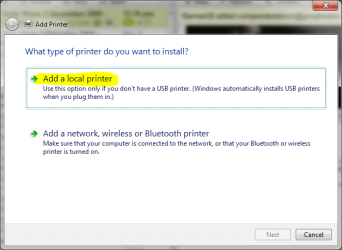
Click Add a local printer
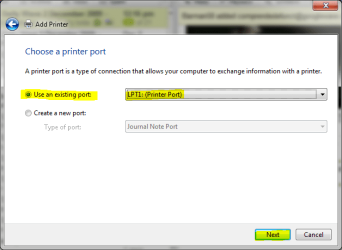
Choose Use an existing port and choose LPT1: (Printer Port) from the drop down list. Click Next
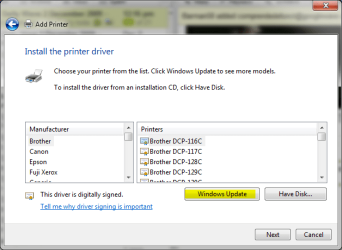
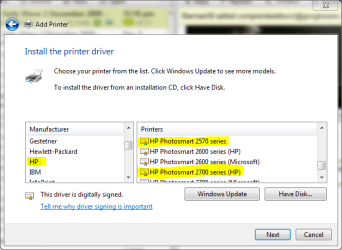
Click Windows Update button. Please notice it takes a long time, several minutes, to load the printer list. Just wait
Choose HP from Manufacturer list and HP Photosmart 2570 series from Printers list
Click Next, follow the instructions given. Only connect your printer when asked to do so.
Your printer should work now.
Repeat this procedure to add your Photosmart 2700. Even if you are using your printer as a network printer, connected directly to your router, you should first install it as a local printer. After installation you can then disconnect the printer from computer, connect it to router using LAN cable and follow this procedure to step 5 where you can choose Add a network printer.
Kari
My Computer
Computer type
Laptop
Computer Manufacturer/Model Number
HP ENVY 17-1150eg
OS
Windows 10 Pro x64 EN-GB
CPU
1.6 GHz Intel Core i7-720QM Processor
Memory
6 GB
Graphics Card(s)
ATI Mobility Radeon HD 5850 Graphics
Sound Card
Beats sound system with integrated subwoofer
Monitor(s) Displays
17" laptop display, 22" LED and 32" Full HD TV through HDMI
Screen Resolution
1600*900 (1), 1920*1080 (2&3)
Hard Drives
Internal: 2 x 500 GB SATA Hard Disk Drive 7200 rpm
External: 2TB for backups, 3TB USB3 network drive for media
Cooling
As Envy runs a bit warm, I have it on a Cooler Master pad
Thanks so much for helping me get the printer working. I used the usb port and put the printer cable in and voila. However, I am tethered to the printer cable and wonder if you can help me with making the printer communicate with the computer using my Belkin wire network. I know I am asking the world aren't I...lol.
I have no faith in having Belkin resolve this issue. Should tell you that my wireless router is about 4 years old and worked fine with my old XP laptop.
Thanks again for all your help. My limited experience has been that community forums are the way to seek intelligient problem solving. meajha
Connect your Photosmart to router with a LAN cable, disconnect USB cable. Power on printer. Do steps 3 and 4 from my last post. Click Add a network, wireless or Bluetooth printer and follow the instructions given.
Your Belkin router should now find the printer.
Kari
My Computer
Computer type
Laptop
Computer Manufacturer/Model Number
HP ENVY 17-1150eg
OS
Windows 10 Pro x64 EN-GB
CPU
1.6 GHz Intel Core i7-720QM Processor
Memory
6 GB
Graphics Card(s)
ATI Mobility Radeon HD 5850 Graphics
Sound Card
Beats sound system with integrated subwoofer
Monitor(s) Displays
17" laptop display, 22" LED and 32" Full HD TV through HDMI
Screen Resolution
1600*900 (1), 1920*1080 (2&3)
Hard Drives
Internal: 2 x 500 GB SATA Hard Disk Drive 7200 rpm
External: 2TB for backups, 3TB USB3 network drive for media
Cooling
As Envy runs a bit warm, I have it on a Cooler Master pad


 rb:, type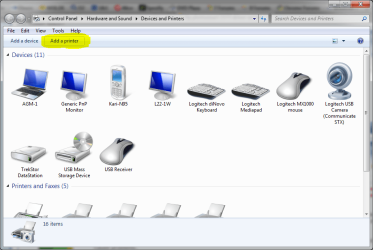
 meajha