
| Windows 7: BIOS; keyboard unresponsive at certain key points |
05 Dec 2009
|
#1 | | |
BIOS; keyboard unresponsive at certain key points Hi all. I have been agonizing over this issue for a couple days. I hope someone can help me find some closure on this. ISSUE: I cannot enter BIOS when the BIOS configuration jumper is set to 'normal'; it seems that the keyboard is unresponsive. If I set the jumper to 'configure' the system automatically enters BIOS, but the keyboard is then unresponsive.
I recentely built a new computer:
MOBO: Intel DG45FC.
CPU: Intel E7400
RAM: Corsair XMS2 (2 x 2 GB) PC2-6400 DDR2 800
HDD: Western Digital Blue Caviar 250GB
ODD: Sony CD/DVD drive
On its face, everything is working just fine. But, I want to enter the BIOS for various reasons, one of which is to update it. As stated, when the BIOS configuration jumper is set to 'normal,' I will repeatedly hit F2, but nothing happens.
If I put the jumper to 'configure,' I get pushed into BIOS automatically, but the keyboard is unresponsive. In both instances, the keyboard has power, but it just doesn't work. Keyboard type: Logitech Illuminated wired USB keyboard.
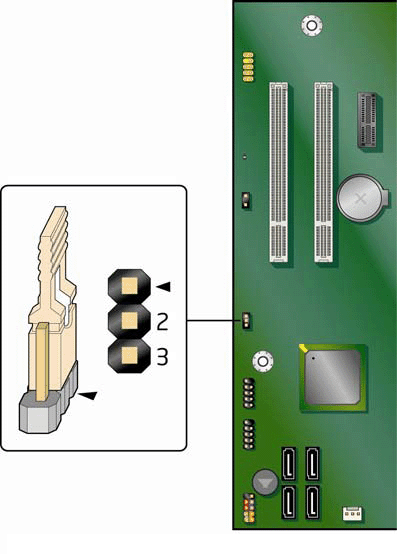
I tried resetting the CMOS - didn't work. I tried updating the BIOS with the latest BIOS update from Intel (express method through Windows environment). The update went through, but it still doesn't work. I tested a new keyboard - didn't work.
I researched online and found ONE nearly identical issue someone was having with their Intel board. See System Setup BIOS Freezes! urgent - Intel® Software Network.
But, they ultimately resolved it by simply updating the BIOS. Once they updated the BIOS, it would recognize the keyboard at all critical times.
Can anyone shed some light on this? I am kind of at a loss.
Thanks much in advance.
Last edited by eyc; 05 Dec 2009 at 11:50 AM..
Reason: Type of keyboard
| My System Specs |
| System Manufacturer/Model Number Shuttle SG31G2 Barebones OS Windows 7 CPU Intel Core 2 Quad Q9550 @ 2.83GHz, 12MB Cache Motherboard Stock Intel G31 Memory G.SKILL 4GB (2 x 2GB) DDR2 800 Graphics Card Onboard GMA 3100 Sound Card Realtec ALC888 Monitor(s) Displays Samsung 2333sw 23" Screen Resolution 1920 x 1080 Hard Drives Western Digital Caviar Black 640GB 7200 RPM |
05 Dec 2009
|
#2 | | ME/XP/Vista/Win7 uk Hampshire |
Hi
If you are using a wireless keyboard,try a PS2 or USB. | My System Specs | | |
05 Dec 2009
|
#3 | | |
@theog -- I am using a wired USB keyboard (Logitech Illuminated Keyboard). I will try to find another (more basic) keyboard and see if that makes a difference. Thanks for the input. | My System Specs | | System Manufacturer/Model Number Shuttle SG31G2 Barebones OS Windows 7 CPU Intel Core 2 Quad Q9550 @ 2.83GHz, 12MB Cache Motherboard Stock Intel G31 Memory G.SKILL 4GB (2 x 2GB) DDR2 800 Graphics Card Onboard GMA 3100 Sound Card Realtec ALC888 Monitor(s) Displays Samsung 2333sw 23" Screen Resolution 1920 x 1080 Hard Drives Western Digital Caviar Black 640GB 7200 RPM |
05 Dec 2009
|
#4 | | Windows 7 SP1, Home Premium, 64-bit |
Is there any particular reason you want to update the BIOS? What problems do you expect updating to solve? | My System Specs | | System Manufacturer/Model Number Ignatz Special; 4 speed manual gearbox; factory air conditioning; one of one OS Windows 7 SP1, Home Premium, 64-bit CPU Intel Sandy Bridge i5-2500, not overclocked Motherboard Gigabyte H67A-UD3H-B3, full ATX Memory 4 GB Crucial DDR3-1333 Graphics Card none; graphics are integrated on CPU Sound Card onboard: Realtek ALC892; external: USB Behringer UF0-202 Monitor(s) Displays NEC 90GX2-BK 19" LCD Screen Resolution 800 x 640 Keyboard Leopold Tenkeyless with Cherry Blue switches, USB Mouse Logitech or Microsoft optical wired; either USB or PS 2 PSU Seasonic SS-560KM, modular Case Antec Solo II Cooling CPU: Scythe Big Shuriken; Case: Scythe Slipstream 800 & 500 Hard Drives System: Intel 320 Series SSD, 80 GB;
Data: Samsung Spinpoint 103SJ, 1 TB;
Backup: WD Caviar Green WD15EADS-00P8B0, 1.5TB Other Info Power consumption of this system, including monitor: 68 watts at idle; 144 watts at full load |
05 Dec 2009
|
#5 | | |

Quote: Originally Posted by ignatzatsonic Is there any particular reason you want to update the BIOS? What problems do you expect updating to solve? Good question. I'm actually not sure. I am pretty new to building computers. I just thought it would be the most prudent thing to do. I also have a strange "unkown" PCI device in my device manager. And I thought updating the BIOS would help get rid of it.
Also, I'm sending the computer to California (from Chicago), and I wanted to make sure that it was all buttoned up before sending it along, so that if anyone needed to troubleshoot it, it would be ready to go. I figured that updating the BIOS would be a logical step towards acheiving that goal.
Perhaps I should just ignore it? | My System Specs | | System Manufacturer/Model Number Shuttle SG31G2 Barebones OS Windows 7 CPU Intel Core 2 Quad Q9550 @ 2.83GHz, 12MB Cache Motherboard Stock Intel G31 Memory G.SKILL 4GB (2 x 2GB) DDR2 800 Graphics Card Onboard GMA 3100 Sound Card Realtec ALC888 Monitor(s) Displays Samsung 2333sw 23" Screen Resolution 1920 x 1080 Hard Drives Western Digital Caviar Black 640GB 7200 RPM |
05 Dec 2009
|
#6 | | Windows 7 SP1, Home Premium, 64-bit |
BIOS updates are not to be taken lightly and are generally NOT done as a matter of course or as part of normal maintenance.
They are recommended when you are having specific issues and have very good reason to believe (typically from documentation by the BIOS provider) that the update will resolve the specific issue. They are not recommended as a "well, maybe it will help" or "well, it can't hurt" type of thing. If you can't enumerate and document why you would do it, don't. I've had PCs run on the same BIOS for their entire working lives.
I wouldn't get overly concerned about the unknown PCI device either. What does it prevent you from doing that your PC could otherwise do, particularly when you have (apparently) no good reason other than hope to believe that a BIOS update might resolve it?
You should certainly do what you need to do to be able to enter the BIOS and make whatever changes you need to make. So, I would get that resolved. But I wouldn't update the BIOS given that you don't know whether it would accomplish anything. | My System Specs | | System Manufacturer/Model Number Ignatz Special; 4 speed manual gearbox; factory air conditioning; one of one OS Windows 7 SP1, Home Premium, 64-bit CPU Intel Sandy Bridge i5-2500, not overclocked Motherboard Gigabyte H67A-UD3H-B3, full ATX Memory 4 GB Crucial DDR3-1333 Graphics Card none; graphics are integrated on CPU Sound Card onboard: Realtek ALC892; external: USB Behringer UF0-202 Monitor(s) Displays NEC 90GX2-BK 19" LCD Screen Resolution 800 x 640 Keyboard Leopold Tenkeyless with Cherry Blue switches, USB Mouse Logitech or Microsoft optical wired; either USB or PS 2 PSU Seasonic SS-560KM, modular Case Antec Solo II Cooling CPU: Scythe Big Shuriken; Case: Scythe Slipstream 800 & 500 Hard Drives System: Intel 320 Series SSD, 80 GB;
Data: Samsung Spinpoint 103SJ, 1 TB;
Backup: WD Caviar Green WD15EADS-00P8B0, 1.5TB Other Info Power consumption of this system, including monitor: 68 watts at idle; 144 watts at full load |
05 Dec 2009
|
#7 | | |

Quote: Originally Posted by ignatzatsonic BIOS updates are not to be taken lightly and are generally NOT done as a matter of course or as part of normal maintenance.
They are recommended when you are having specific issues and have very good reason to believe (typically from documentation by the BIOS provider) that the update will resolve the specific issue. They are not recommended as a "well, maybe it will help" or "well, it can't hurt" type of thing. If you can't enumerate and document why you would do it, don't. I've had PCs run on the same BIOS for their entire working lives.
I wouldn't get overly concerned about the unknown PCI device either. What does it prevent you from doing that your PC could otherwise do, particularly when you have (apparently) no good reason other than hope to believe that a BIOS update might resolve it?
You should certainly do what you need to do to be able to enter the BIOS and make whatever changes you need to make. So, I would get that resolved. But I wouldn't update the BIOS given that you don't know whether it would accomplish anything. That is sound advice. Thank you. As you noted, I need to determine whether I should even pursue the issue anymore. At the end of the day, the computer works just fine. The only thing I cannot do is enter the BIOS. I would never need to overclock. But, maybe some day, I'll want to change the boot priority (the only other imagineable thing I would need BIOS for). I'll try some more troubleshooting when I get back home. Thanks again everyone. | My System Specs | | System Manufacturer/Model Number Shuttle SG31G2 Barebones OS Windows 7 CPU Intel Core 2 Quad Q9550 @ 2.83GHz, 12MB Cache Motherboard Stock Intel G31 Memory G.SKILL 4GB (2 x 2GB) DDR2 800 Graphics Card Onboard GMA 3100 Sound Card Realtec ALC888 Monitor(s) Displays Samsung 2333sw 23" Screen Resolution 1920 x 1080 Hard Drives Western Digital Caviar Black 640GB 7200 RPM |
05 Dec 2009
|
#8 | | Windows 7 ultimate 64 bit / XP Home sp3 Gulf Coast Texas |
Have you always used f2 to enter the bios cause I have to hit delete to enter mine. Probaly a dumb question but just wondering. | My System Specs | | System Manufacturer/Model Number Self Built OS Windows 7 ultimate 64 bit / XP Home sp3 CPU intel Core 2 Duo E8400 3.0ghz Motherboard Asus P5ND bios 1401 Memory 8 gigs 1066 OCZ Fata1ty Graphics Card EVGA GTX 580 Call of Duty Black Ops Edition Sound Card Creative Soundblaster Audigy 2zs Monitor(s) Displays Asus 24in LCD's 2MS X2 Screen Resolution 1920x1080p @60Hz Keyboard Logitech Bluetooth Wireless MX5000 Mouse Logitech Bluetooth Wireless MX1000 PSU OCZ 700W GameXtreme Case NZXT Apollo Cooling Corsair H50 CPU/120mm x3 /60mm x2 /Corsair Dominator Ram Hard Drives WD Caviar 500 Black/ WD Caviar 200 Blue Internet Speed Download 19.83 Upload 0.97 Other Info Logitech Z2300 Speakers/ Bose Noise Cancelling Headphones/Avermedia PCI-e Hybrid TV Bravo/Epson NX415 all in one/ 4 Port Powered USB Hub/ LG 10x Bluray Burner /TSST Corp DVDRW External |
05 Dec 2009
|
#9 | | |
I built the computer from scratch with an Intel mobo just yesterday. The splash screen says "Press F2 to enter BIOS," but I never bothered trying another key (i.e., F10, del, etc.)
I'll give it a shot, but I'm pretty sure it is something other than that, as the keyboard is unresponsive when I'm in the configure mode too. | My System Specs | | System Manufacturer/Model Number Shuttle SG31G2 Barebones OS Windows 7 CPU Intel Core 2 Quad Q9550 @ 2.83GHz, 12MB Cache Motherboard Stock Intel G31 Memory G.SKILL 4GB (2 x 2GB) DDR2 800 Graphics Card Onboard GMA 3100 Sound Card Realtec ALC888 Monitor(s) Displays Samsung 2333sw 23" Screen Resolution 1920 x 1080 Hard Drives Western Digital Caviar Black 640GB 7200 RPM |
05 Dec 2009
|
#10 | | Windows 7 SP1, Home Premium, 64-bit |
What BIOS do you currently have?
Here is a list of recent BIOSes for that board, with some detail on what each is supposed to fix: http://downloadmirror.intel.com/1817...leaseNotes.pdf
Here is what it says about the most recent BIOS from September:
BIOS Version 0117
About This Release:
• September 27, 2009
• IDG4510H.86A.0117.2009.0927.1107
• ME Firmware Revision: 1129 SKU4
• Integrated Graphics Option ROM Revision: 1800
• SATA RAID Option ROM Revision: 8.8.0.1009
• PXE LAN Option ROM Revision: Intel(R) Boot Agent GE v1.3.27
New Fixes/Features:
• Fixed issue where the system would be unrecoverable if unsuitable
manual memory settings are used.
• Fixed issue where system is unable to boot to hard drive when Boot
Type is set to Advanced.
• Fixed issue where Express BIOS Update in silent mode fails in
Windows* Vista with Service Pack 2.
• Fixed issue where the BIOS Setup Compliance Test failed.
• Fixed issue with POST code 51 when using certain wireless
keyboard.
The last bullet may or may not refer to your issue? | My System Specs | | System Manufacturer/Model Number Ignatz Special; 4 speed manual gearbox; factory air conditioning; one of one OS Windows 7 SP1, Home Premium, 64-bit CPU Intel Sandy Bridge i5-2500, not overclocked Motherboard Gigabyte H67A-UD3H-B3, full ATX Memory 4 GB Crucial DDR3-1333 Graphics Card none; graphics are integrated on CPU Sound Card onboard: Realtek ALC892; external: USB Behringer UF0-202 Monitor(s) Displays NEC 90GX2-BK 19" LCD Screen Resolution 800 x 640 Keyboard Leopold Tenkeyless with Cherry Blue switches, USB Mouse Logitech or Microsoft optical wired; either USB or PS 2 PSU Seasonic SS-560KM, modular Case Antec Solo II Cooling CPU: Scythe Big Shuriken; Case: Scythe Slipstream 800 & 500 Hard Drives System: Intel 320 Series SSD, 80 GB;
Data: Samsung Spinpoint 103SJ, 1 TB;
Backup: WD Caviar Green WD15EADS-00P8B0, 1.5TB Other Info Power consumption of this system, including monitor: 68 watts at idle; 144 watts at full load BIOS; keyboard unresponsive at certain key points problems? All times are GMT -5. The time now is 04:25 AM. | |