| Windows 7: USB ports stop working w/ too many devices |
10 Dec 2009
|
#1 | | |
USB ports stop working w/ too many devices My setup:
Acer Aspire with Windows 7 Ultimate w/ the latest Windows updates
4gb of Ram
Intel Core 2 Duo Processor
Don't think that much more is relevant.
I use a usb wireless device on my computer and if only it and my keyboard are plugged into the usb ports it seems to work fine.
I have 2 monitors, 1 has usb ports on it, so I have a cable running from it to a usb port as well. Even with this, everything works fine.
When I try plugging in something as simple as my Logitech wireless mouse's receiver, eventually my usb ports will stop working and I must manually cut the computer off by pushing the power button. Otherwise, the computer will get stuck at "Shutting Down..." and remain so until I manually cut it off.
In some instances, I have only plugged in a Seagate 500gb external hard drive and a SanDisk 4gb flash drive. When I do this, the usb ports stop working before I can do anything, again, a manual restart is requried.
So far I've tried removing things one at a time, but the result is the same once the usb ports get "overloaded."
I read about installing the latest drivers from the manufacturer, but all I get as a description of the usb ports is the generic description of them. | My System Specs |
| |
10 Dec 2009
|
#2 | | Win 8 Release candidate 8400 |

Quote: Originally Posted by Mboose My setup:
Acer Aspire with Windows 7 Ultimate w/ the latest Windows updates
4gb of Ram
Intel Core 2 Duo Processor
Don't think that much more is relevant.
I use a usb wireless device on my computer and if only it and my keyboard are plugged into the usb ports it seems to work fine.
I have 2 monitors, 1 has usb ports on it, so I have a cable running from it to a usb port as well. Even with this, everything works fine.
When I try plugging in something as simple as my Logitech wireless mouse's receiver, eventually my usb ports will stop working and I must manually cut the computer off by pushing the power button. Otherwise, the computer will get stuck at "Shutting Down..." and remain so until I manually cut it off.
In some instances, I have only plugged in a Seagate 500gb external hard drive and a SanDisk 4gb flash drive. When I do this, the usb ports stop working before I can do anything, again, a manual restart is requried.
So far I've tried removing things one at a time, but the result is the same once the usb ports get "overloaded."
I read about installing the latest drivers from the manufacturer, but all I get as a description of the usb ports is the generic description of them. Hi MB and welcome
Could be as simple as your PSU. USB uses +5volts and if your psu is marginal the 5volt circuit may drop to less than that.
Tell us about your system
Ken J | My System Specs | | System Manufacturer/Model Number HP Pavillion dv-7 1005 Tx OS Win 8 Release candidate 8400 CPU 2@2.4 Memory 4 gigs Graphics Card Nvidia 9600M Sound Card HD built-in Monitor(s) Displays 17" Wxga Screen Resolution 1440x900 Cooling none Internet Speed 45Mb down 5Mb up |
10 Dec 2009
|
#3 | | Windows 7 Ultimate x64 SP1 Pittsburgh |
Zig is on the right path. It sounds like you dont have enough power for all the items.
The best thing to do is get a Powered USB Hub, they around about $40 for a powered one the cheaper ones will only cost 20 but are non-powered with trying to use a mouse and hard drive both are heavy power items I would recommend getting a powered hub. | My System Specs | | System Manufacturer/Model Number Custom Build OS Windows 7 Ultimate x64 SP1 CPU AMD Phenom II 1090 3.2 six core Motherboard MSI 890FXA-GD65 Memory 16 gig DDR3 Graphics Card MSI R6950 2gig Sound Card on board Monitor(s) Displays Acer 23inch led Screen Resolution 1900x1080 widescreen PSU CORSAIR Enthusiast Series TX750 V2 750W Case CoolMaster HAF 922 Cooling Box AMD Heatsink/Fan Hard Drives Seagate 1tb SATA6
2x 1tb HITACHI Deskstar Internet Speed Cable 12Mbps/3Mbps |
10 Dec 2009
|
#4 | | |
I actually replaced the power supply to a 650 so that my nVidia 9800 gtx + would have enough power running to it. I had the same things hooked up occassionally in windows vista. | My System Specs | | |
10 Dec 2009
|
#5 | | Win 8 Release candidate 8400 |

Quote: Originally Posted by Mboose I actually replaced the power supply to a 650 so that my nVidia 9800 gtx + would have enough power running to it. I had the same things hooked up occassionally in windows vista.
MB
You know in terms of the USB, its not the total wattage that is important but how much amperage it can put into the 5 volt rail. Might want to check the specs. Unpowered usb devices can cause all sorts of random craziness
Ken J+ | My System Specs | | System Manufacturer/Model Number HP Pavillion dv-7 1005 Tx OS Win 8 Release candidate 8400 CPU 2@2.4 Memory 4 gigs Graphics Card Nvidia 9600M Sound Card HD built-in Monitor(s) Displays 17" Wxga Screen Resolution 1440x900 Cooling none Internet Speed 45Mb down 5Mb up |
22 Aug 2010
|
#6 | | |
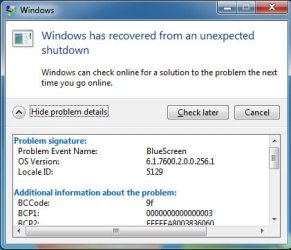
I have I think the same issue. All I have plugged in is basic USB Mouse and keyboard (they work fine) but when i plug in a universal laser (runs as a printer basically), after about an hour of idling all the rear usb ports shut down (except keyboard and mouse), and unplugging and replugging the device doesnt fix it. If I swap the plugs of the laser for where the mouse is, the same thing then happens to that usb port. All power saving features have been disabled (including selective suspend). Drivers uninstalled and reinstalled.. So far the problem doesn't seem to be occuring if I use the front USB ports, or if I plug a USB hub (not powered) into the back of the computer. In this situation it doesnt appear to be shutting down the ports after an hour or so. I Also get the same problem where once the usb ports crash, my computer will hang while shutting down. I will get an shutdown error on next restart saying I blue screened. This computer is brand new. These USB ports are meant to provide extra power or something. On the watt metre on the wall my computer never goes over 100 watts, so I assume it cant be a too weak power supply? I see similar problems to this everywhere, with no solution as of yet. Any suggestions would be great. If there is other info i need to provide let me know. | My System Specs | | OS Windows 7 CPU AMD Athlon II x4 635 2.90 ghz Motherboard Gigabyte GA-MA74GMT-S2 Memory 2GB DDR3 1333 Graphics Card Onboard PSU 300watts |
22 Aug 2010
|
#7 | | Main - Windows 7 Pro SP1 64-Bit; 2nd - Windows Server 2008 R2 Westlake, Ohio |
USB self-powered ports are limited in how much juice they can provide. DarkXeno put you on the right track with his recommendation of a powered hub. | My System Specs | | System Manufacturer/Model Number Self OS Main - Windows 7 Pro SP1 64-Bit; 2nd - Windows Server 2008 R2 CPU Main - Core i7 2600K; 2nd - Core i7 920 Motherboard Main - Asus P8Z68-V Pro/Gen3; 2nd - Gigabyte GA-EX58-UDR3 Memory Main - 16GB Corsair Vengeance; 2nd - 12GB Corsair Vengeance Graphics Card Main - XFX Radeon 6870 1GB; 2nd - XFX Radeon 4870 1GB Sound Card Both: Onboard Realtek Azalia Monitor(s) Displays Main - Hann 25" + I-INC 25" + Acer 23"; 2nd - Upgrading Soon Screen Resolution Main - 1920x1080 (All Three Monitors); 2nd - Upgrading Soon Keyboard Main - Razer Reclusa; 2nd - Old MS Keyboard Mouse Main - Logitech MX Revolution; 2nd - Old MS Mouse PSU Main - OCZ 600W Modular; 2nd - OCZ 600W Case Main - Thermaltake Element G; 2nd - NZXT something or other Cooling Main - Corsair H80; 2nd - Prolimatech Megahalems Hard Drives Main - (1) Crucial M4 128GB (Boot)
Main - (1) Seagate 2TB 64MB Cache (Data)
Main - (1) Seagate 2TB 64MB Cache (Data Backup)
2nd - (1) Intel X25-M SSD 80GB (Boot)
2nd - (3) Seagate 1TB 32MB Cache (Data Backup)
2nd - (1) Seagate 320GB (Because) Internet Speed 20Mbps Time-Warner Cable |
23 Aug 2010
|
#8 | | |
Yeah the odd thing is I dont think I need one. As I mentioned I've used a non powered hub with no issues. And during use the Laser runs fine. It is only if I go afk for an hour or so and come back to work that the rear USB ports freeze up (excluding USB KB and Mouse). Today I opened device manager after I came back and double clicked on root hub, and when i clicked on power tab it stopped responding. Seems like a driver incompatability with windows and the gb mobo?
There is no hibernate and nothing switches off except the screen. I know the obvious solution is to use the hub, but I have like 6 unused ports on this mobo (only kb and mouse). I've seen this issue numerous times I think, and always the same uninstall drivers / reboot.. update bios.. use powered hub (for a self powered device like a laser?). This is the first time I've ever experienced this with a computer. And I have 2 other gigabyte mobo/windows 7 PCs.
Any direction as to what sort of issue it appears to be is great. I don't think it's the lacking in power one in this case. | My System Specs | | OS Windows 7 CPU AMD Athlon II x4 635 2.90 ghz Motherboard Gigabyte GA-MA74GMT-S2 Memory 2GB DDR3 1333 Graphics Card Onboard PSU 300watts |
23 Aug 2010
|
#9 | | Windows 7 Ultimate AMD64 Sydney, Nova Scotia |
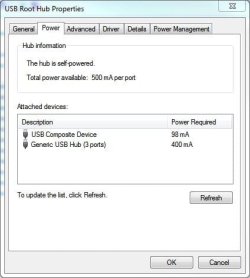
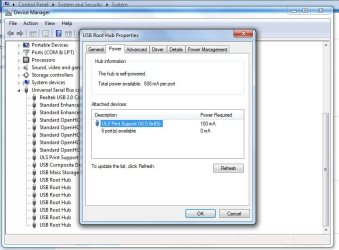
Each USB port on your PC is limited to 500ma max current draw. If you exceed that the +5V rail for that port will shut down to prevent an overload. It's been my experience the ports usually shut down in pairs of two. You have to power down the PC to reset it. If you use an unpowered hub every device plugged into it will try to draw what power it needs from the one USB port the hub is plugged into. If you plug a couple of power hungry devices into the one hub there is a good chance the USB port will shut down. As posted above you can see how much current is being drawn if you know where to look. I personally don't use an unpowered hub unless I absolutely have too. Anything with it's own power pack probably doesn't draw any power from a USB port, just DATA. Just some info to file away some where for future use. | My System Specs | | Computer type PC/Desktop System Manufacturer/Model Number Home Built OS Windows 7 Ultimate AMD64 CPU AMD Phenom II X4 980 Black Edition Deneb 3.7GHz Motherboard Asus M4N68T-M V2 µATX Motherboard Memory 8GB 4GBx2 Kingston PC10600 DDR3 1333 Memory Graphics Card BFG NVIDIA Geforce 220GT 1 Gig DDR2 PCIe Sound Card VIA VT1708s High Definition Audio 8-channel Onboard Monitor(s) Displays 2 x 19" I-INC AG191D TFT Flat Panel Screen Resolution 1280x1024 x 2 Keyboard Logitech Internet 600 Mouse Logitech Wireless Trackman Wheel PSU Retail Plus 465 Watt Case Power Up Black ATX Mid-Tower Case Cooling Stock heatsink and fan Hard Drives 500 Gig WesternDigital SATA-300 Drive Internet Speed 80 Mbps Down 30 Mbps Up Antivirus Microsoft Security Essentials Browser Internet Explorer 10 Other Info HP DVD1040e Lightscribe - External USB2 |
23 Aug 2010
|
#10 | | MS Windows 7 Ultimate SP1 64-bit Austin, Texas |

Quote: Originally Posted by broom Yeah the odd thing is I dont think I need one. A Powered USB Hub is cheap. Get one and don't be surprised when your problems vanish. | My System Specs | | System Manufacturer/Model Number Toshiba Satellite S875D-S7239 laptop OS MS Windows 7 Ultimate SP1 64-bit CPU AMD A10-4600M Motherboard AMD Pumori (Socket FT1) Memory 6.00 GB Dual-Channel DDR3 @ 798MHz (11-11-12-28) Graphics Card AMD Radeon HD 7660G Sound Card High Definition Audio Device Monitor(s) Displays Generic PnP Monitor (1600x900@60Hz) Screen Resolution 1600x900@60Hz Keyboard Standard PS/2 Keyboard Mouse HP Wireless Optical Mobile Mouse Model FHA-3410 Hard Drives SSD 119GB Corsair CSSD-V128GB2 ATA Device Internet Speed What the local pub, local coffee shop offers. Other Info Optical Drive:MATSHITA BD-CMB UJ160B ATA Device
Also have an Asus ha1002xp netbook with Win 7 Ultimate installed. USB ports stop working w/ too many devices problems? All times are GMT -5. The time now is 03:19 AM. | |