Windows 7 Forums


Windows 7: Installing Sata DVD Blu Ray Burner

12 Dec 2009   #1

Windows 7 Ultimate 64-bit
 
 
Installing Sata DVD Blu Ray Burner

This will be my first Sata DVD Drive how do I go about installing the drive (hardware).


Thanks
My System SpecsSystem Spec

12 Dec 2009   #2

Windows 7 Pro X64 SP1
Danbury, CT


Quote   Quote: Originally Posted by Copson20 View Post
This will be my first Sata DVD Drive how do I go about installing the drive (hardware).

Thanks
What do you want to know?

The main difference between the SATA drives and the PATA (IDE) ones is that the SATA drives have no master/slave/cable select jumper, as there is a single drive per SATA controller channel. The cables and connectors are different than with PATA, but the principles are the same. SATA data and power connectors are more likely (in my opinion) to come loose than the old ones, but the SATA data cable is quite slender, which is good from an airflow basis.
My System SpecsSystem Spec
12 Dec 2009   #3

Windows 7 7600 1 X64
Lake Buena Vista The Magic Kingdom


Quote   Quote: Originally Posted by Copson20 View Post
This will be my first Sata DVD Drive how do I go about installing the drive (hardware).

Thanks
SATA installation is easy depending on your skill level.
  1. Shut down your system
  2. power off and unplug, disconnect all cables
  3. put your pc on a stable work area.
  4. remove the locking screws on port/left side with the computer facing you for ref. point
  5. remove the shield.cover plate
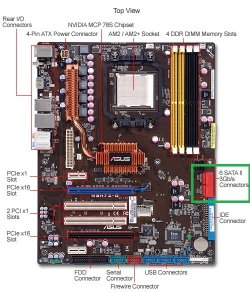
  6. your sata ports are red in color.
  7. mount your drive and lock it down
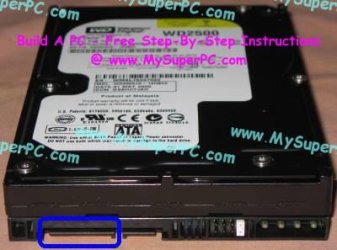
  8. connect the sata power cable connector to your mounted drive (See img)
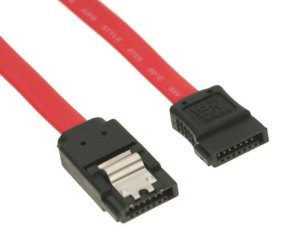
  9. Connect your drive with the red SATA cable to the SATA port on your MOBO
  10. Make sure your connections are secure. Put your side panel back on your pc
  11. connect all your cables and power plug.
  12. turn on your pc, it should begin the post, windows 7 will load and find the new device and then install it.
That should do it for you.
Attached Thumbnails
Installing Sata DVD Blu Ray Burner-a455-2422-call03-re.jpg   Installing Sata DVD Blu Ray Burner-sata-20cable-thumb-600x514-49949.jpg   Installing Sata DVD Blu Ray Burner-sata-power-cable-extension-8-inch.jpg   Installing Sata DVD Blu Ray Burner-sata_hard_drive_connectors_jumpers.jpg  
My System SpecsSystem Spec
.


13 Dec 2009   #4

Windows 7 Ultimate 64-bit


Quote   Quote: Originally Posted by Adrian View Post
Quote   Quote: Originally Posted by Copson20 View Post
This will be my first Sata DVD Drive how do I go about installing the drive (hardware).

Thanks
SATA installation is easy depending on your skill level.
  1. Shut down your system
  2. power off and unplug, disconnect all cables
  3. put your pc on a stable work area.
  4. remove the locking screws on port/left side with the computer facing you for ref. point
  5. remove the shield.cover plate
  6. your sata ports are red in color.
  7. mount your drive and lock it down
  8. connect the sata power cable connector to your mounted drive (See img)
  9. Connect your drive with the red SATA cable to the SATA port on your MOBO
  10. Make sure your connections are secure. Put your side panel back on your pc
  11. connect all your cables and power plug.
  12. turn on your pc, it should begin the post, windows 7 will load and find the new device and then install it.
That should do it for you.

thanks exactly what I was looking for
My System SpecsSystem Spec
Reply

 Installing Sata DVD Blu Ray Burner problems?


Thread Tools


Similar help and support threads for: Installing Sata DVD Blu Ray Burner
Thread Forum
Installing both sata 1 and sata 2 on my pc Hardware & Devices
win 7 on installing ,sata and ide disk partition Installation & Setup
Problem with new Sata dvd burner Hardware & Devices
Solved SATA DVD burner... Hardware & Devices
Installing more than one SATA Drive problem...Solved! Hardware & Devices


All times are GMT -5. The time now is 06:24 PM.


Seven Forums Android App Seven Forums IOS App Follow us on Facebook

Windows 7 Forums is an independent web site and has not been authorized,
sponsored, or otherwise approved by Microsoft Corporation.
"Windows 7" and related materials are trademarks of Microsoft Corp.
© Designer Media Ltd
  

1 2 3 4 5 6 7 8 9 10 11 12 13 14 15 16 17 18 19 20 21 22 23 24 25 26 27 28 29 30 31 32