Windows 7 Forums


Windows 7: Troubles with IPod/USB

12 Dec 2009   #1

Windows 7 ultimate 64 bit
 
 
Troubles with IPod/USB

Hey guys,


I've been reading about people saying they have troubles when syncing, but can't find my problem anywhere. Ill start off by saying I usethe Nvidia nForce A8N32-SLI Deluxe motherboard, and CANNOT find drivers for 7 ultimate 64 bit. But Mouse USB, Keyboard USB, ethernet and everything works fine, so obviously it's not a huge deal.

When I plug in my Ipod Nano though, I comes up saying USB Device not recognized. Also itunes will not recognize it either, so I cant sync my ipod at all . Anyway, I've been trying to figure this out for weeks, and figured it might as well be time to post up a thread. BTW, the ipod still does charge when it is plugged in.

Thanks for any help!!!!

P.S. Please if you can help all I want to do is ad some new songs

Thanks again
My System SpecsSystem Spec

12 Dec 2009   #2

Windows 7 Ultimate 64bit
Meath Ireland


Nvidia dont make motherboards do they?
I think it may be a ASUS motherboard
My System SpecsSystem Spec
12 Dec 2009   #3

Windows 7 7600 1 X64
Lake Buena Vista The Magic Kingdom


Quote   Quote: Originally Posted by Andyandhisboard View Post
Hey guys,

I've been reading about people saying they have troubles when syncing, but can't find my problem anywhere. Ill start off by saying I usethe Nvidia nForce A8N32-SLI Deluxe motherboard, and CANNOT find drivers for 7 ultimate 64 bit. But Mouse USB, Keyboard USB, ethernet and everything works fine, so obviously it's not a huge deal.

When I plug in my Ipod Nano though, I comes up saying USB Device not recognized. Also itunes will not recognize it either, so I cant sync my ipod at all . Anyway, I've been trying to figure this out for weeks, and figured it might as well be time to post up a thread. BTW, the ipod still does charge when it is plugged in.

Thanks for any help!!!!

P.S. Please if you can help all I want to do is ad some new songs

Thanks again
Welcome to the Windows 7 support forum.
As we understand your issue your mobile device will not sync due to missing USB driver.
The issue is due to an incomplete install/32 bit version of Itunes or an older chipset configuration of your MOBO.
To resolve your issue you must perform the following:
  1. Remove/Un-install all Apple Software including the following, quicktime+Bonjour+appleinstaller+Itunes+applemobile srvices
  2. re-boot your system
  3. Upload the latest Itunes for Windows 7 64 bit (V9.025)
  4. Install the Itunes installer as Administrator.
  5. Re-boot
  6. Open Itunes, set your sync preferences.
  7. Plug your Apple Mobile device into your USB port. You should hear 2 consecutive sounds indicating that the drivers have been loaded.
  8. Start your sync op.
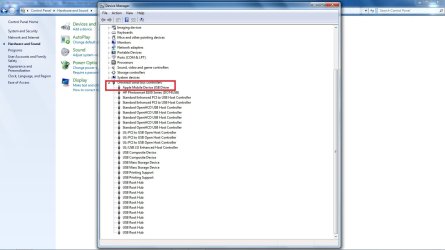
In device manager your apple mobile device should appear under USB devices like the image I posted for you.
Attached Thumbnails
Troubles with IPod/USB-apple_driver.jpg  
My System SpecsSystem Spec
.


12 Dec 2009   #4

Windows 7 ultimate 64 bit


Thanks, I will try this. I'm 100% sure I did indeed install the 64 but edition of itunes. Although when I installed it I just ran the .exe. Windows 7 is different from XP and I'm still learning. When I'm at the user logon screen, I can no longer push CTRL+ALT+DELETE and then log on as administrator to install it. Mind a quick explanation on how I would go about installing as administrator as opposed to my regular user?

Thanks much!
My System SpecsSystem Spec
Reply

 Troubles with IPod/USB problems?


Thread Tools


Similar help and support threads for: Troubles with IPod/USB
Thread Forum
Ipod / itunes troubles Hardware & Devices
Solved RAM Troubles Hardware & Devices
Log on troubles General Discussion
iPod Nano or iPod Touch? Chillout Room
iPod Owners - Do you transfer from ipod like a hdd? Chillout Room


All times are GMT -5. The time now is 08:34 PM.


Windows 7 Forums is an independent web site and has not been authorized,
sponsored, or otherwise approved by Microsoft Corporation.
"Windows 7" and related materials are trademarks of Microsoft Corp.
© Designer Media Ltd