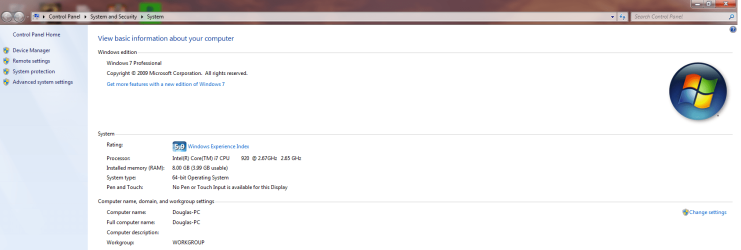
I've read a lot of forum post about the same problem. I recently purchased Windows 7 64 bit to take advantage of all 8 gigs of RAM that I currently have in my PC that I just built. When I went to check up on my PC stats, it says 8 gigs installed (3.99 usable). I don't know if this a bug or not but I've tried every solution suggested by the forum Reps. and nothing has worked for me. I ran a RAM test to make sure all my ram is working properly and it came out to all 8 gigs working properly. I don't want my PC to think there's only 4 gigs to spare, I want my PC to take advantage of all 8 gigs of RAM.
Here is my build:
Intel i7 920
EVGA GTX 285 1GB
EVGA X58 SLI
CoolerMaster V8
Corsair XMS (2gb x 2) x2
Kingwin Mach 1 1000w
Antec 1200 Gaming Case
Here is my build:
Intel i7 920
EVGA GTX 285 1GB
EVGA X58 SLI
CoolerMaster V8
Corsair XMS (2gb x 2) x2
Kingwin Mach 1 1000w
Antec 1200 Gaming Case
My Computer
At a glance
Windows 7 (64bit)Intel i7 920CORSAIR XMS3 DHX 4GB (x2)EVGA GeForce GTX 285 1GB
- OS
- Windows 7 (64bit)
- CPU
- Intel i7 920
- Motherboard
- EVGA X58
- Memory
- CORSAIR XMS3 DHX 4GB (x2)
- Graphics Card(s)
- EVGA GeForce GTX 285 1GB
- Sound Card
- Standard
- Monitor(s) Displays
- LG
- Hard Drives
- Western Digital VelociRaptor 300GB
- PSU
- KINGWIN Mach 1 1000W
- Case
- Antec 1200 Gaming Case
- Cooling
- COOLER MASTER V8