Windows 7 Forums


Windows 7: I am using windows 7 Ultimate and my processor (CPU) is

10 Jan 2010   #1

Windows 7 Ultimate SP1 64-bit
 
 
I am using windows 7 Ultimate and my processor (CPU) is

My processor is AMD Athlon II X2 250 3.0Ghz.When I am running windows 7 my processor is working at 20%-30% when I am doing nothing.My processor is he working on empty or what.


Here i my configuration for each case:

AMD Athlon II X2 250
AMD 760G
4GB DDR2-800
Radeon HD 4730 512MB GDDR5
500GB SATAII 7200rpm 16MB
DVD±R/RW 20x SATAII
Ethernet, Audio
3.5" Card reader 15-in-1
CoolerMaster MidiTower 420W
Windows 7 Ultimate


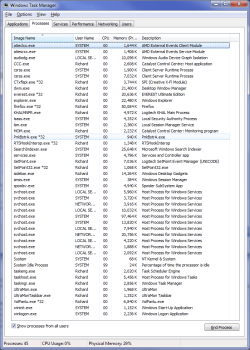
look at this in task manager look at CPU For all Processes and look on the other side
how much is my processor working 29% (it should be about 6%) sometimes is higher.


If my processor is working on empty,is it possible to break?
Is this because of my operating system?
Is there any Solution
My System SpecsSystem Spec

10 Jan 2010   #2

Windows 7 Ultimate (32 bit)
Surprise, Arizona


This is normal for Win & 64bit and 4 gig of memory BUT
after looking at many of the things you have running in the background this can be reduced by shutting down dome of the services that don't need to be on after a clean boot.

Man do you have extra baggage that you don't need running.
I'm not talking Windows 7 stuff but the other stuff.
Google Chrome, Microsoft messenger, PowerISO,Nero Home just to name a few.
You don't need that stuff running all the time inthe background.
I only have 2 gig and running 32bit Windows 7 Ultimate and here are the few things I have that are not for Windows 7 OS.

Last edited by IggyAZ; 05 May 2010 at 01:53 PM..
My System SpecsSystem Spec
10 Jan 2010   #3

Win 7 Ultimate 64-bit SP1 (desktop)
east central NY state


What does it show if you close all programs, put it to sleep, then wake it up? That RAM percentage seems high for doing nothing too.
My System SpecsSystem Spec
.


10 Jan 2010   #4

Windows 7 Ultimate SP1 64-bit


Quote   Quote: Originally Posted by IggyAZ View Post
This is normal for Win & 64bit and 4 gig of memory
Thanks for reply,is you processor working like that?
My System SpecsSystem Spec
10 Jan 2010   #5

Win 7 Ultimate 64-bit SP1 (desktop)
east central NY state


Quote   Quote: Originally Posted by IggyAZ View Post
This is normal for Win & 64bit and 4 gig of memory
Really? My CPU is hovering between 2-4% playing music and reading this forum(granted, it's clocked higher than the OP's). My RAM is around 30% right now, but if I closed everythingt out and put it to sleep, then upon re-awakening the RAM would drop down to like 15%.
My System SpecsSystem Spec
10 Jan 2010   #6

Windows 7 Ultimate SP1 64-bit


Quote   Quote: Originally Posted by noob View Post
What does it show if you close all programs, put it to sleep, then wake it up? That RAM percentage seems high for doing nothing too.
its lower 20 %
My System SpecsSystem Spec
10 Jan 2010   #7

Win 7 Ultimate x64
Etobicoke, Ontario


wizard25 another screenshot with "Show Processes from all users" checked and showing everything that is running would help.
My System SpecsSystem Spec
10 Jan 2010   #8

Windows 7 Ultimate SP1 64-bit


Quote   Quote: Originally Posted by stormy13 View Post
wizard25 another screenshot with "Show Processes from all users" checked and showing everything that is running would help.
yes i see system idle process is most using the cpu.
and the other processes CPU as about 00-06

Is my CPU so high because of that?
And how some windows 7 users CPU works so Low (for example 5%).
is there any solution for this?
My System SpecsSystem Spec
10 Jan 2010   #9

Win 7 Ultimate x64
Etobicoke, Ontario


Quote:
And how some windows 7 users CPU works so Low (for example 5%).
Or less,

I am using windows 7 Ultimate and my processor (CPU) is-taskman1.png

It will bounce up around 5-10% when playing music with Winamp, but when no music and just browsing what you see there is about it.

Grab this,

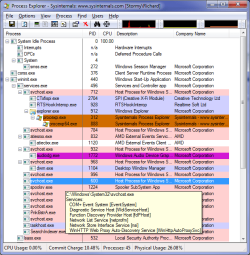
Process Explorer

and post back a screen shot of everything it shows.
My System SpecsSystem Spec
11 Jan 2010   #10

Windows 7 Ultimate SP1 64-bit


Quote   Quote: Originally Posted by stormy13 View Post
Quote:
And how some windows 7 users CPU works so Low (for example 5%).
Or less,

Attachment 46934

It will bounce up around 5-10% when playing music with Winamp, but when no music and just browsing what you see there is about it.

Grab this,

Process Explorer

and post back a screen shot of everything it shows.
But your processes are like my system idle process CPU is about 70-99 and the rest are about 00-06.
But You have 5%-10%
But my is stil 30%-50%

Heres a screenshot

My System SpecsSystem Spec
Reply

 I am using windows 7 Ultimate and my processor (CPU) is problems?


Thread Tools


Similar help and support threads for: I am using windows 7 Ultimate and my processor (CPU) is
Thread Forum
Intel GMA Graphics Processor with Windows 7 Ultimate Drivers
Upgrading from Windows ultimate 32bit to Ultimate 64bit Installation & Setup
How would I go get Hold'em from vista Ultimate and install it to windows 7 Ultimate Gaming
VISTA Ultimate to Windows 7 ultimate issues.. wit gamin Gaming
Processor for 32-bit and 64-bit windows 7? Hardware & Devices


All times are GMT -5. The time now is 09:54 PM.


Seven Forums Android App Seven Forums IOS App Follow us on Facebook

Windows 7 Forums is an independent web site and has not been authorized,
sponsored, or otherwise approved by Microsoft Corporation.
"Windows 7" and related materials are trademarks of Microsoft Corp.
© Designer Media Ltd
  

1 2 3 4 5 6 7 8 9 10 11 12 13 14 15 16 17 18 19 20 21 22 23 24 25 26 27 28 29 30 31 32