Windows 7 Forums Search
Welcome to Windows 7 Forums. Our forum is dedicated to helping you find solutions with any problems, errors or issues you are experiencing with Windows 7. The Windows 7 forum also covers news and updates and has an extensive Windows 7 tutorial section that covers a wide range of tips and tricks.


Windows 7 - HP Laserjet 1200

 
01-23-2010   #1


Windows 7 Ultimate (64)


HP Laserjet 1200

Have Win 7 (64) on new computer. Had to get a modification cable to connect my LPT HP printer to a USB port. Ok so far.
I cannot get any software to print multiple copies on this printer. I want 5, I get 1. I want 10 and I get 1. Also it will no longer print 1200 DPI.

Navigating the HP website to obtain any driver updates is a nightmare, in fact my MS Secuity will not let me go to the site HP connects me to.

I suppose HP just wants me to purchase a new printer, but this one is working fine except the issues above. I have a Canon color printer connected and it will print mulitple copies, but I prefer the Laserjet for quality documents.

Any ideas?

My System SpecsSystem Spec
01-23-2010   #2


Windows 7 Ultimate 64 - OEM Service Pack 1


My System SpecsSystem Spec
01-23-2010   #3


ME/XP/Vista/Win7


Try one of these:

Microsoft Update Catalog
My System SpecsSystem Spec
.


01-23-2010   #4


Windows 7 Ultimate (64)


Thanks guys. I tried all the downloads. Nothing helps. I suspect the fix must come from HP devloping new drivers for use with Windows 7. I will write them on Monday. I am up and running, just cannot print multiple copies with a single number being inserted. All the best.
My System SpecsSystem Spec
01-23-2010   #5


Hello Gary, welcome to the Seven Forums.

Try this:
  • Unplug the printer from computer
  • Unistall all HP LaserJet 1200 related software (Control Panel > Programs and features)
  • Click Start > Devices and Printers
  • Click Add a printer
  • Click Add a local printer
  • Choose Use an existing port, click Next
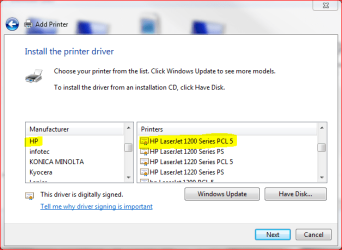
  • From Manufacturer list, choose HP
  • From Printers, choose HP LaserJet 1200 Series PCL5
    HP Laserjet 1200-lj1200.png
  • Click Next, follow the instructions given by install application
  • Do not connect your printer to computer before install asks you to do so

It should work now.

Kari
My System SpecsSystem Spec
02-08-2010   #6


windows 7


How to print multiple copies

In order to get printing of multiple copies you need to disable Mopier Mode:

Click Start
Click Devices and Printers
Right click your Laserjet printer
Click on Printer Properties
Click the tab labelled Device Settings
Scroll down to the bottom
If necessary expand Installable Options
Click on Mopier Mode which should be the last of the Installable Options
You should now be able to select Disabled in the selection box that appears.

You should now be able to print multiple copies.
This information is not specific to Windows 7 and also applies to some other HP Laserjets.

Regards, RobDavies
My System SpecsSystem Spec
02-08-2010   #7


Windows 7 Ultimate (64)


This Forum Works

Rob Davies
WOW!! A million thanks! Now my HP 1200 will print multiple copies when requested. Changed the "Mopier Mode" tao "disabled". Go figure! Whatever the heck that means. But it worked. Why can't HP and MS put out a bulletin on this??
This kind of help makes the Forum very valuable.
All the best.

Last edited by Gary N; 02-08-2010 at 10:26 AM.. Reason: Spelling
My System SpecsSystem Spec
02-08-2010   #8


windows 7


Glad the Brits can help the Yanks out for a change.
Regards, RobDavies
My System SpecsSystem Spec
02-08-2010   #9


Windows 7 Ultimate (64)


Thanks

Quote   Quote: Originally Posted by RobDavies View Post
Glad the Brits can help the Yanks out for a change.
Regards, RobDavies
You bet.... I will take any help I can get, and yours was terrific. I guess running at 220V just makes you smarter.
My System SpecsSystem Spec
02-08-2010   #10


windows 7


Mopier Mode

My understanding is that Mopier Mode requires that the Laserjet printer is fitted with a Hard Disk. Mopy means Multiple Original Copies. To minimise network traffic only one copy of the file to be printed is sent to the printer and stored on the Hard Disk. That Hard Disk copy in the printer is then used to print the required multiple copies, instead of the computer repeatedly sending copies. Clearly if the printer does not have its own Hard disk there is no point in enabling Mopier Mode. Why it is enabled by default is beyond me.

Regards, RobDavies
My System SpecsSystem Spec
Reply

 HP Laserjet 1200 problems?


Thread Tools


Similar Threads for: HP Laserjet 1200
Thread Forum
HP LaserJet 1200 Drivers
HP Laserjet 1200 No Go on Network Network & Sharing
Laserjet 1200 Series HELP Drivers
Laserjet 1200 sharing Drivers
LaserJet 1200 won't work on Windows 7 Network & Sharing


All times are GMT -5. The time now is 02:31 PM.


Windows 7 Forums is an independent web site and has not been authorized,
sponsored, or otherwise approved by Microsoft Corporation.
"Windows 7" and related materials are trademarks of Microsoft Corp.
© Designer Media Ltd
  

1 2 3 4 5 6 7 8 9 10 11 12 13 14 15 16 17 18 19 20 21 22 23 24 25 26 27 28 29 30