|  | | |
31 Jan 2010
|
#11 | | XP Pro & Vista Home Premium (x86); Windows Ultimate 7600 x64 Retail |
Some MOBO/Processor combinations will allow 4GB of RAM and installation of a 64-bit OS.
But you are never going to see the 4GB except in the POST or BIOS display.
Case in point - Dell E510.
I don't know if that is what is happening here - but it is something to consider. | My System Specs |
| OS XP Pro & Vista Home Premium (x86); Windows Ultimate 7600 x64 Retail |
31 Jan 2010
|
#12 | | Win 7 pro 64-bit, Ubuntu 9.10 64-bit |

Quote: Originally Posted by stormy13 Does the bios report 3 or 4 GB?
Have a look in the bios for anything to do with memory hole or memory remapping, and if available make sure it is set to enabled (being an Acer, it may not be there). Yeah, but it's 2x 2, so if it werent in BIOS, it would only show 2gigs right? Amd sorry about not telling you all this before. | My System Specs | | System Manufacturer/Model Number Acer Veriton m261 (modded) OS Win 7 pro 64-bit, Ubuntu 9.10 64-bit CPU Intel Core 2 Duo 2.60 Ghz Motherboard Whatever came with the system Memory 4 gb ddr2 667 Mhz Graphics Card NVidia Geforce 9400 GS 1 gb ddr2 550 mhz GPU Sound Card Intergrated Monitor(s) Displays samsung SyncMaster 2494 24" Screen Resolution 1080p Keyboard Apple Aluminium (Awesome) Mouse Some awesome Dell mouse, really good. PSU whatever came with the system Case whatever came with the system Cooling whatever came with the system Hard Drives 80gb - IDE
750gb - SATA II Internet Speed 100mbps |
31 Jan 2010
|
#13 | | Windows 7 Ultimate x64 Service Pack 1 Doncaster, UK |
Have you checked this option in msconfig?
Select Boot tab, click on Advanced options... 
Ensure that Maximum memory: is unchecked as shown below. 
Click OK twice to save any changes and then restart to put the changes into effect. | My System Specs | | System Manufacturer/Model Number Dwarf Dwf/11/2012 OS Windows 7 Ultimate x64 Service Pack 1 CPU Intel Core-i5-3570K 4-core @ 3.4GHz (Ivy Bridge) (OC 4.2GHz) Motherboard ASRock Z77 Extreme4-M Memory 4 x 4GB DDR3-1600 Corsair Vengeance CMZ8GX3M2A1600C9B (16GB) Graphics Card 2 x AMD Radeon HD7770 1GB CrossFired (OC 1100MHz/1250MHz) Sound Card Realtek High Definition on board solution (ALC 898) Monitor(s) Displays ViewSonic VA1912w Widescreen (VGA) Screen Resolution 1440x900 Keyboard Microsoft Comfort Curve Keyboard 3000 (USB) Mouse Microsoft Comfort Mouse 3000 for Business (USB) PSU XFX Pro Series 850W Semi-Modular Case Gigabyte IF233 Cooling 1 x 120mm Front Inlet 1 x 120mm Rear Exhaust Hard Drives OCZ Agility 3 SSD 120GB SATA III x2 (RAID 0)
Samsung HD501LJ 500GB SATA II x2
Hitachi HDS721010CLA332 1TB SATA II
Iomega 1.5TB Ext USB 2.0
WD 2.0TB Ext USB 3.0 Internet Speed NetGear DG834Gv3 ADSL Modem/Router (Ethernet) ~4.0 Mb/s (O2) Antivirus Avast! 7.0.1474 Browser IE 9 Other Info Optical Drive: HL-DT-ST BD-RE BH10LS30 SATA Bluray
Lexmark S305 Printer/Scanner/Copier (USB)
CTF-430 Tablet & Pen
WEI Score: 7.7/7.9/7.4/7.4/7.9
Asus Eee PC 1011PX Netbook (Windows 7 x86 Starter) |
31 Jan 2010
|
#14 | | Win 7 pro 64-bit, Ubuntu 9.10 64-bit |

Quote: Originally Posted by Dwarf Have you checked this option in msconfig?
Select Boot tab, click on Advanced options... Attachment 51229
Ensure that Maximum memory: is unchecked as shown below. Attachment 51230
Click OK twice to save any changes and then restart to put the changes into effect. Both are done correctly. Thanks for your help ppl. Hope someone can get me the solution tho. | My System Specs | | System Manufacturer/Model Number Acer Veriton m261 (modded) OS Win 7 pro 64-bit, Ubuntu 9.10 64-bit CPU Intel Core 2 Duo 2.60 Ghz Motherboard Whatever came with the system Memory 4 gb ddr2 667 Mhz Graphics Card NVidia Geforce 9400 GS 1 gb ddr2 550 mhz GPU Sound Card Intergrated Monitor(s) Displays samsung SyncMaster 2494 24" Screen Resolution 1080p Keyboard Apple Aluminium (Awesome) Mouse Some awesome Dell mouse, really good. PSU whatever came with the system Case whatever came with the system Cooling whatever came with the system Hard Drives 80gb - IDE
750gb - SATA II Internet Speed 100mbps |
31 Jan 2010
|
#15 | | Vista, Windows7, Mint Mate, Zorin, Windows 8 Florida in winter, Black Forest/Germany |

Quote: Originally Posted by stormy13 
Quote: Originally Posted by whs Quote: My graphics card has 1gb DEDCATED memory See, that's a bit of information you did not give us before. Would have saved me a lot of typing. And doesn't make any difference on a 64 bit OS. If that was the case mine would be showing 4 GB installed and 3.5 GB available. Not so. If it was an integrated graphics chip, it could take real RAM away, not only address space. | My System Specs | | System Manufacturer/Model Number HP, Dell, Gateway, Toshiba - 4 laptops and 2 desktops OS Vista, Windows7, Mint Mate, Zorin, Windows 8 CPU from 1.6GHz Duo to i7 Monitor(s) Displays 2x HP w2207 Keyboard with trackball - no mices Mouse Trackball mice Hard Drives 5x HDD, 7x SSD, 12x Externals Internet Speed DSL 6000 |
05 Feb 2010
|
#16 | | Windows 7 Home Premium SP1, clean install, upgrade disc CT |
I think that the summary of all that was said appears in this article Windows Vista: 3GB or 4GB RAM? | My System Specs | | System Manufacturer/Model Number Dell XPS 420 OS Windows 7 Home Premium SP1, clean install, upgrade disc CPU Intel Core2 processsor Q8200(2.33Ghz 1333FSB) Quad Core Tech Motherboard Dell Memory 6 gb Graphics Card ATI Radeon 256MB HD3650 Sound Card Intergrated 7.1 Channel Audio Monitor(s) Displays Dell SP2009W 20" Keyboard Dell USB Keyboard Mouse Dell Premium Optical USB Cooling Fan Hard Drives 640 GB Serial ATA Hard drive Internet Speed DSL 2.85 |
05 Feb 2010
|
#17 | | Win 7 pro 64-bit, Ubuntu 9.10 64-bit |
Uhh, but i have a 64-bit OS, and the artice was about 32-bit OS's. Thanks for your help. | My System Specs | | System Manufacturer/Model Number Acer Veriton m261 (modded) OS Win 7 pro 64-bit, Ubuntu 9.10 64-bit CPU Intel Core 2 Duo 2.60 Ghz Motherboard Whatever came with the system Memory 4 gb ddr2 667 Mhz Graphics Card NVidia Geforce 9400 GS 1 gb ddr2 550 mhz GPU Sound Card Intergrated Monitor(s) Displays samsung SyncMaster 2494 24" Screen Resolution 1080p Keyboard Apple Aluminium (Awesome) Mouse Some awesome Dell mouse, really good. PSU whatever came with the system Case whatever came with the system Cooling whatever came with the system Hard Drives 80gb - IDE
750gb - SATA II Internet Speed 100mbps |
05 Feb 2010
|
#18 | | Windows 7 Home Premium SP1, clean install, upgrade disc CT |

Quote: Originally Posted by Coolness Uhh, but i have a 64-bit OS, and the artice was about 32-bit OS's. Thanks for your help. The reasons would be the same. The point of the article is to show that some of the RAM would not show as available. I did not think that the actual allocation was as important as the fact that you do not have a problem
Last edited by richc46; 05 Feb 2010 at 09:43 AM..
| My System Specs | | System Manufacturer/Model Number Dell XPS 420 OS Windows 7 Home Premium SP1, clean install, upgrade disc CPU Intel Core2 processsor Q8200(2.33Ghz 1333FSB) Quad Core Tech Motherboard Dell Memory 6 gb Graphics Card ATI Radeon 256MB HD3650 Sound Card Intergrated 7.1 Channel Audio Monitor(s) Displays Dell SP2009W 20" Keyboard Dell USB Keyboard Mouse Dell Premium Optical USB Cooling Fan Hard Drives 640 GB Serial ATA Hard drive Internet Speed DSL 2.85 |
05 Feb 2010
|
#19 | | Win 7 pro 64-bit, Ubuntu 9.10 64-bit |

Quote: Originally Posted by richc46 
Quote: Originally Posted by Coolness Uhh, but i have a 64-bit OS, and the artice was about 32-bit OS's. Thanks for your help. The reasons would be the same. Really? So even if i have a 64-bit OS, it doesnt matter, it's the same as 32-bit OS's? Interesting... | My System Specs | | System Manufacturer/Model Number Acer Veriton m261 (modded) OS Win 7 pro 64-bit, Ubuntu 9.10 64-bit CPU Intel Core 2 Duo 2.60 Ghz Motherboard Whatever came with the system Memory 4 gb ddr2 667 Mhz Graphics Card NVidia Geforce 9400 GS 1 gb ddr2 550 mhz GPU Sound Card Intergrated Monitor(s) Displays samsung SyncMaster 2494 24" Screen Resolution 1080p Keyboard Apple Aluminium (Awesome) Mouse Some awesome Dell mouse, really good. PSU whatever came with the system Case whatever came with the system Cooling whatever came with the system Hard Drives 80gb - IDE
750gb - SATA II Internet Speed 100mbps |
05 Feb 2010
|
#20 | | Windows 7 Ultimate x64 Service Pack 1 Doncaster, UK |
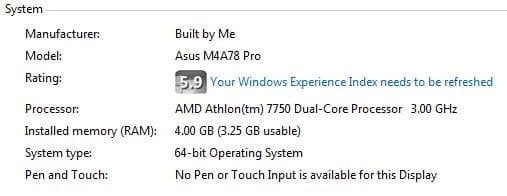
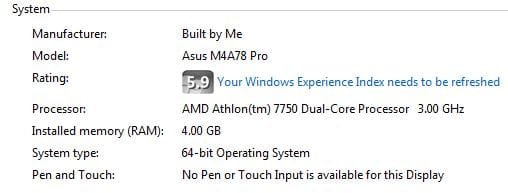
Compare this image from my system to that from the first post in this thread. As you can see, they are both 64-bit systems with 4GB of RAM. Mine, however, is showing the full amount as being usable (it only says xGB usable if less than the installed amount). 
Since you have already checked the settings I mentioned in my earlier post about Maximum memory: (you might like to double check),I can only think that it might be a BIOS setting. | My System Specs | | System Manufacturer/Model Number Dwarf Dwf/11/2012 OS Windows 7 Ultimate x64 Service Pack 1 CPU Intel Core-i5-3570K 4-core @ 3.4GHz (Ivy Bridge) (OC 4.2GHz) Motherboard ASRock Z77 Extreme4-M Memory 4 x 4GB DDR3-1600 Corsair Vengeance CMZ8GX3M2A1600C9B (16GB) Graphics Card 2 x AMD Radeon HD7770 1GB CrossFired (OC 1100MHz/1250MHz) Sound Card Realtek High Definition on board solution (ALC 898) Monitor(s) Displays ViewSonic VA1912w Widescreen (VGA) Screen Resolution 1440x900 Keyboard Microsoft Comfort Curve Keyboard 3000 (USB) Mouse Microsoft Comfort Mouse 3000 for Business (USB) PSU XFX Pro Series 850W Semi-Modular Case Gigabyte IF233 Cooling 1 x 120mm Front Inlet 1 x 120mm Rear Exhaust Hard Drives OCZ Agility 3 SSD 120GB SATA III x2 (RAID 0)
Samsung HD501LJ 500GB SATA II x2
Hitachi HDS721010CLA332 1TB SATA II
Iomega 1.5TB Ext USB 2.0
WD 2.0TB Ext USB 3.0 Internet Speed NetGear DG834Gv3 ADSL Modem/Router (Ethernet) ~4.0 Mb/s (O2) Antivirus Avast! 7.0.1474 Browser IE 9 Other Info Optical Drive: HL-DT-ST BD-RE BH10LS30 SATA Bluray
Lexmark S305 Printer/Scanner/Copier (USB)
CTF-430 Tablet & Pen
WEI Score: 7.7/7.9/7.4/7.4/7.9
Asus Eee PC 1011PX Netbook (Windows 7 x86 Starter) All times are GMT -5. The time now is 10:19 PM. | |