Windows 7 Forums


Windows 7: RAM issue

30 Jan 2010   #1

Win 7 pro 64-bit, Ubuntu 9.10 64-bit
 
 
RAM issue

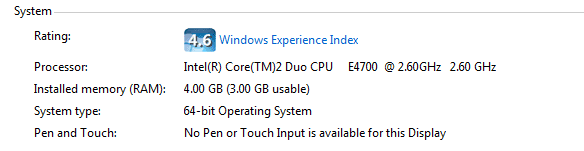
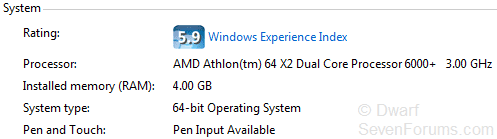
hey, I have 4gb of RAM, 3gb usable, in a 64-bit OS. Probably just another n00b question, but hey, thats what the forum is for. So, why am i missing a Gig?

Attached Thumbnails
RAM issue-4gb-ram-3gb-usable.png  
My System SpecsSystem Spec

30 Jan 2010   #2

Win 7 Ultimate 64-bit SP1 (desktop)
east central NY state


Quote   Quote: Originally Posted by Coolness View Post
hey, I have 4gb of RAM, 3gb usable, in a 64-bit OS. Probably just another n00b question, but hey, thats what the forum is for. So, why am i missing a Gig?
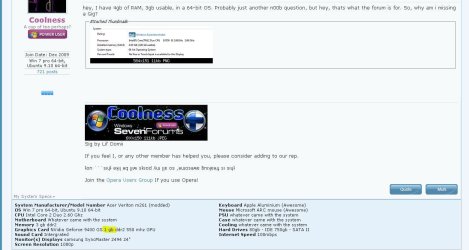
My guess is the highlighted portion of the snip......the other GB is being used by your graphics card.
Attached Thumbnails
RAM issue-capture.jpg  
My System SpecsSystem Spec
30 Jan 2010   #3

Windows 7 Home Premium - 32-bit Version
Gallman, MS


I also have 4Gb installed, but Windows is only recognizing 3.44GB. Why is this?
My System SpecsSystem Spec
.


30 Jan 2010   #4

Windows 7 Pro X64 SP1
Danbury, CT


Quote   Quote: Originally Posted by Datalyss View Post
I also have 4Gb installed, but Windows is only recognizing 3.44GB. Why is this?
The standard response: desktop versions of 32 bit Windows (including 7) can address 4GB at most. However, some of these addresses are reserved for other purposes, so that a 32 bit system with 4GB of RAM will always show less than that available. The exact amount will depend on what hardware devices are present.

There are 32 bit server OSes that support PAE (physical address extension) that support more. They don't support 64 bit applications, though, so the limits on individual applications remain.
My System SpecsSystem Spec
30 Jan 2010   #5

Windows 7 Ultimate x64


Quote   Quote: Originally Posted by Datalyss View Post
I also have 4Gb installed, but Windows is only recognizing 3.44GB. Why is this?
Most likely because
1). you are running a 32-bit version of the operating system
2). you have an integrated video card which is sharing system RAM.
My System SpecsSystem Spec
30 Jan 2010   #6
whs

Vista, Windows7, Mint Mate, Zorin, Windows 8
Florida in winter, Black Forest/Germany


For a 32bit system it is a problem of address space. As was said, graphics (even if they have their own memory) and some other functions need address space which can range from 0.5 to 1.2GBs. Thus the adddress space available for the RAM that the OS uses is between 2.8 and 3.5GB.

For 64bit systems there is no address space problem because the 64bit Windows 7 address space goes up to 128GBs. It is, however, possible that an integrated graphics uses "shared memory" which takes real RAM away from the OS. For the size of that you have to check the specs of the on-board graphics chip.
My System SpecsSystem Spec
31 Jan 2010   #7

Win 7 pro 64-bit, Ubuntu 9.10 64-bit


Quote   Quote: Originally Posted by whs View Post
For a 32bit system it is a problem of address space. As was said, graphics (even if they have their own memory) and some other functions need address space which can range from 0.5 to 1.2GBs. Thus the adddress space available for the RAM that the OS uses is between 2.8 and 3.5GB.

For 64bit systems there is no address space problem because the 64bit Windows 7 address space goes up to 128GBs. It is, however, possible that an integrated graphics uses "shared memory" which takes real RAM away from the OS. For the size of that you have to check the specs of the on-board graphics chip.
My graphics card has 1gb DEDCATED memory, and has nothing to do with system RAM. The OS is 64-bit, and when i had 3gigs (just upgraded) It showed 3 gigs, not 2 gigs. So, whats wrong?
My System SpecsSystem Spec
31 Jan 2010   #8

Win 7 Ultimate x64
Etobicoke, Ontario


Does the bios report 3 or 4 GB?

Have a look in the bios for anything to do with memory hole or memory remapping, and if available make sure it is set to enabled (being an Acer, it may not be there).
My System SpecsSystem Spec
31 Jan 2010   #9
whs

Vista, Windows7, Mint Mate, Zorin, Windows 8
Florida in winter, Black Forest/Germany


Quote:
My graphics card has 1gb DEDCATED memory
See, that's a bit of information you did not give us before. Would have saved me a lot of typing.
My System SpecsSystem Spec
31 Jan 2010   #10

Win 7 Ultimate x64
Etobicoke, Ontario


Quote   Quote: Originally Posted by whs View Post
Quote:
My graphics card has 1gb DEDCATED memory
See, that's a bit of information you did not give us before. Would have saved me a lot of typing.
And doesn't make any difference on a 64 bit OS. If that was the case mine would be showing 4 GB installed and 3.5 GB available.
My System SpecsSystem Spec
Reply

 RAM issue problems?


Thread Tools


Similar help and support threads for: RAM issue
Thread Forum
net start command line issue - 64bit issue? General Discussion
HP Multi Print/Scan Issue Re Install Issue? Hardware & Devices
jpeg permission issue / possible encryption issue General Discussion
Interesting connectivity issue, just a browser issue Network & Sharing
8800GT Driver issue? Or maybe its a bios issue. Drivers


All times are GMT -5. The time now is 01:14 AM.


Seven Forums Android App Seven Forums IOS App Follow us on Facebook

Windows 7 Forums is an independent web site and has not been authorized,
sponsored, or otherwise approved by Microsoft Corporation.
"Windows 7" and related materials are trademarks of Microsoft Corp.
© Designer Media Ltd
  

1 2 3 4 5 6 7 8 9 10 11 12 13 14 15 16 17 18 19 20 21 22 23 24 25 26 27 28 29 30 31 32