- Local time
- 2:37 PM
- Messages
- 292
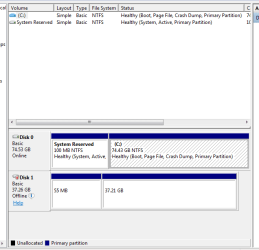
I have a Dell D430. I want to back up some files to a hard drive I have in an enclosure that hooks up by USB, My laptop does not see it in my computer. Ii have tried restarting and that does not help. What can I do to get it to recognize it?
Thanks, Bill
Thanks, Bill
My Computer
At a glance
Windows 7 ProfessionalCore I58GB
- Computer type
- Laptop
- Computer Manufacturer/Model Number
- Dell Vostro 3750
- OS
- Windows 7 Professional
- CPU
- Core I5
- Memory
- 8GB
- Hard Drives
- Seagate 600 240GB SSD
- Antivirus
- MSE
- Browser
- Chrome, IE, Firfox