Windows 7 Forums Search
Welcome to Windows 7 Forums. Our forum is dedicated to helping you find solutions with any problems, errors or issues you are experiencing with Windows 7. The Windows 7 forum also covers news and updates and has an extensive Windows 7 tutorial section that covers a wide range of tips and tricks.


Windows 7 - Laptop will not recognize USB Hard Drive


02-08-2010   #1


Windows 7 Professional


Laptop will not recognize USB Hard Drive

I have a Dell D430. I want to back up some files to a hard drive I have in an enclosure that hooks up by USB, My laptop does not see it in my computer. Ii have tried restarting and that does not help. What can I do to get it to recognize it?
Thanks, Bill

My System SpecsSystem Spec
02-08-2010   #2


Vista and Windows7, sometimes Ubuntu and Fedora


Have a look in Disk Management and check whether it has a drive letter and is initialized and formatted.
My System SpecsSystem Spec
02-08-2010   #3


Windows 7 Professional


How do I do that?
My System SpecsSystem Spec
.


02-08-2010   #4


Vista and Windows7, sometimes Ubuntu and Fedora


Start > right click on Computer in the right pane > Manage > Disk Management. Tell me what it says about your drive.
My System SpecsSystem Spec
02-08-2010   #5


Windows 7 Professional


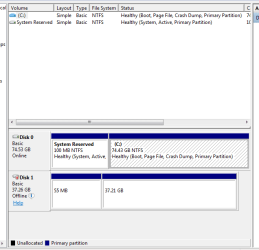
What does all this mean?
Attached Thumbnails
Laptop will not recognize USB Hard Drive-capture.png  
My System SpecsSystem Spec
02-08-2010   #6


W7, Xp Pro


Whats on that hard drive and where did it come from ?
My System SpecsSystem Spec
02-08-2010   #7


Vista and Windows7, sometimes Ubuntu and Fedora


Well, for one they have no drive letter - so you cannot see them. Assign a drive letter to the 37GB partition. Then, what is this mini partition of 55MB, where did that come from?
My System SpecsSystem Spec
02-08-2010   #8


Windows 7 Professional


It is a hard drive I had cloned an image of another hard drive on using Acronis. Sold that computer. I went into disk managment as you see, then formatted the larger portion after the sytem assined it as D: They was some kind of conflict I had to address. I don't know what the small partition is, but it would not let me format it if I remember correctly, and I did a Windows Easy tranfer of Files and settings to the D partition. I am reinstalling Windows 7 Pro clean on this computer, and that's what I was using this USB hard drive for. Got it done correctly I think. Never have ran into this "not recgognizing problem. I guess it's a Windows 7 thing huh?
My System SpecsSystem Spec
02-08-2010   #9


Vista and Windows7, sometimes Ubuntu and Fedora


Quote   Quote: Originally Posted by billberry12 View Post
It is a hard drive I had cloned an image of another hard drive on using Acronis. Sold that computer. I went into disk managment as you see, then formatted the larger portion after the sytem assined it as D: They was some kind of conflict I had to address. I don't know what the small partition is, but it would not let me format it if I remember correctly, and I did a Windows Easy tranfer of Files and settings to the D partition. I am reinstalling Windows 7 Pro clean on this computer, and that's what I was using this USB hard drive for. Got it done correctly I think. Never have ran into this "not recgognizing problem. I guess it's a Windows 7 thing huh?

I don't think we can blame it on Windows7. Something is all screwed up. I do not quite undestand the cloning part. Are you saying that you cloned a Windows 7 image to that drive? The small partition could be an image of the a system assigned partition from where you cloned the whole thing. Then you say that you transfered files. You need to unravel that whole story because I do not see the sequence of events.
My System SpecsSystem Spec
02-08-2010   #10


Windows 7 Professional


I'll try to explain. I had used the USB hard drive as a cloned back up for another computer that I sold. I no longer need the clone. I decided to use this hard drive as an external drive to transfer my files and settings from this computer to it so I can do a clean install on this one, then put the files and settings back on here. I formatted the USB drive, then transferred my files and settings from this computer to it using Windows easy tranfer. I tranferred to the newly formatted D: partional on the USB. I do not know what the small partition is. Does this make better sense?

My original problem was that this computer would not recognize the USB hard drive initially. When I was told to go to disk management, I figured out how to assign it a letter and format it, therefore, problem is solved, unless you see something I missed.


Comments please?
My System SpecsSystem Spec
Reply

 Laptop will not recognize USB Hard Drive


Thread Tools


Similar Threads for: Laptop will not recognize USB Hard Drive
Thread Forum
BSOD and then cant recognize hard drive Drivers
Won't Recognize Hard Drive Installation & Setup
Windows 7 doesn't recognize my hard drive Crashes and Debugging
Win7 doesn't recognize hard drive Hardware & Devices
Getting Windows to recognize new internal hard drive Hardware & Devices


All times are GMT -5. The time now is 07:55 AM.


Windows 7 Forums is an independent web site and has not been authorized,
sponsored, or otherwise approved by Microsoft Corporation.
"Windows 7" and related materials are trademarks of Microsoft Corp.
© Designer Media Ltd
  

1 2 3 4 5 6 7 8 9 10 11 12 13 14 15 16 17 18 19 20 21 22 23 24 25 26 27 28 29 30