

Since I moved to windows 7 via upgrade, I have noticed that my hard drives are filling up. I have two hard drives 1. is the main drive HP (C and portioned to drive (D with factory image and drive 2. which is; NEW_VOLUME (E. Before the upgrade, E: drive had about 250 gig free space of 298 gigs. Now it showing only 113 gigs of free space and yesterday it read 120 gigs of free space. There are some strange file folders in there now that wasn't in there before. Why is my drive filling up so fast and where did these files come from? Screen shots.
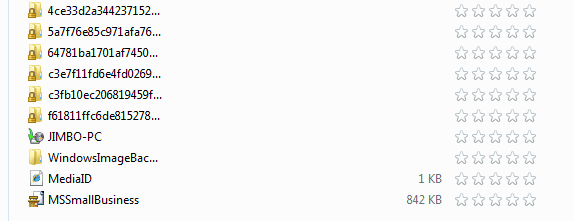
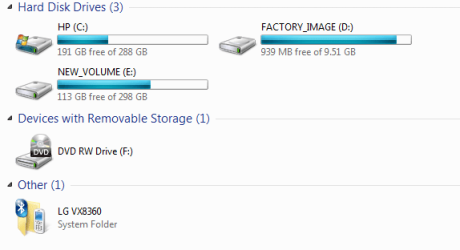
and portioned to drive (D with factory image and drive 2. which is; NEW_VOLUME (E. Before the upgrade, E: drive had about 250 gig free space of 298 gigs. Now it showing only 113 gigs of free space and yesterday it read 120 gigs of free space. There are some strange file folders in there now that wasn't in there before. Why is my drive filling up so fast and where did these files come from? Screen shots. My Computer
At a glance
Windows 7 Ultimate 64 bitAMD Phenom II X4 965 Black EditionGSkill 4 X 2 GB PC 8500XFX Radeon HD 6790 D
- Computer Manufacturer/Model Number
- Custom built
- OS
- Windows 7 Ultimate 64 bit
- CPU
- AMD Phenom II X4 965 Black Edition
- Motherboard
- Gigabyte GA-MA790X-DS4
- Memory
- GSkill 4 X 2 GB PC 8500
- Graphics Card(s)
- XFX Radeon HD 6790 D
- Sound Card
- On board RealTek HD
- Monitor(s) Displays
- Dual monitors:Samsung SyncMaster S20B300
- Screen Resolution
- 1600 X 900
- Hard Drives
- Seagate Barracuda 1TB (primary)
Seagate Barracuda 2 X 320 GB
- PSU
- Ultra X4 750 watt fully modular
- Case
- Thermaltake Overseer RX 1 full tower
- Cooling
- Core-Contact 92 mm CPU Cooler
- Keyboard
- Logitech G510
- Mouse
- Razor DeathAdder
- Internet Speed
- 50/5 Mbps UL/DL
- Other Info
- Optical: Super Muliti DVD burner w/lightscribe, Hauppauge WinTV HVR-1800


