windows 7 does not turn off usb mass storage

arash2009

New member
Local time
1:40 AM
Messages
15
I have windows 7 ultimate 64 bit, when I click on "safely Remove Hardware and eject media" it does not turn off the usb flash disk the light is still on , but in xp it does turn off the light ,,
 

My Computer My Computer

At a glance

windows 7 Ultimatecore 2 duo4 gig
Computer Manufacturer/Model Number
hp, g61
OS
windows 7 Ultimate
CPU
core 2 duo
Memory
4 gig
Hello arash,

That is perfectly normal. The USB port is still supplying power to the drive, just not sending any signal.
 

My Computer My Computer

At a glance

Windows 7 Professional x64Intel i7 2600K OC'd @ 4620 MHz16GB GSkill Sniper 2133 Mhz (4x4GB)EVGA GeForce GTX 480 SuperClocked+
Computer Manufacturer/Model Number
Custom
OS
Windows 7 Professional x64
CPU
Intel i7 2600K OC'd @ 4620 MHz
Motherboard
Asus P8Z68-V Pro
Memory
16GB GSkill Sniper 2133 Mhz (4x4GB)
Graphics Card(s)
EVGA GeForce GTX 480 SuperClocked+
Sound Card
Realtek High Definition Audio
Monitor(s) Displays
2x Acer S273HLbmii 27"
Screen Resolution
2 x 1920x1080
Hard Drives
64GB Crucial M4 SSD

Storage: Hitachi 1TB 5400RPM, Samsung 1.5TB 5400RPM
PSU
Corsair HW Series 750w (modular)
Case
Cooler Master HAF 932 Advanced Blue Edition
Cooling
CM Hyper 212+ CPU cooler, 3x 230mm + 1x 140mm case fans
Keyboard
Logitech MK320 (wireless)
Mouse
Logitech MK320 (wireless)
Internet Speed
30 Mb/s : 2 Mb/s
http://www.sevenforums.com/tutorials/10169-safely-remove-hardware-eject-device.html

That is the tutorial for safely removing a device in Windows 7. Windows 7 plug and play is greatly improved over XP so there is no real need for it for flash drives and many other USB devices. Having said that there may be a few devices that are sensitive to how they are powered on and off, but for flash drives, they are pretty durable for quick plug and play. Actually they are quite durable in general as I have left two of my flash drives (one drive in two occasions) in my pants and had them go through a complete wash and dry clothing cycle and still perform perfectly afterwords.

The other half of the safely remove hardware is to power off the computer before plugging the device in. If your not powering your computer off before you plug the device in and it still works, then you should be able to unplug it without the safely remove hardware. One thing I would recommend is to give the flash drive a few seconds after data has been transferred just to make sure the transfer is complete (especially with flash drives and XP)
 

My Computer My Computer

At a glance

Windows 7 Ultimate X64Q6600 @3.62X2 MushkinXFX 4870X2
OS
Windows 7 Ultimate X64
CPU
Q6600 @3.6
Motherboard
DFI X38-T2R
Memory
2X2 Mushkin
Graphics Card(s)
XFX 4870X2
Monitor(s) Displays
Philips 240PW
Hard Drives
Intel X25-M 80GB
PSU
PCP&C 750W
Case
Antec 900
Cooling
TRUE 120
I guess old habits die hard....I was told I shouldn't have to worry about doing the "Safely remove" thing with this OS, but it's still ingrained in me to do it, whether it is unplugging my mp3 players, my flash drive, my camera, or my external drive.:geek:
 

My Computer My Computer

At a glance

Win 7 Ultimate 64-bit SP1 (desktop)Intel Core 2 Duo E84002x 2GB OCZ DDR II SDRAM PC2-6400NVIDIA GeForce 9400GT
Computer type
PC/Desktop
Computer Manufacturer/Model Number
Gigabyte Technology Co., Ltd.
OS
Win 7 Ultimate 64-bit SP1 (desktop)
CPU
Intel Core 2 Duo E8400
Motherboard
Gigabyte GA-EP35-DS3R
Memory
2x 2GB OCZ DDR II SDRAM PC2-6400
Graphics Card(s)
NVIDIA GeForce 9400GT
Monitor(s) Displays
HP 2009m(primary), Acer P191W
Screen Resolution
1600x900, 1440x900
Hard Drives
Internal:WD Caviar Black 640GB 32MB cache 7200RPM
External:Samsung Story Station 1TB HDD desktop drive
500GB Toshiba portable drive
PSU
Antec Earthwatts EA500D
Case
Antec Sonata III
Cooling
4 fans
Keyboard
Logitech Wave
Mouse
Logitech M-SBF90
Internet Speed
Slow due to home Wireless-G router
Antivirus
MSE, Hitman Pro, Malwarebytes
Browser
Chrome and Palemoon
Other Info
Laptop....Acer 5750Z-4835
15.6" HD Widescreen CineCrystal™ LED-backlit LCD Display: (1366x768 resolution, 16:9 aspect ratio)
Intel® Pentium® Processor B940 (2.0GHz, 2MB L3 cache)
Windows® 7 Home Premium,500GB Hard Drive,4GB DDR3 RAM, Intel® HD Graphics,8X DVD-Super Multi Double-Layer Drive
Multi-in-1 Digital Media Card Reader,802.11b/g/n Wi-Fi
Chrome and Palemoon, MSE, Hitman Pro
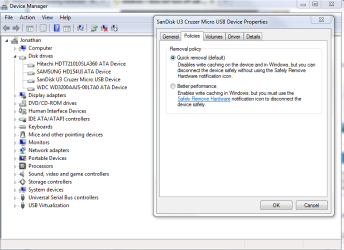
I believe the safely remove hardware feature is related to write-caching. Basically, Windows might not have actually finished writing the data to the drive when it says it has. It may be just watching for a time when it can write the data without affecting performance.

When you eject the drive, it needs to make sure that all data "saved" to it is actually written.

You can turn off write caching if you want, and with it, the need to safely remove.

Capture.PNG
 

My Computer My Computer

At a glance

Windows 7 Professional x64Intel i7 2600K OC'd @ 4620 MHz16GB GSkill Sniper 2133 Mhz (4x4GB)EVGA GeForce GTX 480 SuperClocked+
Computer Manufacturer/Model Number
Custom
OS
Windows 7 Professional x64
CPU
Intel i7 2600K OC'd @ 4620 MHz
Motherboard
Asus P8Z68-V Pro
Memory
16GB GSkill Sniper 2133 Mhz (4x4GB)
Graphics Card(s)
EVGA GeForce GTX 480 SuperClocked+
Sound Card
Realtek High Definition Audio
Monitor(s) Displays
2x Acer S273HLbmii 27"
Screen Resolution
2 x 1920x1080
Hard Drives
64GB Crucial M4 SSD

Storage: Hitachi 1TB 5400RPM, Samsung 1.5TB 5400RPM
PSU
Corsair HW Series 750w (modular)
Case
Cooler Master HAF 932 Advanced Blue Edition
Cooling
CM Hyper 212+ CPU cooler, 3x 230mm + 1x 140mm case fans
Keyboard
Logitech MK320 (wireless)
Mouse
Logitech MK320 (wireless)
Internet Speed
30 Mb/s : 2 Mb/s
I believe the safely remove hardware feature is related to write-caching. Basically, Windows might not have actually finished writing the data to the drive when it says it has. It may be just watching for a time when it can write the data without affecting performance.

When you eject the drive, it needs to make sure that all data "saved" to it is actually written.

You can turn off write caching if you want, and with it, the need to safely remove.

View attachment 56498
When it says, "enable write caching for better performance", what exactly does it mean by better performance? Sorry if that's a dumb question, but I am half-awake and want to be sure I understand before I change any setting.:o
 

My Computer My Computer

At a glance

Win 7 Ultimate 64-bit SP1 (desktop)Intel Core 2 Duo E84002x 2GB OCZ DDR II SDRAM PC2-6400NVIDIA GeForce 9400GT
Computer type
PC/Desktop
Computer Manufacturer/Model Number
Gigabyte Technology Co., Ltd.
OS
Win 7 Ultimate 64-bit SP1 (desktop)
CPU
Intel Core 2 Duo E8400
Motherboard
Gigabyte GA-EP35-DS3R
Memory
2x 2GB OCZ DDR II SDRAM PC2-6400
Graphics Card(s)
NVIDIA GeForce 9400GT
Monitor(s) Displays
HP 2009m(primary), Acer P191W
Screen Resolution
1600x900, 1440x900
Hard Drives
Internal:WD Caviar Black 640GB 32MB cache 7200RPM
External:Samsung Story Station 1TB HDD desktop drive
500GB Toshiba portable drive
PSU
Antec Earthwatts EA500D
Case
Antec Sonata III
Cooling
4 fans
Keyboard
Logitech Wave
Mouse
Logitech M-SBF90
Internet Speed
Slow due to home Wireless-G router
Antivirus
MSE, Hitman Pro, Malwarebytes
Browser
Chrome and Palemoon
Other Info
Laptop....Acer 5750Z-4835
15.6" HD Widescreen CineCrystal™ LED-backlit LCD Display: (1366x768 resolution, 16:9 aspect ratio)
Intel® Pentium® Processor B940 (2.0GHz, 2MB L3 cache)
Windows® 7 Home Premium,500GB Hard Drive,4GB DDR3 RAM, Intel® HD Graphics,8X DVD-Super Multi Double-Layer Drive
Multi-in-1 Digital Media Card Reader,802.11b/g/n Wi-Fi
Chrome and Palemoon, MSE, Hitman Pro
I guess old habits die hard....I was told I shouldn't have to worry about doing the "Safely remove" thing with this OS, but it's still ingrained in me to do it, whether it is unplugging my mp3 players, my flash drive, my camera, or my external drive.:geek:

Yeah I do not really believe in that remove hardware procedure either. I hot swap all USB and SATA/E-SATA devices myself, but I would hate to tell someone else to do that as well and have something happen to the device. Microsoft knows that people want to put in their Flash drives/memory cards/cameras etc and be able to do what they need and take their device out and be on their way, not have them be part of the computer and leave them plugged in all the time. That is why they make improvements on plug and play all the time. I have been hot swapping all USB devices since XP without incident, so I cannot see Windows 7 being any less capable.

EDIT:
I believe the safely remove hardware feature is related to write-caching. Basically, Windows might not have actually finished writing the data to the drive when it says it has. It may be just watching for a time when it can write the data without affecting performance.

When you eject the drive, it needs to make sure that all data "saved" to it is actually written.

You can turn off write caching if you want, and with it, the need to safely remove.

Yeah, it seemed to affect XP a lot more than Windows 7. With Windows 7 and a flash drive, as soon as my flash drive transfer was completed, the drive could be removed without incident. With XP, if I did not give it a few extra seconds after transfer, I would occasionally get failed to write to device error (cache write error) and the OS would recognize the error with the next time it was plugged in and prompt for a fix. The data was never affected though.
 

My Computer My Computer

At a glance

Windows 7 Ultimate X64Q6600 @3.62X2 MushkinXFX 4870X2
OS
Windows 7 Ultimate X64
CPU
Q6600 @3.6
Motherboard
DFI X38-T2R
Memory
2X2 Mushkin
Graphics Card(s)
XFX 4870X2
Monitor(s) Displays
Philips 240PW
Hard Drives
Intel X25-M 80GB
PSU
PCP&C 750W
Case
Antec 900
Cooling
TRUE 120
Basically it will write the data in its own leisure.

I could be wrong. I recommend a Google search of write caching.

Write Caching
 

My Computer My Computer

At a glance

Windows 7 Professional x64Intel i7 2600K OC'd @ 4620 MHz16GB GSkill Sniper 2133 Mhz (4x4GB)EVGA GeForce GTX 480 SuperClocked+
Computer Manufacturer/Model Number
Custom
OS
Windows 7 Professional x64
CPU
Intel i7 2600K OC'd @ 4620 MHz
Motherboard
Asus P8Z68-V Pro
Memory
16GB GSkill Sniper 2133 Mhz (4x4GB)
Graphics Card(s)
EVGA GeForce GTX 480 SuperClocked+
Sound Card
Realtek High Definition Audio
Monitor(s) Displays
2x Acer S273HLbmii 27"
Screen Resolution
2 x 1920x1080
Hard Drives
64GB Crucial M4 SSD

Storage: Hitachi 1TB 5400RPM, Samsung 1.5TB 5400RPM
PSU
Corsair HW Series 750w (modular)
Case
Cooler Master HAF 932 Advanced Blue Edition
Cooling
CM Hyper 212+ CPU cooler, 3x 230mm + 1x 140mm case fans
Keyboard
Logitech MK320 (wireless)
Mouse
Logitech MK320 (wireless)
Internet Speed
30 Mb/s : 2 Mb/s
Interesting.....I have seen what is referenced in Brink's tutorial , and in Jonathan's link, the device saying to the computer that the transfer is done before it really is done, with the write caching enabled.

So after a little poking around and reading, a test was in order....and come to find out, the one device in particular, a Samsung mp3 player, will not let me select the quick removal operation, after all. Then again,I suppose if it was that big a deal to quickly disconnect it, I could switch it over to the MTP USB protocol instead of the MSC setting.

Anyways, thanks for your help.:)
 

My Computer My Computer

At a glance

Win 7 Ultimate 64-bit SP1 (desktop)Intel Core 2 Duo E84002x 2GB OCZ DDR II SDRAM PC2-6400NVIDIA GeForce 9400GT
Computer type
PC/Desktop
Computer Manufacturer/Model Number
Gigabyte Technology Co., Ltd.
OS
Win 7 Ultimate 64-bit SP1 (desktop)
CPU
Intel Core 2 Duo E8400
Motherboard
Gigabyte GA-EP35-DS3R
Memory
2x 2GB OCZ DDR II SDRAM PC2-6400
Graphics Card(s)
NVIDIA GeForce 9400GT
Monitor(s) Displays
HP 2009m(primary), Acer P191W
Screen Resolution
1600x900, 1440x900
Hard Drives
Internal:WD Caviar Black 640GB 32MB cache 7200RPM
External:Samsung Story Station 1TB HDD desktop drive
500GB Toshiba portable drive
PSU
Antec Earthwatts EA500D
Case
Antec Sonata III
Cooling
4 fans
Keyboard
Logitech Wave
Mouse
Logitech M-SBF90
Internet Speed
Slow due to home Wireless-G router
Antivirus
MSE, Hitman Pro, Malwarebytes
Browser
Chrome and Palemoon
Other Info
Laptop....Acer 5750Z-4835
15.6" HD Widescreen CineCrystal™ LED-backlit LCD Display: (1366x768 resolution, 16:9 aspect ratio)
Intel® Pentium® Processor B940 (2.0GHz, 2MB L3 cache)
Windows® 7 Home Premium,500GB Hard Drive,4GB DDR3 RAM, Intel® HD Graphics,8X DVD-Super Multi Double-Layer Drive
Multi-in-1 Digital Media Card Reader,802.11b/g/n Wi-Fi
Chrome and Palemoon, MSE, Hitman Pro
There's a safely remove hardware button? :shock:

I've been lied to my whole life.:cry:
 

My Computer My Computer

At a glance

Windows 8.1 PRO3rd Generation Intel Core i7‐3612QM CPU @ 2.1...8GB DDR3NVIDIA GeForce GT 525M (128 bit), 1GB Grpahics
Computer type
PC/Desktop
Computer Manufacturer/Model Number
DELL VOSTRO 3650
OS
Windows 8.1 PRO
CPU
3rd Generation Intel Core i7‐3612QM CPU @ 2.10GHZ
Memory
8GB DDR3
Graphics Card(s)
NVIDIA GeForce GT 525M (128 bit), 1GB Grpahics
Screen Resolution
1920X1080
Hard Drives
750GB 5400RPM
thanks for information
 

My Computer My Computer

At a glance

windows 7 Ultimatecore 2 duo4 gig
Computer Manufacturer/Model Number
hp, g61
OS
windows 7 Ultimate
CPU
core 2 duo
Memory
4 gig
Back
Top