Windows 7 Forums Search
Welcome to Windows 7 Forums. Our forum is dedicated to helping you find solutions with any problems, errors or issues you are experiencing with Windows 7. The Windows 7 forum also covers news and updates and has an extensive Windows 7 tutorial section that covers a wide range of tips and tricks.


Windows 7 - USB ATA HD: Primary vs Logical

 
03-01-2010   #1


MS Windows 7 Enterprise 64-bit


USB ATA HD: Primary vs Logical

Win 7 recognizes my UST ATA hard drive but I want to test it before I spend hours moving data to it.

How do I test the drive?

Since it is formated as a primary drive does that mean it must on when I power up my computer?

What happens if I turn it off and on again.

Should I convert it to a Logical drive?

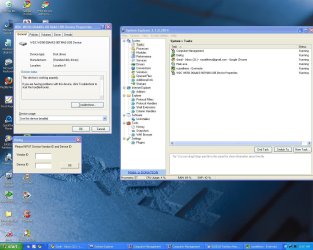
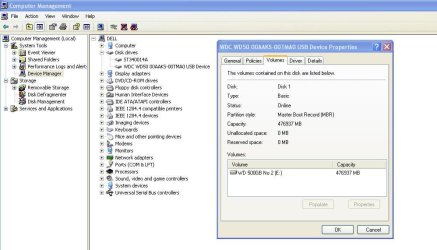
The most frustrating part of the process is the drive is not consistently recognized by Win 7, VM Player or XP Home. EASEUS Partition Manager failed several times to complete a move, format, delete partition.

Background:
I recently converted a Western Digital 500GB drive from Raw to NTFS. Saturday I used an Elevated Command to format it ~ F: /NTFS /Q. At that point Win 7 recognized the drive and I backup 140GB to this drive.

Sunday morning Win 7 could not recognize the drive.

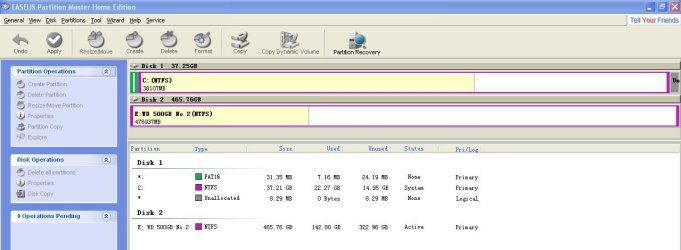
I then installed VM Player, XP Home Edition and ran EASEUS Partition Manager. PM found several Partition in front of the F drive. PM removed all of the partitions and formatted the drive.

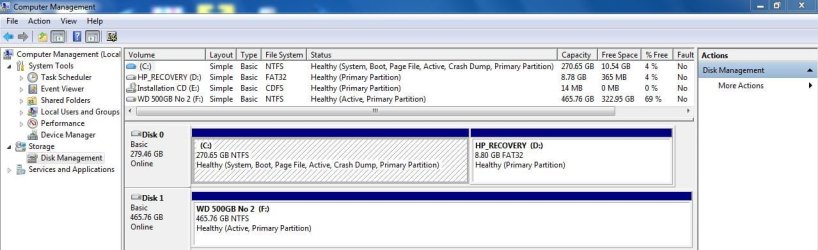
Win 7 currently recognizes the drive. Computer Manager reports it as:

F: Simple, Basic, NTFS Healthy (Active Primary Partition) 465.7 GB Free: 322.9

My System SpecsSystem Spec
03-01-2010   #2


Windows 7 Professional x64


Being Primary does not mean it needs to be on when you power up your computer. There is no need to convert to Logical unless you run out of Primary partitions.

Have you tried updating your USB drivers from Device Manager, and updating your chipset drivers?
My System SpecsSystem Spec
03-01-2010   #3


MS Windows 7 Enterprise 64-bit


The similar threads below answers some of my questions.
1. Use a primary drive to assign a letter so Win 7 can recognize it.

Can I rely Win 7 to recognize this drive now?
What happens if I turn it off and on?
My System SpecsSystem Spec
.


03-01-2010   #4


Windows 7 Professional x64


If you turn it off without using the Safely Remove Hardware button in the system tray, you risk data loss. I am not at home now, so I can't show you a screenshot, but search Google for "disable write caching windows 7".
My System SpecsSystem Spec
03-01-2010   #5


MS Windows 7 Enterprise 64-bit


Quote   Quote: Originally Posted by Jonathan_King View Post
Being Primary does not mean it needs to be on when you power up your computer. There is no need to convert to Logical unless you run out of Primary partitions.

Have you tried updating your USB drivers from Device Manager, and updating your chipset drivers?
I did try to update the USB drivers from Device Manager but it did not find any drivers.

I recently updated most of my drivers. What driver update service or program do you use?
My System SpecsSystem Spec
03-01-2010   #6


MS Windows 7 Enterprise 64-bit


My System SpecsSystem Spec
03-01-2010   #7


Windows 7 Professional x64


Quote   Quote: Originally Posted by Russellreno View Post
Quote   Quote: Originally Posted by Jonathan_King View Post
Being Primary does not mean it needs to be on when you power up your computer. There is no need to convert to Logical unless you run out of Primary partitions.

Have you tried updating your USB drivers from Device Manager, and updating your chipset drivers?
I did try to update the USB drivers from Device Manager but it did not find any drivers.

I recently updated most of my drivers. What driver update service or program do you use?
I use Device Manager and manually search for new drivers for the devices I need to update, but I can recommend a third-party program: Driver Easy - Free Driver Detect & Download Software
My System SpecsSystem Spec
03-01-2010   #8
whs


Vista and Windows7, sometimes Ubuntu and Fedora


I hate do argue with my friend Jonathan, but there is really no need to disable write caching if you ALWAYS use "safely remove". The safely remove will purge the cache before it releases the disk. But it is very rare that there is anything left in the cache anyhow. When you disable write caching, you may get a performance hit.
My System SpecsSystem Spec
03-01-2010   #9


Windows 7 Professional x64


I agree with whs completely. Using the Safely Remove button is a good practice.
My System SpecsSystem Spec
03-01-2010   #10


MS Windows 7 Enterprise 64-bit


I updated my Intel Chipset drivers on January 19, 2010.

Device Manager reports I have the current drivers for the USB Mass Storage Device.

It looks like we are finished here!

I will leave this post open until tomorrow.

Thanks Jonathon.

BTW the next time I am in Rednecksville I will buy you a beer.
My System SpecsSystem Spec
Reply

 USB ATA HD: Primary vs Logical problems?


Thread Tools


Similar Threads for: USB ATA HD: Primary vs Logical
Thread Forum
Logical to primary, with a twist Backup and Restore
Changing primary partitions to logical General Discussion
Solved Primary vs Logical Partition Installation & Setup
Can I make a logical drive primary? General Discussion
Primary or Logical for USB backup Backup and Restore


All times are GMT -5. The time now is 02:37 PM.


Windows 7 Forums is an independent web site and has not been authorized,
sponsored, or otherwise approved by Microsoft Corporation.
"Windows 7" and related materials are trademarks of Microsoft Corp.
© Designer Media Ltd
  

1 2 3 4 5 6 7 8 9 10 11 12 13 14 15 16 17 18 19 20 21 22 23 24 25 26 27 28 29 30