| | Welcome to Windows 7 Forums. Our forum is dedicated to helping you find solutions with any problems, errors or issues you are experiencing with Windows 7. The Windows 7 forum also covers news and updates and has an extensive Windows 7 tutorial section that covers a wide range of tips and tricks. | Windows 7 - New 1tb hd will not initialize, Disk Management Crashes
|
03-12-2010
|
#1 | | Windows 7 Professional x64 |
New 1tb hd will not initialize, Disk Management Crashes I just bought a Thermaltake Blacx SATA-USB Docking Station and a Samsung 1TB Spinpoint hard drive to go along with it. After connecting everything, I noticed that the hard drive is recognized in bios but not in Windows. The usb device installed alright but the hard drive is no where to be found.
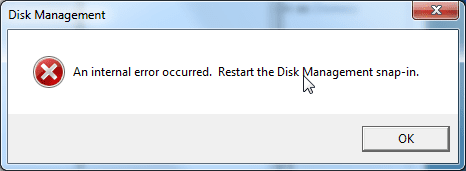
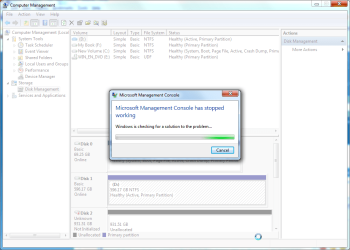
I read that you had to initialize the disk before being able to format it. So I went to 'disk management' but I get this error "An internal error occurred. Restart the Disk Management snap-in." Then I press ok and the disk management window comes. I am unable to do anything at this point because another error comes up "Microsoft Management Console has stopped working." I am then forced to close the program. However in the background I can see that the Samsung drive is there.
I tried getting into disk management with the Samsung drive powered off. I still got the errors but I was able to actually look around in disk management. I then turned on the drive and the Samsung drive shows up. I right click to initialize but I get the same error message right away...
Any clues? If it is relevant, my hardware specs are somewhere down below... | My System Specs | | OS Windows 7 Professional x64 CPU AMD Phenom II X4 965 Black Edition 3.4GHz stock Motherboard ASUS M4A79XTD EVO Memory G.SKILL Ripjaws 4GB (2 x 2GB) DDR3 1600 Graphics Card EVGA GTX 260 core 216 Sound Card Onboard Monitor(s) Displays Samsung 260HD TOC Screen Resolution 1900x1200 Keyboard Logitech Illuminated Keyboard Mouse Logitech G500 PSU OCZ ModXStream Pro OCZ600MXSP 600W Case COOLER MASTER Storm Scout Cooling Scythe Ninja-Mini Hard Drives Western Digital Raptor WD740
Western Digital 6400AAKS |
03-13-2010
|
#2 | | |
What if you try formatting it in DOS? Then see if Disk Management can then see it? | My System Specs | | System Manufacturer/Model Number Custom OS Windows 7 CPU AMD Phenom II X2 (dual-core) Motherboard GA-MA785GM-US2H Memory 4G Graphics Card integrated ATI HD 4200 Sound Card integrated Monitor(s) Displays Samsung 24" Screen Resolution 1920x1080 Keyboard Microsoft Digital Media Pro Mouse Logitech WIRED! PSU Ultra X4 500W Case Ultra X-blaster Hard Drives 1 SATA (750GB, 32MB cache, 7200 RPM)
1 IDE (80GB, 8MB cache, 7200 RPM) Internet Speed 15 Mbps FIOS |
03-13-2010
|
#3 | | |
have you tried hooking the drive up internally? | My System Specs | | System Manufacturer/Model Number Custom Built OS Windows 7 Pro 64-bit CPU AMD Phenom II X2 550 BE Motherboard ASUS M4A79XTD EVO Memory A-Data DDR3 1600 4gb Graphics Card HIS Radeon HD 4670 Sound Card VIA VT1708S (8 channel onboard) Monitor(s) Displays Dell 23" S2309W Screen Resolution 1920 x 1080 PSU Rosewill Green Series 430W Case Coolermaster Cooling Scythe SCKTN-3000 Hard Drives WD 320,750gb, Seagate 500gb External Backup |
03-13-2010
|
#4 | | MS Windows 7 Ultimate SP1 64-bit |
Dweezy,
WIN key (that's the one with the funny looking wavy flag on it)
type CMD.EXE (do not hit enter)
Right-click on CMD.EXE in the area above where you typed
Click on "Run as administrator"
You are now at a command prompt
Type following: - Diskpart and hit enter
- List Disk and hit enter
- Select Disk n where n is the number shown for your problem drive and hit enter
- Create Partition Primary and hit enter
- Format fs=ntfs quick and hit enter
- Assign and hit enter
- Exit and hit enter
Now :
Win key
type DISKMGMT.MSC and hit enter
Does your drive show up? | My System Specs | | System Manufacturer/Model Number Toshiba Satellite L305D laptop OS MS Windows 7 Ultimate SP1 64-bit CPU AMD Athlon X2 Dual-Core QL-64, 2100 Mhz, 2 Cores Motherboard TOSHIBA Portable PC (Socket M2/S1G1) Memory 4.0GB (2x2GB) DDR2 @ 333MHz 5-5-5-15 Graphics Card ATI Radeon 3100 Graphics (Toshiba) Sound Card Realtek High Definition Audio Monitor(s) Displays Generic PnP Monitor @ 1280x800 Screen Resolution 1280 x 800 Keyboard standard PS/2 Keyboard Mouse HP Wireless Optical Mobile Mouse Model FHA-3410 Hard Drives 125.03GB Corsair CSSD-V128GB2 ATA Device (IDE)
Depending upon testing, organized as 1,2, or 3 partitions with/without a 100mb system partition at the front. Internet Speed What the local pub, local coffee shop offers. Other Info Optical Drives HL-DT-ST DVDRAM GSA-T50N ATA Device
Synaptics PS/2 Port TouchPad
Speakers (Realtek High Definition Audio)
Atheros AR5007EG Wireless Network Adapter
Also have an Asus ha1002xp netbook with Win 7 Ultimate installed. |
03-13-2010
|
#5 | | Windows 7 Professional x64 |

Quote: Originally Posted by karlsnooks Dweezy,
WIN key (that's the one with the funny looking wavy flag on it)
type CMD.EXE (do not hit enter)
Right-click on CMD.EXE in the area above where you typed
Click on "Run as administrator"
You are now at a command prompt
Type following: - Diskpart and hit enter
- List Disk and hit enter
- Select Disk n where n is the number shown for your problem drive and hit enter
- Create Partition Primary and hit enter
- Format fs=ntfs quick and hit enter
- Assign and hit enter
- Exit and hit enter
Now :
Win key
type DISKMGMT.MSC and hit enter
Does your drive show up? Thank you! My drive does show up, but I had to connect the hd internally for it to work. As such, I took out another hard drive and now the new drive was assigned the letter of the hard drive that I pulled out, which brings about some complications...
So I had a drive with the path "D". I pulled that out to put the Samsung hd in, now the Samsung is named "D". I actually wanted to replace the "D" hd with the Samsung one. So now that the Samsung is named "D," can I just simply copy over the entire contents of the old hard drive onto this one? Would anything be affected? The "D" drive was not my OS drive, it is a storage drive and it also has all my games installed to that drive.
Last edited by Dweezy; 03-13-2010 at 03:14 AM..
| My System Specs | | OS Windows 7 Professional x64 CPU AMD Phenom II X4 965 Black Edition 3.4GHz stock Motherboard ASUS M4A79XTD EVO Memory G.SKILL Ripjaws 4GB (2 x 2GB) DDR3 1600 Graphics Card EVGA GTX 260 core 216 Sound Card Onboard Monitor(s) Displays Samsung 260HD TOC Screen Resolution 1900x1200 Keyboard Logitech Illuminated Keyboard Mouse Logitech G500 PSU OCZ ModXStream Pro OCZ600MXSP 600W Case COOLER MASTER Storm Scout Cooling Scythe Ninja-Mini Hard Drives Western Digital Raptor WD740
Western Digital 6400AAKS |
03-13-2010
|
#6 | | MS Windows 7 Ultimate SP1 64-bit |
Dweezy,
Do I understand correctly that, before, you had a C: drive AND a D: drive. Furthermore, you had installed some programs to D:?
And now you want to clone your D drive from the old to the new? | My System Specs | | System Manufacturer/Model Number Toshiba Satellite L305D laptop OS MS Windows 7 Ultimate SP1 64-bit CPU AMD Athlon X2 Dual-Core QL-64, 2100 Mhz, 2 Cores Motherboard TOSHIBA Portable PC (Socket M2/S1G1) Memory 4.0GB (2x2GB) DDR2 @ 333MHz 5-5-5-15 Graphics Card ATI Radeon 3100 Graphics (Toshiba) Sound Card Realtek High Definition Audio Monitor(s) Displays Generic PnP Monitor @ 1280x800 Screen Resolution 1280 x 800 Keyboard standard PS/2 Keyboard Mouse HP Wireless Optical Mobile Mouse Model FHA-3410 Hard Drives 125.03GB Corsair CSSD-V128GB2 ATA Device (IDE)
Depending upon testing, organized as 1,2, or 3 partitions with/without a 100mb system partition at the front. Internet Speed What the local pub, local coffee shop offers. Other Info Optical Drives HL-DT-ST DVDRAM GSA-T50N ATA Device
Synaptics PS/2 Port TouchPad
Speakers (Realtek High Definition Audio)
Atheros AR5007EG Wireless Network Adapter
Also have an Asus ha1002xp netbook with Win 7 Ultimate installed. |
03-13-2010
|
#7 | | Windows 7 Professional x64 |

Quote: Originally Posted by karlsnooks Dweezy,
Do I understand correctly that, before, you had a C: drive AND a D: drive. Furthermore, you had installed some programs to D:?
And now you want to clone your D drive from the old to the new? That's right. I had a C and a D prior. Now the new drive was installed as D since I pulled out the old D. If I just copy over the contents of the old D to the new one, would everything be a-ok? | My System Specs | | OS Windows 7 Professional x64 CPU AMD Phenom II X4 965 Black Edition 3.4GHz stock Motherboard ASUS M4A79XTD EVO Memory G.SKILL Ripjaws 4GB (2 x 2GB) DDR3 1600 Graphics Card EVGA GTX 260 core 216 Sound Card Onboard Monitor(s) Displays Samsung 260HD TOC Screen Resolution 1900x1200 Keyboard Logitech Illuminated Keyboard Mouse Logitech G500 PSU OCZ ModXStream Pro OCZ600MXSP 600W Case COOLER MASTER Storm Scout Cooling Scythe Ninja-Mini Hard Drives Western Digital Raptor WD740
Western Digital 6400AAKS |
03-13-2010
|
#8 | | MS Windows 7 Ultimate SP1 64-bit |
Dweezy,
If you still are using the same "c:" drive, then the next question is:
Which drives are actually connected at this very minute?
I need to know so that I can correctly advise you. I don't want to see you lose anything from your C: and old D: drive.
There are many quick answers but I will not give out a flippant comment as how to accomplish your objective. | My System Specs | | System Manufacturer/Model Number Toshiba Satellite L305D laptop OS MS Windows 7 Ultimate SP1 64-bit CPU AMD Athlon X2 Dual-Core QL-64, 2100 Mhz, 2 Cores Motherboard TOSHIBA Portable PC (Socket M2/S1G1) Memory 4.0GB (2x2GB) DDR2 @ 333MHz 5-5-5-15 Graphics Card ATI Radeon 3100 Graphics (Toshiba) Sound Card Realtek High Definition Audio Monitor(s) Displays Generic PnP Monitor @ 1280x800 Screen Resolution 1280 x 800 Keyboard standard PS/2 Keyboard Mouse HP Wireless Optical Mobile Mouse Model FHA-3410 Hard Drives 125.03GB Corsair CSSD-V128GB2 ATA Device (IDE)
Depending upon testing, organized as 1,2, or 3 partitions with/without a 100mb system partition at the front. Internet Speed What the local pub, local coffee shop offers. Other Info Optical Drives HL-DT-ST DVDRAM GSA-T50N ATA Device
Synaptics PS/2 Port TouchPad
Speakers (Realtek High Definition Audio)
Atheros AR5007EG Wireless Network Adapter
Also have an Asus ha1002xp netbook with Win 7 Ultimate installed. |
03-13-2010
|
#9 | | Windows 7 Professional x64 |
At this very minute, the C, D( the new samsung drive), and H (Old D drive). I also have a CD/DVD labeled as E.
Actually, I would also like to know how to switch the drive letters so that my Old D drive can retain its D: path, while making the new Samsung drive whatever letter. I guess I would prefer it this way. If it can be done in the command prompt, that would be preferred because I my Disk Management tool crashes...
Last edited by Dweezy; 03-13-2010 at 01:14 PM..
| My System Specs | | OS Windows 7 Professional x64 CPU AMD Phenom II X4 965 Black Edition 3.4GHz stock Motherboard ASUS M4A79XTD EVO Memory G.SKILL Ripjaws 4GB (2 x 2GB) DDR3 1600 Graphics Card EVGA GTX 260 core 216 Sound Card Onboard Monitor(s) Displays Samsung 260HD TOC Screen Resolution 1900x1200 Keyboard Logitech Illuminated Keyboard Mouse Logitech G500 PSU OCZ ModXStream Pro OCZ600MXSP 600W Case COOLER MASTER Storm Scout Cooling Scythe Ninja-Mini Hard Drives Western Digital Raptor WD740
Western Digital 6400AAKS |
03-13-2010
|
#10 | | MS Windows 7 Ultimate SP1 64-bit |
Dweezy,
Here's the approach:
Use the good ol' command prompt and an xcopy command that I give you to copy everything from H: to D: Simply dragging and dropping using Windows Exploer will miss a couple of files.
That's going to give you a backup copy of your old d: on the new D:
After we've finished reassigning drive letters, and all is ok, then you can delete the stuff you copied to the Samsung if you so desire.
We're going to gain a little confidence regarding reassigning. We'll practice by getting your CDROM drive letter out of the way by reassigning your CDROM to M: (or whatever letter you would like).
For this one we will use DiskMgmt.MSC
We will reassign your harddrives using DiskPart.
So first let's do the harmless step of assigning the CDROM to M; - WIN key | type DISKMGMT.MSC | Enter key
- In the graphic display showing your drives,
On the LEFT-HAND side of the CDROM graphic display
Right-Click and choose "Change Drive Letter and Paths" - Click on the "Change" button
- Click on the Down "arrow" next to your present CDROM drive letter
- Click OK and OK your way out.
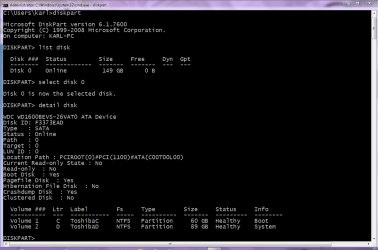
Now before I type out the XCOPY command and procedure you need, I'd like you to go to a command prompt, run some DiskPart commands and take a snapshot using the Snipping Tool and attach to your post.
I've attached a snapshot I made which shows the DiskPart Commands needed and the response from my Toshiba laptop. | My System Specs | | System Manufacturer/Model Number Toshiba Satellite L305D laptop OS MS Windows 7 Ultimate SP1 64-bit CPU AMD Athlon X2 Dual-Core QL-64, 2100 Mhz, 2 Cores Motherboard TOSHIBA Portable PC (Socket M2/S1G1) Memory 4.0GB (2x2GB) DDR2 @ 333MHz 5-5-5-15 Graphics Card ATI Radeon 3100 Graphics (Toshiba) Sound Card Realtek High Definition Audio Monitor(s) Displays Generic PnP Monitor @ 1280x800 Screen Resolution 1280 x 800 Keyboard standard PS/2 Keyboard Mouse HP Wireless Optical Mobile Mouse Model FHA-3410 Hard Drives 125.03GB Corsair CSSD-V128GB2 ATA Device (IDE)
Depending upon testing, organized as 1,2, or 3 partitions with/without a 100mb system partition at the front. Internet Speed What the local pub, local coffee shop offers. Other Info Optical Drives HL-DT-ST DVDRAM GSA-T50N ATA Device
Synaptics PS/2 Port TouchPad
Speakers (Realtek High Definition Audio)
Atheros AR5007EG Wireless Network Adapter
Also have an Asus ha1002xp netbook with Win 7 Ultimate installed. | New 1tb hd will not initialize, Disk Management Crashes | All times are GMT -5. The time now is 08:05 AM. |  |