Windows 7 Forums Search
Welcome to Windows 7 Forums. Our forum is dedicated to helping you find solutions with any problems, errors or issues you are experiencing with Windows 7. The Windows 7 forum also covers news and updates and has an extensive Windows 7 tutorial section that covers a wide range of tips and tricks.


Windows 7 - Unable to Partition C Drive

 
03-19-2010   #1


Windows 7


Unable to Partition C Drive

Hi,

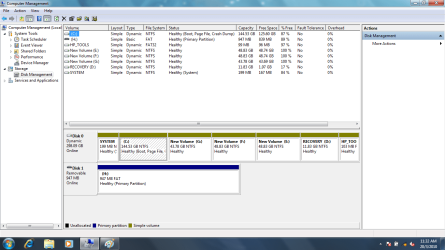
I bought a laptop with 320 GB space in Windows 7 32 bit os. I tried to create multiple 50GB partitions. I tried to shrink the c drive an I created 3 partitions. Now the C drive is having 144GB. I am not able to partition this 144GB.

Any ideas how can i partition this?

Regards
Malai

My System SpecsSystem Spec
03-19-2010   #2


Vista x64 / 7 X64


Please post a screenshot of the Disk Management window:

http://www.sevenforums.com/tutorials...en-forums.html
My System SpecsSystem Spec
03-19-2010   #3


Windows 7


Unable to Partition C Drive-cm.png
My System SpecsSystem Spec
.


03-19-2010   #4
whs


Vista and Windows7, sometimes Ubuntu and Fedora


You are stuck in a mess of dynamic disks. You probably kept creating partitions after you already had 4 primaries. The next step then gets you into dynamics. You should have stopped at 3 primaries and then created an extended partition under which you could have created more partitions. But that is too late. Now you have to get rid of those dynamics. Here is how: Change a dynamic disk back to a basic disk: Storage Services; Local File Systems
My System SpecsSystem Spec
03-19-2010   #5


Vista x64 / 7 X64


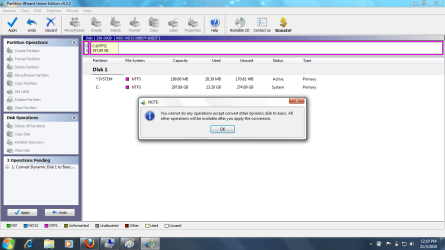
It's a simple Dynamic Drive.

Partition Wizard free can do that without data loss:

How to convert dynamic disk to basic disk with Partition Wizard?

Last edited by SIW2; 03-20-2010 at 11:45 PM..
My System SpecsSystem Spec
03-19-2010   #6


Windows 7


Thanks for your fast reply

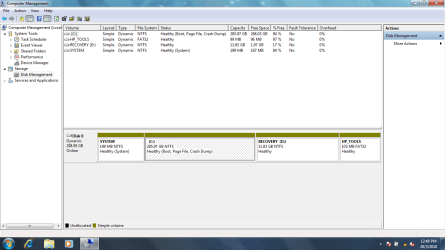
Unable to Partition C Drive-cm.png

I changed back to the actual settings.

Can you guide me how to create 5 partitions (50GB each)
My System SpecsSystem Spec
03-20-2010   #7


Windows 7


Any updates... I really stuck here
My System SpecsSystem Spec
03-20-2010   #8


Vista x64 / 7 X64


I suggest you convert it into a Basic Disk.

Partition Wizard will do it.


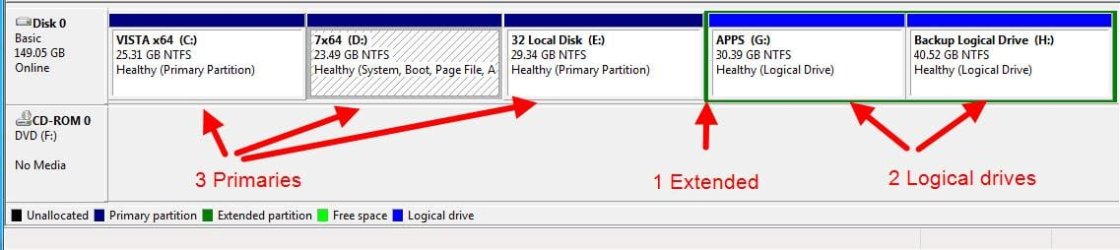
You can only have 4 partitions on an mbr hard drive.

You can have more than 4 volumes.

You do that by having 4 Primary partitions and one Extended partition.

You can create volumes inside the extended partition.

Like this:

Unable to Partition C Drive-partitions-20032010_221443.jpg

If you move or resize the oem Recovery and Tools partitions, you may have trouble accesing them.

Last edited by SIW2; 03-20-2010 at 06:01 PM..
My System SpecsSystem Spec
03-20-2010   #9


Windows 7


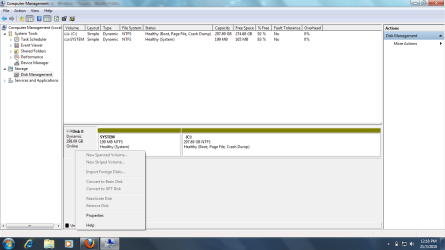
Thanks for your valuable reply. I dont find any way to convert my dynamic disc to basic dist.

How can I do that? Following are the screenshots are for your reference. Its not allowing me to convert to basic.

Unable to Partition C Drive-1.png

Unable to Partition C Drive-2.png
My System SpecsSystem Spec
03-20-2010   #10
whs


Vista and Windows7, sometimes Ubuntu and Fedora


I found this post. Maybe it can help you. The referred program works in Vista, so one might assume it will work in Windows 7 too.
My System SpecsSystem Spec
Reply

 Unable to Partition C Drive problems?


Thread Tools


Similar Threads for: Unable to Partition C Drive
Thread Forum
Unable to assign drive letter to newly installed SATA drive. Installation & Setup
Setup unable to create a new partition or locate an existing partition Installation & Setup
Unable to extend my C drive partition from unallocated space General Discussion
Unable to partition drive Hardware & Devices
Unable to partition my c drive General Discussion


All times are GMT -5. The time now is 02:41 PM.


Windows 7 Forums is an independent web site and has not been authorized,
sponsored, or otherwise approved by Microsoft Corporation.
"Windows 7" and related materials are trademarks of Microsoft Corp.
© Designer Media Ltd
  

1 2 3 4 5 6 7 8 9 10 11 12 13 14 15 16 17 18 19 20 21 22 23 24 25 26 27 28 29 30