| Windows 7: How to apply artic silver 5 paste? |
22 Mar 2010
|
| | Windows 8 Pro 64 bit 207 posts UK |
How to apply artic silver 5 paste? Hi, don't know if this is the right section but I ordered some of this and should be here this week some time. I’ve heard different methods online like YouTube and other forums Is it best to spread it out with something like a credit card, put a little blob in the centre or a line across? I have an AMD phenom triple core. Thanks | My System Specs |
| System Manufacturer/Model Number *Custom* OS Windows 8 Pro 64 bit CPU Intel Core i7 3770K @ 4.2 GHz Motherboard Gigabyte Z77X-D3H Memory 8GB Corsair XMS3 1333mhz 2x4GB Graphics Card Gigabyte Radeon HD 7970 OC WindForce Sound Card VIA High Definition Audio Monitor(s) Displays Dell S2740L (Primary) Samsung P2450H (Secondary) Screen Resolution 1920x1080 Keyboard Logitech G510 Gaming Keyboard Mouse Thermaltake TteSPORTS Theron Gaming Mouse PSU Coolmaster Silent ProM 600W Case Coolermaster HAF 912 Plus Cooling Cooler Master Hyper 612S Hard Drives OCZ Vertex 2 60GB (2.5) (OS+Aps)
Western Digital Caviar Blue 640GB 7200RPM (3.5) (Games)
Western Digital Caviar Green 500GB 5400RPM (3.5) (Media/Data) Internet Speed 50-60Mbs (DL) 12-20Mbs (UL) BT Infinity FTTC Other Info Samsung SH-B083L 8x Blu-Ray Reader |
22 Mar 2010
|
| | XP Pro SP3 X86 / Win7 Pro X86 1,212 posts Southern Ontario Canada |

Quote: Originally Posted by F1FAN Hi, don't know if this is the right section but I ordered some of this and should be here this week some time. I’ve heard different methods online like YouTube and other forums Is it best to spread it out with something like a credit card, put a little blob in the centre or a line across? I have an AMD phenom triple core. Thanks I'm probably going to get blasted for this, but...
The extremely thin layer you see so much noise about really doesn't give you lasting perfomance from a paste. With Champhor based "phase change" materials it's the way to go but with pastes that tend to creep out of the thermal junctions I just put a big blob in the middle of the chip, smear it around with my finger tip and then tap it out into a smooth, gooey layer, and put on the heatsink. The excess will find it's way out the sides, with no harm done.
I have power transistors and a couple of CPUs that have held their temperatures for years with this method whereas with the ever so careful technique I seemed to be redoing them once or twice a year because the thermal junction would actually dry out.
Also don't forget that pastes go through stages... the temperature will be very low when you first apply them. Then as they dry a little the temperature will creep up for a couple of weeks. Once it all settles in, your temperatures will stabalize somewhere between the coolest and hottest... and they'll stay that way for a long time. | My System Specs | | System Manufacturer/Model Number Homebrew OS XP Pro SP3 X86 / Win7 Pro X86 CPU Amd 64 x2 4200 (2.4ghz) Motherboard Asus M2N-MX SE Plus Memory Kingston DDR2 800 2gb Graphics Card Nvidia GF-8400 Sound Card Realtek on Motherboard Monitor(s) Displays Acer x-193bw Screen Resolution 1440 x 900 Keyboard yes Mouse yes PSU 350watt In-Win Case In-Win Cooling Air Hard Drives Western Digital 500g Internet Speed 5mpbs Other Info Also ASRock ION 330 as HTPC (on XP).
Acer Aspire as GP netbook (on XP). |
22 Mar 2010
|
| | Windows Vista Home Premium -> Windows 7 Home Premium 40 posts |
| My System Specs | | OS Windows Vista Home Premium -> Windows 7 Home Premium |
22 Mar 2010
|
| | Windows 7 Ultimate x64 8,025 posts |
I just put a pea sized small blob in the middle of the CPU and let the heat sink application spread it around. Has always worked well for me. | My System Specs | | System Manufacturer/Model Number Self-Built in July 2009 OS Windows 7 Ultimate x64 CPU Intel Q9550 2.83Ghz OC'd to 3.40Ghz Motherboard Gigabyte GA-EP45-UD3R rev. 1.1, F12 BIOS Memory 8GB G.Skill PI DDR2-800, 4-4-4-12 timings Graphics Card EVGA 1280MB Nvidia GeForce GTX570 Sound Card Realtek ALC899A 8 channel onboard audio Monitor(s) Displays 23" Acer x233H Screen Resolution 1920x1080 Keyboard ABS M1 Mechanical Mouse Logitech G9 Laser Mouse PSU Corsair 620HX modular Case Antec P182 Cooling stock Hard Drives Intel X25-M 80GB Gen 2 SSD
Western Digital 1TB Caviar Black, 32MB cache. WD1001FALS Internet Speed 15/2 cable modem Other Info Windows and Linux enthusiast. Logitech G35 Headset. |
22 Mar 2010
|
| | Win 7 Ultimate x64 6,700 posts Etobicoke, Ontario |
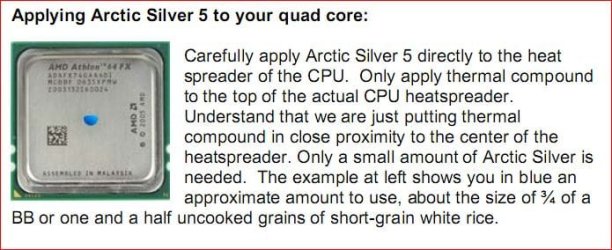
Or you could go straight to the source, Arctic Silver Incorporated - Route to Product Instructions for Arctic Silver 5
Just pick out your CPU and follow the instructions. | My System Specs | | System Manufacturer/Model Number Me OS Win 7 Ultimate x64 CPU Phenom II x4 955 @ 4 GHz. Motherboard Asus M5A97 EVO Memory 2x2 GB Kingston HyperX DDR3 1600 Graphics Card Sapphire HD 6850 Sound Card Xonar DGX w/ Logitech X-530 Monitor(s) Displays Acer S232HL Abid Screen Resolution 1920x1080 Keyboard Logitech Wave Mouse Logitech G5 v2 PSU Antec Earthwatts 650W Green Case Antec Three Hundred Cooling Cooler Master 212 EVO Hard Drives 120 GB OCZ Vertex 3
500 GB Seagate 7200.12 Internet Speed 24000/1000 |
22 Mar 2010
|
| | Windows 7 Ultimate x64 SP1 5,854 posts Philadelphia, PA |
Maximum PC just discussed this. They recommend the small pea sized blob in the center as well. They've done significant testing and found no better option, and on top of that, it is the easiest method as well. I've been doing it this way for about a decade now without issue. | My System Specs | | OS Windows 7 Ultimate x64 SP1 CPU Intel Core i7-2600 Motherboard Gigabyte GA-P67A-UD3P-B3 Memory 12 GB Patriot Extreme DDR3-1333 Graphics Card Nvidia GTX 470 Monitor(s) Displays Dell UltraSharp 2209WA PSU OCZ ModStream 700W Case CoolerMaster HAF 912 Advanced Cooling CoolerMaster Hyper 212 Plus Hard Drives OCZ Agility3 240 GB, WD5001AALS, WD7501AALS |
22 Mar 2010
|
| | Vista, Windows7, Mint Mate, Zorin, Windows 8 17,868 posts Florida in winter, Black Forest/Germany |

Quote: Originally Posted by DeaconFrost Maximum PC just discussed this. They recommend the small pea sized blob in the center as well. They've done significant testing and found no better option, and on top of that, it is the easiest method as well. I've been doing it this way for about a decade now without issue. Do you mean pea size in the middle with or without spreading? | My System Specs | | System Manufacturer/Model Number HP, Dell, Gateway, Toshiba - 4 laptops and 2 desktops OS Vista, Windows7, Mint Mate, Zorin, Windows 8 CPU from 1.6GHz Duo to i7 Monitor(s) Displays 2x HP w2207 Keyboard with trackball - no mices Mouse Trackball mice Hard Drives 5x HDD, 7x SSD, 12x Externals Internet Speed DSL 6000 |
22 Mar 2010
|
| | Windows 7 Ultimate 32 & 64 -(Boot Camped Snow Leopard on a Mac Mini) 233 posts the 'burbs of @lanta, USA |
I always used the "grain of rice" size. After all, peas come in a variety of sizes. | My System Specs | | System Manufacturer/Model Number Self built OS Windows 7 Ultimate 32 & 64 -(Boot Camped Snow Leopard on a Mac Mini) CPU AMD Athlon A64 X2 6000+ 3.1GHz Motherboard DFI LanParty Jr 790GX M2RS Memory 4GB Corsair XMS RAM Graphics Card Gigabyte ATI Radeon HD4550/512MB/DDR3 passive cooled Sound Card latest RealTek HD/HDMI drivers Monitor(s) Displays Samsung LN40A550 (primary); Zalman 7" LCD (secondary) Screen Resolution 1920x1080 ; 800x600 Keyboard Gyration wireless Media Center Keyboard Mouse Gyration Cordless Optical Air Mouse PSU Corsair HX520W Case Zalman HD160XT Cooling Zalman CNPS9500Cu on processor - Four Nexus case fans Hard Drives WD Raptor for OS
Seagate 7211 640GB
Two Samsung EcoGreens for TV in RAID 0 = 3TB
Two WD MyBook 1TB externals for B/U and Movies
Optical Drive:
LG GGC-H20L Super Multi Blue BluRay/HD-DVD internal Internet Speed 6344 kbps Down/1043 kbps Up (Comcast cable) Other Info HDMI audio/video out to Yamaha RX-V1065 receiver.
All controlled by a Harmony One universal remote.
Four other home built computers plus a Mac Mini, but this is my main Win7 testbed. |
22 Mar 2010
|
| | Win 7 Ultimate x64 6,700 posts Etobicoke, Ontario |
Without spreading,
The pressure from the heatsink does the spreading. | My System Specs | | System Manufacturer/Model Number Me OS Win 7 Ultimate x64 CPU Phenom II x4 955 @ 4 GHz. Motherboard Asus M5A97 EVO Memory 2x2 GB Kingston HyperX DDR3 1600 Graphics Card Sapphire HD 6850 Sound Card Xonar DGX w/ Logitech X-530 Monitor(s) Displays Acer S232HL Abid Screen Resolution 1920x1080 Keyboard Logitech Wave Mouse Logitech G5 v2 PSU Antec Earthwatts 650W Green Case Antec Three Hundred Cooling Cooler Master 212 EVO Hard Drives 120 GB OCZ Vertex 3
500 GB Seagate 7200.12 Internet Speed 24000/1000 |
22 Mar 2010
|
| | XP Pro SP3 X86 / Win7 Pro X86 1,212 posts Southern Ontario Canada |

Quote: Originally Posted by stormy13 Without spreading, Attachment 62445
The pressure from the heatsink does the spreading. I do spread it out and I'd use a lot more than your picture shows...
The reason I spread it is that you can't count on exactly even pressure from the heat sink, until it's settled and you might get hot spots on the chip.
But yea... it's all good. | My System Specs | | System Manufacturer/Model Number Homebrew OS XP Pro SP3 X86 / Win7 Pro X86 CPU Amd 64 x2 4200 (2.4ghz) Motherboard Asus M2N-MX SE Plus Memory Kingston DDR2 800 2gb Graphics Card Nvidia GF-8400 Sound Card Realtek on Motherboard Monitor(s) Displays Acer x-193bw Screen Resolution 1440 x 900 Keyboard yes Mouse yes PSU 350watt In-Win Case In-Win Cooling Air Hard Drives Western Digital 500g Internet Speed 5mpbs Other Info Also ASRock ION 330 as HTPC (on XP).
Acer Aspire as GP netbook (on XP). How to apply artic silver 5 paste? problems? All times are GMT -5. The time now is 01:36 AM. | |