Windows 7 Forums


Windows 7: Front Panel not reacting to any input

26 Mar 2010   #1

Windows 7 64 bit
Europe
 
 
Front Panel not reacting to any input

My front panel on my case doesn't react to any input..microphone,headphones,speakers...useless..can someone help me??Are there any drivers to download??

My System SpecsSystem Spec

26 Mar 2010   #2

Windows 7 Professional x64
The Wild West


Did you build the system? Are the front panel ports plugged into the motherboard?

Maybe they have come loose.
My System SpecsSystem Spec
26 Mar 2010   #3

Windows 7 64 bit
Europe


i build it partly,but not all...I have checked and the front panel cable goes into audio and usb..there is one connector that seperates into two cables(i think,it is messy..) and then goes into USB and audio..
My System SpecsSystem Spec
.


26 Mar 2010   #4

Windows 7 Ultimate x64 Service Pack 1
Doncaster, UK


Double check to make sure that you haven't got the connectors mixed up, and that they are wired correctly. Refer to your motherboard manual.
My System SpecsSystem Spec
01 Apr 2010   #5

Windows 7 64 bit
Europe


i am just checking it but i just don't get where is the problem..one cable goes from front panel to 3-4 places on to MOBO..and manual is not helpfull
My System SpecsSystem Spec
01 Apr 2010   #6

Windows 7 Ultimate x64 Service Pack 1
Doncaster, UK


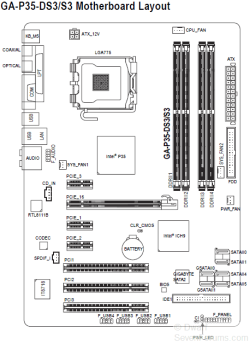
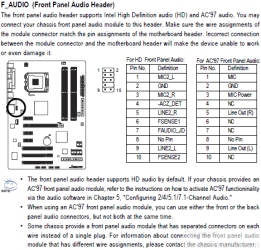
Here you go. These are from the manual. I hope they help.

Front Panel not reacting to any input-capture.png

Front Panel not reacting to any input-capture1.png

Front Panel not reacting to any input-capture2.png

http://download.gigabyte.eu/FileList...35-(d)s3_e.pdf
My System SpecsSystem Spec
01 Apr 2010   #7

Windows 7 64 bit
Europe


Quote   Quote: Originally Posted by Dwarf View Post
i checked everything and connected the cables as needed but it still doesn't work
My System SpecsSystem Spec
01 Apr 2010   #8

Windows 7 Ultimate x64 Service Pack 1
Doncaster, UK


Do you have the latest Realtek driver installed? See Latest Realtek HD Audio Driver Version

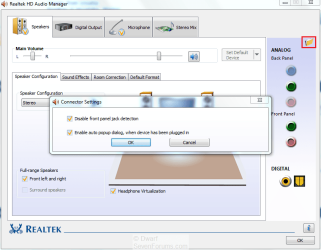
In the System Tray, right-click on the Realtek HD Audio Manager and select Sound Manager from the list of options.

Front Panel not reacting to any input-capture.png

Click on the folder icon (highlighted) and then ensure that the two options are set as shown in the Connector Settings dialogue. Click OK to close this dialogue panel and then OK to close the Sound Manager.
My System SpecsSystem Spec
02 Apr 2010   #9

Windows 7 64 bit
Europe


Quote   Quote: Originally Posted by Dwarf View Post
Do you have the latest Realtek driver installed? See Latest Realtek HD Audio Driver Version

In the System Tray, right-click on the Realtek HD Audio Manager and select Sound Manager from the list of options.

Attachment 64411

Click on the folder icon (highlighted) and then ensure that the two options are set as shown in the Connector Settings dialogue. Click OK to close this dialogue panel and then OK to close the Sound Manager.
it is working..thanks!
My System SpecsSystem Spec
02 Apr 2010   #10

Windows 7 Ultimate x64 Service Pack 1
Doncaster, UK


You're welcome.
My System SpecsSystem Spec
Reply

 Front Panel not reacting to any input problems?


Thread Tools


Similar help and support threads for: Front Panel not reacting to any input
Thread Forum
USB 3.0 Front Panel Header Hardware & Devices
Realtek Mute Rear output when front input is plugged in Sound & Audio
Front input headphone jack does not work Sound & Audio
front panel jacks Sound & Audio
Front panel.. Sound & Audio


All times are GMT -5. The time now is 01:06 AM.


Seven Forums Android App Seven Forums IOS App Follow us on Facebook

Windows 7 Forums is an independent web site and has not been authorized,
sponsored, or otherwise approved by Microsoft Corporation.
"Windows 7" and related materials are trademarks of Microsoft Corp.
© Designer Media Ltd
  

1 2 3 4 5 6 7 8 9 10 11 12 13 14 15 16 17 18 19 20 21 22 23 24 25 26 27 28 29 30 31 32