Windows 7 Forums


Windows 7: Dvd drive not working

27 Mar 2010   #1

Windows 7 64bit
 
 
Dvd drive not working

I've recently bought a new computer with windows 7, and pretty much as soon as I'd installed the OS, the dvd drive stopped working


I've tried deleting the upper and lower filters, disabling the driver signature enforcement, and also tried disabling integrity checks, but nothing seems to work

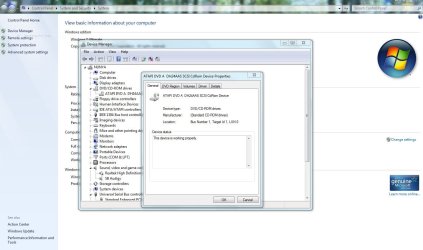
It shows up in device management, but when I try to access it, it just crashes, and I have to reboot, same when I try and insert a CD, although it does sometimes work through autorun, although not 100%

Last edited by InFlames01; 28 Mar 2010 at 06:31 AM..
My System SpecsSystem Spec

27 Mar 2010   #2
whs

Vista, Windows7, Mint Mate, Zorin, Windows 8
Florida in winter, Black Forest/Germany


That looks like a driver problem (unless the drive itself is defunct). Try to find the latest driver from the manufacturers website.
My System SpecsSystem Spec
27 Mar 2010   #3

Win7 Enterprise, Win7 x86 (Ult 7600), Win7 x64 Ult 7600, TechNet RTM on AMD x64 (2.8Ghz)
SomeWhere in the HOT Arizona Desert !


Desltop or laptop computer ? Make & Model ?

DVD drive Make & Model ?
My System SpecsSystem Spec
.


27 Mar 2010   #4

Windows 7 64bit


It's a desktop, Andromeda ST20 from cube 247
DVD is Sony Optiarc AD-7240s

Just looking at the new drivers now, so I'll get back to you on how that works
My System SpecsSystem Spec
27 Mar 2010   #5

Windows 7 64bit


Well, just got an autoplay from the first disk I put in after a reboot, I'll see if it works, so it looks like drivers were out of date
My System SpecsSystem Spec
27 Mar 2010   #6
whs

Vista, Windows7, Mint Mate, Zorin, Windows 8
Florida in winter, Black Forest/Germany


Good, keep us up-to-date. Would be interested whether the driver fixed it. This seems to be a pretty common problem.
My System SpecsSystem Spec
27 Mar 2010   #7

Windows 7 64bit


Hmm, still causing device manager to crash, and not got an autoplay the next couple of times, might just have been a coincidence
My System SpecsSystem Spec
27 Mar 2010   #8
BWK

win7 ultimate x64
it's cold,it's warm,it's rainy,it's dry


Have you tried turning off your pc and unhooking the dvd drive. Turn pc back on to allow it to see no drive. Then power back down and plug the dvd drive back in and let windows try to pick it up as new hardware and see if that helps.
My System SpecsSystem Spec
27 Mar 2010   #9

Windows 7 64bit


Just tried that, and it wasn't recognised as new hardware, although it showed up as normal, any ideas?
My System SpecsSystem Spec
27 Mar 2010   #10
BWK

win7 ultimate x64
it's cold,it's warm,it's rainy,it's dry


Uninstall all drivers for it and reinstall the latest. Maybe the clean install instead of updating drivers may be helpful. After the installation of the newest drivers restart pc.
Attached Thumbnails
Dvd drive not working-capture.jpg  
My System SpecsSystem Spec
Reply

 Dvd drive not working problems?


Thread Tools


Similar help and support threads for: Dvd drive not working
Thread Forum
Help! DVD drive not working Hardware & Devices
dvd drive is not working Hardware & Devices
My pen drive not working Hardware & Devices
DVD Drive Not Working Hardware & Devices
Help required, USB flash drive/Pen drive not working! Drivers


All times are GMT -5. The time now is 03:19 AM.


Seven Forums Android App Seven Forums IOS App Follow us on Facebook

Windows 7 Forums is an independent web site and has not been authorized,
sponsored, or otherwise approved by Microsoft Corporation.
"Windows 7" and related materials are trademarks of Microsoft Corp.
© Designer Media Ltd
  

1 2 3 4 5 6 7 8 9 10 11 12 13 14 15 16 17 18 19 20 21 22 23 24 25 26 27 28 29 30 31 32