
| Windows 7: Merging unlocated space on hard disk |
07 Apr 2010
|
#1 | | |
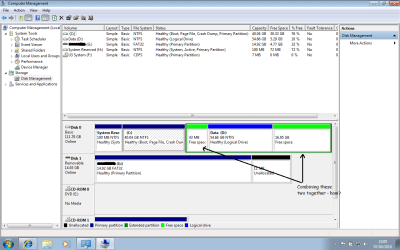
Merging unlocated space on hard disk Hello,
I have ended up with two unlocated bits of spaces on my hard drive. There are 4 partitions on the hard disk now. I want to merge the two to make a single partition. How can I do that? | My System Specs |
| System Manufacturer/Model Number TOSHIBA EQUIUM A200 (X86-based PC AT/AT COMPATIBLE) OS Windows 7 Ultimate x86 CPU Intel(R) Pentium(R) Dual CPU T2310 @ 1.46GHz Motherboard Intel Corporation SANTA ROSA CRB Memory 2GB Graphics Card Mobile Intel(R) 965 Express Chipset Family Screen Resolution 1280 * 800 Pixels Hard Drives ST9120822AS ATA Device (IDE) |
07 Apr 2010
|
#2 | | Windows 7 Professional x64 Rednecksville |
You may be able to create a new Spanned volume using Disk Management, but you're probably better off moving the partitions.
I recommend using the free program Partition Wizard, and moving the D volume to the right. Then create a new volume in that space. | My System Specs | | System Manufacturer/Model Number Custom OS Windows 7 Professional x64 CPU Intel i7 2600K OC'd @ 4620 MHz Motherboard Asus P8Z68-V Pro Memory 16GB GSkill Sniper 2133 Mhz (4x4GB) Graphics Card EVGA GeForce GTX 480 SuperClocked+ Sound Card Realtek High Definition Audio Monitor(s) Displays 2x Acer S273HLbmii 27" Screen Resolution 2 x 1920x1080 Keyboard Logitech MK320 (wireless) Mouse Logitech MK320 (wireless) PSU Corsair HW Series 750w (modular) Case Cooler Master HAF 932 Advanced Blue Edition Cooling CM Hyper 212+ CPU cooler, 3x 230mm + 1x 140mm case fans Hard Drives 64GB Crucial M4 SSD
Storage: Hitachi 1TB 5400RPM, Samsung 1.5TB 5400RPM Internet Speed 30 Mb/s : 2 Mb/s |
07 Apr 2010
|
#3 | | |
Seems to me that moving around partitions or creating spanned volumes to simply get 43MB of disk space usable is quite a bit of extra work for that little disk space. | My System Specs | | System Manufacturer/Model Number Self-Built in July 2009 OS Windows 7 Ultimate x64 CPU Intel Q9550 2.83Ghz OC'd to 3.40Ghz Motherboard Gigabyte GA-EP45-UD3R rev. 1.1, F12 BIOS Memory 8GB G.Skill PI DDR2-800, 4-4-4-12 timings Graphics Card EVGA 1280MB Nvidia GeForce GTX570 Sound Card Realtek ALC899A 8 channel onboard audio Monitor(s) Displays 23" Acer x233H Screen Resolution 1920x1080 Keyboard ABS M1 Mechanical Mouse Logitech G9 Laser Mouse PSU Corsair 620HX modular Case Antec P182 Cooling stock Hard Drives Intel X25-M 80GB Gen 2 SSD
Western Digital 1TB Caviar Black, 32MB cache. WD1001FALS Internet Speed 15/2 cable modem Other Info Windows and Linux enthusiast. Logitech G35 Headset. |
07 Apr 2010
|
#4 | | |

Quote: Originally Posted by Jonathan_King I recommend using the free program Partition Wizard, and moving the D volume to the right. Then create a new volume in that space. I will just do that now. Thank you for so quick reply! | My System Specs | | System Manufacturer/Model Number TOSHIBA EQUIUM A200 (X86-based PC AT/AT COMPATIBLE) OS Windows 7 Ultimate x86 CPU Intel(R) Pentium(R) Dual CPU T2310 @ 1.46GHz Motherboard Intel Corporation SANTA ROSA CRB Memory 2GB Graphics Card Mobile Intel(R) 965 Express Chipset Family Screen Resolution 1280 * 800 Pixels Hard Drives ST9120822AS ATA Device (IDE) |
07 Apr 2010
|
#5 | | |

Quote: Originally Posted by pparks1 Seems to me that moving around partitions or creating spanned volumes to simply get 43MB of disk space usable is quite a bit of extra work for that little disk space. You probably are right. But that space doesn't look right there! :S
I'll give try that software. If it works great, otherwise - as you have suggested - it shouldn't be a problem really.
Thanks | My System Specs | | System Manufacturer/Model Number TOSHIBA EQUIUM A200 (X86-based PC AT/AT COMPATIBLE) OS Windows 7 Ultimate x86 CPU Intel(R) Pentium(R) Dual CPU T2310 @ 1.46GHz Motherboard Intel Corporation SANTA ROSA CRB Memory 2GB Graphics Card Mobile Intel(R) 965 Express Chipset Family Screen Resolution 1280 * 800 Pixels Hard Drives ST9120822AS ATA Device (IDE) |
07 Apr 2010
|
#6 | | Windows 7 HP 64bit, Windows 8 Pro w/Media Center 64bit Covington, La |

Quote: Originally Posted by Jonathan_King You may be able to create a new Spanned volume using Disk Management, but you're probably better off moving the partitions.
I recommend using the free program Partition Wizard, and moving the D volume to the right. Then create a new volume in that space. I also recommend Partition Wizard but I would move the D drive to the Left next to C just to keep the drive letters in order. Then you can create a new partition to the Right of D. Or you can expand D in both directions to absolve both free spaces. Partition Wizard does a great job.
Jim | My System Specs | | Computer type PC/Desktop System Manufacturer/Model Number Home Built OS Windows 7 HP 64bit, Windows 8 Pro w/Media Center 64bit CPU Phenom II X6 1100T Motherboard ASUS M5A99X EVO Memory Crucial Balistic 8gb DDR3-1866 CL9 Graphics Card MSI R6850 Cyclone IGD5 PE Sound Card On Board Monitor(s) Displays ASUS VE258Q 25" LED with DVI-HDMI-DisplayPort Screen Resolution 1920 x 1080 Keyboard Logitech K120 Mouse Logitech Marble Mouse USB, Logitech Precision Game Pad PSU Seasonic X650 80 Plus GOLD Modular Case Corsair 400R Cooling Antec Kuhler H2O 620, Two 120mm and four 140mm Hard Drives Two WD Cavier Black 2TB Sata III, WD My Book Essential 2TB USB 3.0 Internet Speed 15MB Antivirus Norton IS 2012, Malwarebytes Pro Browser IE-10, FF-19 Other Info APC UPS ES 750, Netgear WNR3500L Gigabit & Wireless N Router with SamKnows Test Program, Motorola SB6120 Gigabit Cable Modem. Brother HL-2170W Laser Printer, Epson V300 Scanner |
07 Apr 2010
|
#7 | | |
Ah the problem is sorted now. Thanks a lot Jonathan, pparks and Jim! | My System Specs | | System Manufacturer/Model Number TOSHIBA EQUIUM A200 (X86-based PC AT/AT COMPATIBLE) OS Windows 7 Ultimate x86 CPU Intel(R) Pentium(R) Dual CPU T2310 @ 1.46GHz Motherboard Intel Corporation SANTA ROSA CRB Memory 2GB Graphics Card Mobile Intel(R) 965 Express Chipset Family Screen Resolution 1280 * 800 Pixels Hard Drives ST9120822AS ATA Device (IDE) |
07 Apr 2010
|
#8 | | Windows 7 Professional x64 Rednecksville |
Great, thanks for posting back. Glad we could help you out.
Let us know if you need anything else. | My System Specs | | System Manufacturer/Model Number Custom OS Windows 7 Professional x64 CPU Intel i7 2600K OC'd @ 4620 MHz Motherboard Asus P8Z68-V Pro Memory 16GB GSkill Sniper 2133 Mhz (4x4GB) Graphics Card EVGA GeForce GTX 480 SuperClocked+ Sound Card Realtek High Definition Audio Monitor(s) Displays 2x Acer S273HLbmii 27" Screen Resolution 2 x 1920x1080 Keyboard Logitech MK320 (wireless) Mouse Logitech MK320 (wireless) PSU Corsair HW Series 750w (modular) Case Cooler Master HAF 932 Advanced Blue Edition Cooling CM Hyper 212+ CPU cooler, 3x 230mm + 1x 140mm case fans Hard Drives 64GB Crucial M4 SSD
Storage: Hitachi 1TB 5400RPM, Samsung 1.5TB 5400RPM Internet Speed 30 Mb/s : 2 Mb/s |
07 Apr 2010
|
#9 | | Windows 7 HP 64bit, Windows 8 Pro w/Media Center 64bit Covington, La |
Glad to help. That Partition Wizard is a sweet program.
Jim | My System Specs | | Computer type PC/Desktop System Manufacturer/Model Number Home Built OS Windows 7 HP 64bit, Windows 8 Pro w/Media Center 64bit CPU Phenom II X6 1100T Motherboard ASUS M5A99X EVO Memory Crucial Balistic 8gb DDR3-1866 CL9 Graphics Card MSI R6850 Cyclone IGD5 PE Sound Card On Board Monitor(s) Displays ASUS VE258Q 25" LED with DVI-HDMI-DisplayPort Screen Resolution 1920 x 1080 Keyboard Logitech K120 Mouse Logitech Marble Mouse USB, Logitech Precision Game Pad PSU Seasonic X650 80 Plus GOLD Modular Case Corsair 400R Cooling Antec Kuhler H2O 620, Two 120mm and four 140mm Hard Drives Two WD Cavier Black 2TB Sata III, WD My Book Essential 2TB USB 3.0 Internet Speed 15MB Antivirus Norton IS 2012, Malwarebytes Pro Browser IE-10, FF-19 Other Info APC UPS ES 750, Netgear WNR3500L Gigabit & Wireless N Router with SamKnows Test Program, Motorola SB6120 Gigabit Cable Modem. Brother HL-2170W Laser Printer, Epson V300 Scanner Merging unlocated space on hard disk problems? All times are GMT -5. The time now is 11:16 PM. | |