| Windows 7: Missing alot of HDD |
09 Apr 2010
|
#1 | | Windows 7 Professional Fox Creek, AB, Canada |
Missing alot of HDD I just recently purchased a 500GB HDD (Verbatim).
I understand that when you actually plug in the HDD, you will get shorted.
I only actually got 465 GB.
But I am missing more space beyond the original bit they short you.
I only have 2 folders on the Verbatim. 1 folder has 320 GB in it (5 subfolders), and the other is only a few KB, but the visual display of how full the HDD is, says I only have 47.3 GB left.
320 + 47.3 = 367.3 GB
465 - 367.3 = 97.7 GB
I have nearly another 100 GB missing off the original 500 GB purchase.
How can I find out why I am missing SOOOOO much. That is just ridiculous, nearly 20% more of my HDD is gone.
Is there some way of locating this, have tried de-frag, but no difference.
Windows7 pro on Acer Aspire laptop. Other specs below. | My System Specs |
| System Manufacturer/Model Number Laptop Acer Aspire 6930 OS Windows 7 Professional CPU Intel Core2 Duo CPU T6400 @ 2.00GHz Memory 3 GB Graphics Card lowly Intel Express Chipset WHOPPING 64 mb dedicated.LOL Monitor(s) Displays 26" RCA and 40" Haier, and laptop 17" screen Screen Resolution 26":1366X768 40":1920X1080 Laptop Screen: 1366X768 Keyboard Microsoft Intellitype Wireless Multimedia Keyboard 1.1 Mouse Microsoft Wireless Optical Mouse 2000 Hard Drives Onboard HDD 300 GB/
Seagate 1TB External HDD/
Verbatim 500 GB External HDD/
Firelite 160 GB USB HDD Other Info Currently using Telus DSL. I currently have a 3.0 connection, but on wait list for 15.0 connection. |
09 Apr 2010
|
#2 | | Windows 7 Ultimate x64 Utah |
Yes, since it's on a laptop, there's probably a manufacturer restore partition on your hard drive taking up that space. This partition will allow you to restore your computer should anything go wrong.
You can see where all the space is by right clicking My Computer --> Click Manager --> Click Disc Management in the left column. | My System Specs | | System Manufacturer/Model Number Zen Productions OS Windows 7 Ultimate x64 CPU Intel i7-860 Motherboard Gigabyte GA-P55A-UD4P Memory Corsair Dominator 1600Mhz, 8-8-8-24 1.65v 2x2GB Graphics Card ATI Radeon 5770 HD Sound Card Intel High Definition Sound Monitor(s) Displays Samsung P2570HD Screen Resolution 1920x1080 Keyboard Logitech G110 Mouse Logitech MX Revolution PSU Corsair CMPSU-750HX 750W Case Antec p183 Cooling Corsair H50 Water Cooler Hard Drives Western Digital Caviar Black 500gb Internet Speed 768 mb/s |
09 Apr 2010
|
#3 | | Windows 7 Professional Fox Creek, AB, Canada |
Thanks but that's not it.
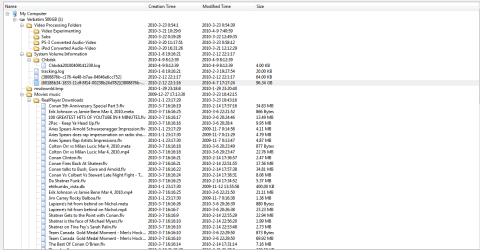
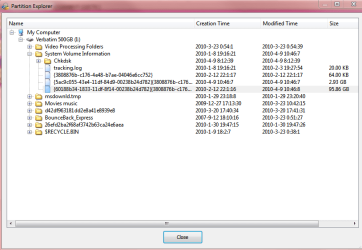
The Verbatim HDD is an external. Should have no windows features or folders on it, but it does....why, don't know.
I went and downloaded WinDirStat. Basically it has no idea either.
It shows some windows folders:
msdownld.tmp
$recycle bin
System Volume Information
2 folders that are random numbers/letters (they have lock icon on folder)
Here's a shot. You can see that Windows has allocated some space or folders for some reason, but they are not occupied. The math is still not adding up.
If Windows is locking me out of this drive space, I'm a little pissed off. I can see maybe 5GB or so, but 97.7GB. That's' ridiculous. Especially without actually using it.
I have WAY more than enough space on my C:\ (119 GB free of 144GB)
D:\ (122 GB free of 140 GB)
I also have an external SeaGate 1 TB H:\ (188 GB free of 931 GB)
Why would Windows allocate all that space then not use it. And if it is doing this, why on my external Verbatim? Why not on C:\? I just got rid of my Windows.old folder(used to have Vista Home Premium) and a bunch of old restore points off my C:\, specifically so I could claim back a bunch of my space back, about 2 weeks ago, and was completely happy when I got nearly 40 GB back. Now I am down 97.7GB.
I know I have alot of disc space in total, but that is still more than I am willing to give up.
Now all of a sudden I am down 97.7 GB more. Frustrating. | My System Specs | | System Manufacturer/Model Number Laptop Acer Aspire 6930 OS Windows 7 Professional CPU Intel Core2 Duo CPU T6400 @ 2.00GHz Memory 3 GB Graphics Card lowly Intel Express Chipset WHOPPING 64 mb dedicated.LOL Monitor(s) Displays 26" RCA and 40" Haier, and laptop 17" screen Screen Resolution 26":1366X768 40":1920X1080 Laptop Screen: 1366X768 Keyboard Microsoft Intellitype Wireless Multimedia Keyboard 1.1 Mouse Microsoft Wireless Optical Mouse 2000 Hard Drives Onboard HDD 300 GB/
Seagate 1TB External HDD/
Verbatim 500 GB External HDD/
Firelite 160 GB USB HDD Other Info Currently using Telus DSL. I currently have a 3.0 connection, but on wait list for 15.0 connection. |
09 Apr 2010
|
#4 | | Windows 7 Professional Fox Creek, AB, Canada |
Thanks but that's not it.
The Verbatim HDD is an external. Should have no windows features or folders on it, but it does....why, don't know.
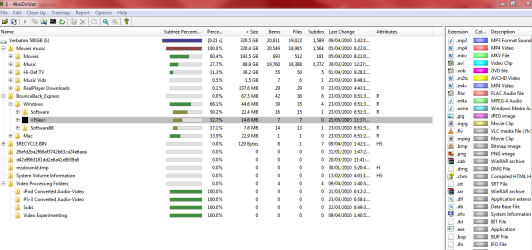
I went and downloaded WinDirStat. Basically it has no idea either.
It shows some windows folders:
msdownld.tmp
$recycle bin
System Volume Information
2 folders that are random numbers/letters (they have lock icon on folder)
Here's a shot. You can see that Windows has allocated some space or folders for some reason, but they are not occupied. The math is still not adding up.
The Movies music folder, and Video processing folder were the only folders I added myself. BounceBack Express came installed on HDD and Windows, well I guess it just does whatever ever the EFFFF it wants like always.
If Windows is locking me out of this drive space, I'm a little pissed off. I can see maybe 5GB or so, but 97.7GB. That's' ridiculous. Especially without actually using it.
I have WAY more than enough space on my C:\ (119 GB free of 144GB)
D:\ (122 GB free of 140 GB)
I also have an external SeaGate 1 TB H:\ (188 GB free of 931 GB)
Why would Windows allocate all that space then not use it. And if it is doing this, why on my external Verbatim? I just got rid of my Windows.old folder(used to have Vista Home Premium) and a bunch of old restore points off my C:\, specifically so I could claim back a bunch of my space back, about 2 weeks ago, and was completely happy when I got nearly 40 GB back. Now I am down 97.7GB.
I know I have alot of disc space in total, but that is still more than I am willing to give up.
Now all of a sudden I am down 97.7 GB more. Frustrating. | My System Specs | | System Manufacturer/Model Number Laptop Acer Aspire 6930 OS Windows 7 Professional CPU Intel Core2 Duo CPU T6400 @ 2.00GHz Memory 3 GB Graphics Card lowly Intel Express Chipset WHOPPING 64 mb dedicated.LOL Monitor(s) Displays 26" RCA and 40" Haier, and laptop 17" screen Screen Resolution 26":1366X768 40":1920X1080 Laptop Screen: 1366X768 Keyboard Microsoft Intellitype Wireless Multimedia Keyboard 1.1 Mouse Microsoft Wireless Optical Mouse 2000 Hard Drives Onboard HDD 300 GB/
Seagate 1TB External HDD/
Verbatim 500 GB External HDD/
Firelite 160 GB USB HDD Other Info Currently using Telus DSL. I currently have a 3.0 connection, but on wait list for 15.0 connection. |
09 Apr 2010
|
#5 | | Windows 7 Professional Fox Creek, AB, Canada |
Sorry bout double reply post, don't know what I did there, went to edit, ended up with 2, sorry | My System Specs | | System Manufacturer/Model Number Laptop Acer Aspire 6930 OS Windows 7 Professional CPU Intel Core2 Duo CPU T6400 @ 2.00GHz Memory 3 GB Graphics Card lowly Intel Express Chipset WHOPPING 64 mb dedicated.LOL Monitor(s) Displays 26" RCA and 40" Haier, and laptop 17" screen Screen Resolution 26":1366X768 40":1920X1080 Laptop Screen: 1366X768 Keyboard Microsoft Intellitype Wireless Multimedia Keyboard 1.1 Mouse Microsoft Wireless Optical Mouse 2000 Hard Drives Onboard HDD 300 GB/
Seagate 1TB External HDD/
Verbatim 500 GB External HDD/
Firelite 160 GB USB HDD Other Info Currently using Telus DSL. I currently have a 3.0 connection, but on wait list for 15.0 connection. |
09 Apr 2010
|
#6 | | Windows 7 Professional x64 Rednecksville |
Part of what you are seeing is the discrepancy between manufacturers' reported capacity and actual capacity.
Manufacturers like to define a gigabyte as 1000MB, or 1,000,000,000 bytes. Developers have defined a Gigabyte as 1024MB, however, for a total of1,073,741,824 bytes.
The OS uses the latter definition of 1024MB to a GB. Guess what 5,000,000,000 bytes is in gigabytes? 465.661287 So what you are seeing is normal. My 1.5TB drive is actually only 1397.26 GB. | My System Specs | | System Manufacturer/Model Number Custom OS Windows 7 Professional x64 CPU Intel i7 2600K OC'd @ 4620 MHz Motherboard Asus P8Z68-V Pro Memory 16GB GSkill Sniper 2133 Mhz (4x4GB) Graphics Card EVGA GeForce GTX 480 SuperClocked+ Sound Card Realtek High Definition Audio Monitor(s) Displays 2x Acer S273HLbmii 27" Screen Resolution 2 x 1920x1080 Keyboard Logitech MK320 (wireless) Mouse Logitech MK320 (wireless) PSU Corsair HW Series 750w (modular) Case Cooler Master HAF 932 Advanced Blue Edition Cooling CM Hyper 212+ CPU cooler, 3x 230mm + 1x 140mm case fans Hard Drives 64GB Crucial M4 SSD
Storage: Hitachi 1TB 5400RPM, Samsung 1.5TB 5400RPM Internet Speed 30 Mb/s : 2 Mb/s |
09 Apr 2010
|
#7 | | Windows 7 Professional Fox Creek, AB, Canada |
I appreciate what you are saying.....I understand that.
I bought a 500 GB HDD. I only got 465 GB. Because of the discrepancy.
I am missing ANOTHER 97.7 GB on top.
So the 500 GB HDD is missing 97.7 GB(unexplained) + 35 GB (off the top) = 132.7 GB MISSING
That's 26.4% of my original purchase.
This is WAY more than the difference between what they say you get and actually get.
I only lost 69 GB out the box on my SeaGate 1TB external HDD. No extra unexplained missing space on that drive. | My System Specs | | System Manufacturer/Model Number Laptop Acer Aspire 6930 OS Windows 7 Professional CPU Intel Core2 Duo CPU T6400 @ 2.00GHz Memory 3 GB Graphics Card lowly Intel Express Chipset WHOPPING 64 mb dedicated.LOL Monitor(s) Displays 26" RCA and 40" Haier, and laptop 17" screen Screen Resolution 26":1366X768 40":1920X1080 Laptop Screen: 1366X768 Keyboard Microsoft Intellitype Wireless Multimedia Keyboard 1.1 Mouse Microsoft Wireless Optical Mouse 2000 Hard Drives Onboard HDD 300 GB/
Seagate 1TB External HDD/
Verbatim 500 GB External HDD/
Firelite 160 GB USB HDD Other Info Currently using Telus DSL. I currently have a 3.0 connection, but on wait list for 15.0 connection. |
09 Apr 2010
|
#8 | | |
You should download a program like Partition Wizard
Post a screenshot of the drive in question.
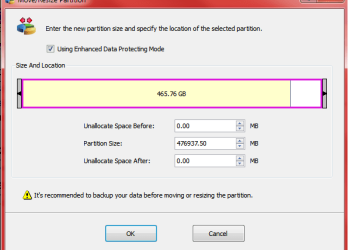
From that screenshot via WinDirStat it looks like me like your disk is partitioned incorrectly. You should be able to resize the partition via Partition Wizard without destroying the data. I would back up your data before resizing anyway.
For example (Screenshot via Partition Wizard):
In that screenshot you can see that Disk 2 has two partitions. One is 7.88 MB of Unallocated space (Normal) the other is 698 GB of NTFS partitioned space (F: LaCie 700GB). You hard drive will likely show a larger area of unallocated space. Either that, or you got a smaller hd than you should have. | My System Specs | | System Manufacturer/Model Number Apple Macbook Pro (April 2009) OS W7 Ult. x64 | OS X CPU Intel Mobile Core 2 Duo 2.93Ghz [T9800 Penryn] Motherboard NVIDIA nForce 730i Rev. B1 [Mac-F2268EC8 (U2E1)] Memory 4096MB Samsung DDR3 Dual Channel [PC3-8500F 1066Mhz] Graphics Card NVIDIA GeForce 9600M GT 512MB [G96M Rev. C1] Sound Card SB X-Fi Surround 5.1 USB | Onboard Realtek (Disabled) Monitor(s) Displays Acer x223wbd 22" | Apple Anti-Glare 17" (Disabled) Screen Resolution {Current} 1440x900 {Acer} 1680x1050 {Apple} 1920x1200 Keyboard Logitech G-15v2 [PN 920-000379] Mouse Logitech G-9 [PN 910-000338] PSU Magsafe Case Aluminum/Unibody (MBP52) Cooling 2 x 6000 RPM Fans Hard Drives {Internal}
Seagate Momentus 320GB 2.5" 7200RPM [ST9320421AS]
{Externals}
LaCie 320GB USB 2.0 HDD [301284UR]
LaCie 750GB USB 2.0 FW400 eSATA HDD [301314U]
LaCie 1TB USB 2.0 HDD [301304UR] Internet Speed 12Mbps/2.5Mbps w/ 24Mbps Speed Boost [Comcast] Other Info Logitech X-540 Speakers [PN 970223-0122]
Sennheiser PC-151 Headset |
09 Apr 2010
|
#9 | | Windows 7 Home Premium 64bit Southern Ohio |
As mentioned, a 500GB showing 465 avail. is normal. For the rest:
What does it look like under the disk management?
Anything unallocated or free?
Control Panel --> Admin. Tools -->
Computer Management --> Storage/Disk Management | My System Specs | | System Manufacturer/Model Number Custom (Self Build) OS Windows 7 Home Premium 64bit CPU Intel Core i7 2700k Motherboard eVGA P67 SLI Memory 8GB Mushkin Redline Ridgebacks @1866 Graphics Card EVGA GTX570 SC Sound Card XiFi Titanium HD Monitor(s) Displays LG W2453V Screen Resolution 1920x1080 Keyboard Saitek Cyborg PSU Seasonic x750 Case Corsair 600T SE White Cooling eVGA Superclocked CPU Cooler Hard Drives Intel 320 80GB -- Intel X25-V 40GB --WD Black 1TB x2 -- WD Blue 640GB Antivirus Kaspersky Browser IE Other Info LG BD/DVD |
09 Apr 2010
|
#10 | | Windows 7 Professional x64 Rednecksville |
Use a mapping program like Windirstat to find where your space is going. | My System Specs | | System Manufacturer/Model Number Custom OS Windows 7 Professional x64 CPU Intel i7 2600K OC'd @ 4620 MHz Motherboard Asus P8Z68-V Pro Memory 16GB GSkill Sniper 2133 Mhz (4x4GB) Graphics Card EVGA GeForce GTX 480 SuperClocked+ Sound Card Realtek High Definition Audio Monitor(s) Displays 2x Acer S273HLbmii 27" Screen Resolution 2 x 1920x1080 Keyboard Logitech MK320 (wireless) Mouse Logitech MK320 (wireless) PSU Corsair HW Series 750w (modular) Case Cooler Master HAF 932 Advanced Blue Edition Cooling CM Hyper 212+ CPU cooler, 3x 230mm + 1x 140mm case fans Hard Drives 64GB Crucial M4 SSD
Storage: Hitachi 1TB 5400RPM, Samsung 1.5TB 5400RPM Internet Speed 30 Mb/s : 2 Mb/s Missing alot of HDD problems? All times are GMT -5. The time now is 09:54 PM. | |