Windows 7 Forums


Windows 7: Change resolution of scroll wheel in MS Intellimouse?

10 Apr 2010   #1

Windows 7 64 bit Home Premium
Northern California Coast
 
 
Change resolution of scroll wheel in MS Intellimouse?

My MS Intellimouse Explorer 3.0 has detents in the scroll wheel operation which cause the scroll to jump two or three lines with every use. However, my MS Comfort Optical Mouse 3000 has a smooth continuous scroll wheel operation which is much preferred. Both mice are wired USB devices.


Is it possible to change the Explorer Mouse to scroll continuously without detents or do I have to just give up and buy the other mouse? I recall reading somewhere that this detent could be changed or removed or maybe I read wrongly.
My System SpecsSystem Spec

10 Apr 2010   #2

XP Pro SP3 X86 / Win7 Pro X86
Southern Ontario Canada


Quote   Quote: Originally Posted by mendopaul View Post
My MS Intellimouse Explorer 3.0 has detents in the scroll wheel operation which cause the scroll to jump two or three lines with every use. However, my MS Comfort Optical Mouse 3000 has a smooth continuous scroll wheel operation which is much preferred. Both mice are wired USB devices.

Is it possible to change the Explorer Mouse to scroll continuously without detents or do I have to just give up and buy the other mouse? I recall reading somewhere that this detent could be changed or removed or maybe I read wrongly.
Control Panel -> Mouse -> Wheel

Set it as you want it.
My System SpecsSystem Spec
11 Apr 2010   #3

Windows 7 64 bit Home Premium
Northern California Coast


Thanks for reply! But seems to me those are only software settings. The detents in my mouse are mechanical.
My System SpecsSystem Spec
.


11 Apr 2010   #4

Windows 7 Professional x64
The Wild West


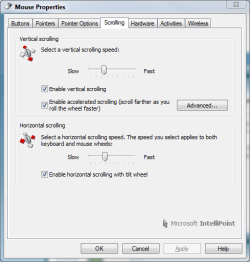
I have a Wireless 5000 mouse. It has the same type of wheel. It can be set to any amount of sensitivity. You MAY need the latest driver. HERE
Change resolution of scroll wheel in MS Intellimouse?-scrolling.png
My System SpecsSystem Spec
11 Apr 2010   #5

XP Pro SP3 X86 / Win7 Pro X86
Southern Ontario Canada


Quote   Quote: Originally Posted by mendopaul View Post
Thanks for reply! But seems to me those are only software settings. The detents in my mouse are mechanical.
Thats right... if you set the wheel setting to 1 it will scroll 1 line per click. Set it to 3 and you get 3 lines per click.

Is that a problem?
My System SpecsSystem Spec
11 Apr 2010   #6

Windows 7 64 bit Home Premium
Northern California Coast


Well, I wouldn't call it exactly a problem but my MS Comfort Mouse has no clicks at all and just smoothly scrolls up and down. I much prefer the Comfort Mouse over the Explorer 3000. I'm after "no clicks" like the other mouse and was just wondering if that was possible with this mouse. Maybe it's the mechanical construction and not electronic at all. Thanks for the replies!
My System SpecsSystem Spec
12 Apr 2010   #7

XP Pro SP3 X86 / Win7 Pro X86
Southern Ontario Canada


Quote   Quote: Originally Posted by mendopaul View Post
Well, I wouldn't call it exactly a problem but my MS Comfort Mouse has no clicks at all and just smoothly scrolls up and down. I much prefer the Comfort Mouse over the Explorer 3000. I'm after "no clicks" like the other mouse and was just wondering if that was possible with this mouse. Maybe it's the mechanical construction and not electronic at all. Thanks for the replies!
Of course it's the mechanical construction of the mouse...

You can't turn a spring off with software.
My System SpecsSystem Spec
20 Jan 2011   #8

Win7 pro
 
 
workaround

I've got the same problem with Intellipoint and scrolling. And as you search the internet, almost everybody complains about the scrolling feature. After an hour of reading through many discussions I've stumbled upon a little tool called X-Mouse Button Control: http://www.highrez.co.uk/downloads/X...tonControl.htm

It has almost the same mouse settings like Intellipoint but a few advantages:

- the scroll function works much better!

- if you don't like the way the mouse scrolls in one of your applications you can set special scroll settings for as many applications as you want.

- it works with every mouse connected to your computer and not just microsoft mice.

- there is a special setting called "make scroll wheel scroll window under cursor" - very useful!

- it is free (as Intellipoint is)


Microsoft's Intellipoint developers should follow the example! There is a guy out there called Phil which does a much better job then you guys at microsoft.
My System SpecsSystem Spec
Reply

 Change resolution of scroll wheel in MS Intellimouse? problems?


Thread Tools


Similar help and support threads for: Change resolution of scroll wheel in MS Intellimouse?
Thread Forum
Scroll wheel bug in Personalization page? General Discussion
Mouse with toggle switch instead of scroll wheel? Hardware & Devices
cyborg 9 second scroll wheel battlefield 3 Gaming
ctrl +scroll wheel Performance & Maintenance
Razer Deathadder scroll wheel problem Drivers


All times are GMT -5. The time now is 02:13 PM.


Seven Forums Android App Seven Forums IOS App Follow us on Facebook

Windows 7 Forums is an independent web site and has not been authorized,
sponsored, or otherwise approved by Microsoft Corporation.
"Windows 7" and related materials are trademarks of Microsoft Corp.
© Designer Media Ltd
  

1 2 3 4 5 6 7 8 9 10 11 12 13 14 15 16 17 18 19 20 21 22 23 24 25 26 27 28 29 30 31 32