Windows 7 Forums Search
Welcome to Windows 7 Forums. Our forum is dedicated to helping you find solutions with any problems, errors or issues you are experiencing with Windows 7. The Windows 7 forum also covers news and updates and has an extensive Windows 7 tutorial section that covers a wide range of tips and tricks.


Windows 7 - How do I move the BCD?

 
04-13-2010   #1


Windows 7 32bit


How do I move the BCD?

I just installed Windows 7 and the Boot Configuration Database is on my F drive. I want it on my C drive, or at least not on my F drive. Does anyone know how I can accomplish this?

Thanks,
Justin

My System SpecsSystem Spec
04-14-2010   #2


Windows 7 Pro 64 SP1


Welcome to the forum Justin,
See if this tutorial helps you out,
BCDEDIT - How to Use
My System SpecsSystem Spec
04-14-2010   #3


Windows 7 32bit


Thanks, I'll give it a try.
My System SpecsSystem Spec
.


04-14-2010   #4


Windows 7 Ultimate 32-bit & 64-bit both SP1


Do you have a multi-boot system?
My System SpecsSystem Spec
04-14-2010   #5


Windows 7 32bit


Dwarf
I don't have multi boot system yet, but I might. If I find out that some of my critical programs don't work with Windows 7, I will have to include XP in the mix for a while.

derekimo
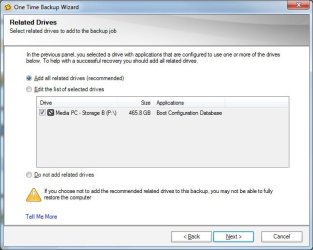
I tried your suggestion. The first picture is the important part of what I saw. It seems to be saying that everything is on the C drive. Is that true? Still, when I use Norton Ghost to back up the C drive, I get the message displayed in the second picture.

Note: the F drive is now the P drive.

Thanks again,
Justin
Attached Thumbnails
How do I move the BCD?-cmd.jpg   How do I move the BCD?-ghost.jpg  
My System SpecsSystem Spec
04-14-2010   #6


Windows 7 x64 pro/ Windows 7 x86 Pro/ XP SP3 x86


Pilotwing,

Provided you have your Windows 7 install disc, there’s an easy solution.

Boot into windows and enter Computer Management, then click Storage, then Disk Management.

Right click your C: drive and select “Mark Partition as Active.” This tells Windows you’ll be booting from this drive.

Restart your computer and enter your BIOS. Set your boot order so that the Optical Drive is at the top.

Save and exit.

Boot into your Windows 7 install disc, and go to the recovery options. Run Startup Repair and you are done. Afterwards, you can set your C: drive back to top of the boot order.

Last edited by Bill2; 04-14-2010 at 01:04 AM.. Reason: typo
My System SpecsSystem Spec
04-14-2010   #7


Windows 7 32bit


This picture is what I see in the Computer Management window. C is already active. What concerns me is that P is also active. I also already set my dvd drive as the first in my bios boot order.

I'm basically concerned about two things.

1. I'll decide I need a dual boot system and the ghost images I've already created will be useless because the BCD isn't included in them. BTW it took about 4 hours for Windows 7 to install on my media pc, so I don't want to have to do that again.
2. Since drive P is "active" windows will do other things to it that I don't want done. It's a drive for file storage, nothing else.

Are either one of these concerns reasonable?
Attached Thumbnails
How do I move the BCD?-manage.jpg  
My System SpecsSystem Spec
04-14-2010   #8


Vista x64 / 7 X64


D/l this , sisparV6.zip

( as always, rt click it select properties>unblock>apply>ok )

Rt click it and select Extract.

Rt click on sisparV6.cmd and RUN AS ADMINISTRATOR.

Select C as the new system partition.

Enter N to adding existing boot menu items.

Select Y to making a partition Inactive.

Select P as the partition to make Inactive.

That's it.
My System SpecsSystem Spec
04-14-2010   #9


Windows 7 x64 pro/ Windows 7 x86 Pro/ XP SP3 x86


Pilotwings,

Am somewhat confused now so just clarify a few things.

1) You have 2 separate hard drives with the os on one and boot files on the other?

2) You dont want the 2nd hdd to be bootable?
My System SpecsSystem Spec
04-14-2010   #10


Windows 7 32bit


Bill2

I have many hard drives in this computer. I installed windows 7 on the c drive, but for some reason it made the P drive the system drive. That seems to be the problem. Since the P drive is just for file storage, I don't want it to be bootable.

SIW2

I will try that right now. Thanks.
My System SpecsSystem Spec
Reply

 How do I move the BCD? problems?


Thread Tools


Similar Threads for: How do I move the BCD?
Thread Forum
the move from X86 to X64 General Discussion
Solved Move from 150 GB HD to a new 488 GB HD Installation & Setup
Can't move folders with files, but can move files General Discussion


All times are GMT -5. The time now is 12:36 PM.


Windows 7 Forums is an independent web site and has not been authorized,
sponsored, or otherwise approved by Microsoft Corporation.
"Windows 7" and related materials are trademarks of Microsoft Corp.
© Designer Media Ltd
  

1 2 3 4 5 6 7 8 9 10 11 12 13 14 15 16 17 18 19 20 21 22 23 24 25 26 27 28 29 30