Windows 7 Forums Search
Welcome to Windows 7 Forums. Our forum is dedicated to helping you find solutions with any problems, errors or issues you are experiencing with Windows 7. The Windows 7 forum also covers news and updates and has an extensive Windows 7 tutorial section that covers a wide range of tips and tricks.


Windows 7 - whats wrong with my folder properties?

 
04-15-2010   #1


windows ultimate 7 64 bit


whats wrong with my folder properties?

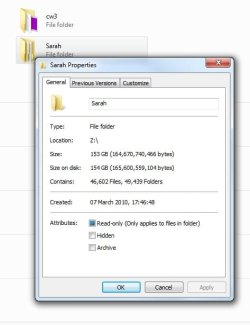
when i right click a folder on my network drive and choose properties the files and folders and the sizes just go up and up forever! see attached pic for example. there is no hope in hell theres almost the same amount of folders as there is files in there and the same goes for the size its nowhere near that.

Attached Thumbnails
whats wrong with my folder properties?-properties.jpg  
My System SpecsSystem Spec
04-15-2010   #2


Windows 7 Ultimate 64 bit Steve Ballmer Signature Edition


Quote   Quote: Originally Posted by totalguy View Post
when i right click a folder on my network drive and choose properties the files and folders and the sizes just go up and up forever! see attached pic for example. there is no hope in hell theres almost the same amount of folders as there is files in there and the same goes for the size its nowhere near that.
Are you running a good Antivirus app? Strange things like this are often caused by virii!
My System SpecsSystem Spec
04-15-2010   #3


XP Pro SP3 X86 / Win7 Pro X86


Quote   Quote: Originally Posted by totalguy View Post
when i right click a folder on my network drive and choose properties the files and folders and the sizes just go up and up forever! see attached pic for example. there is no hope in hell theres almost the same amount of folders as there is files in there and the same goes for the size its nowhere near that.
First step...

Control Panel -> Folder Options -> View
Set it to show hidden files
Uncheck the "hide system files" option.

Now revisit that folder and confirm the numbers you are getting are wrong...
I agree the 49,000+ folders does sound a tad suspicious...

From there there are a couple of possibilities...

1) All those files and folders do, in fact, exist in which case you need to have a talk with Sarah...

2) They don't exist in which case you might have some scrambled directory indexes and can try fixing them with CHKDSK...

On the folder's host machine....

WinKey+R type CMD and click OK.

In the shell window...

CHKDSK /F C:

If the files are not on drive C:, substitute the appropriate drive letter for the C...

The system may suggest you dismount the drive ... say Yes
It may also suggest running on the next reboot ... say Yes

Close the command shell when CHKDSK exits and restart your system.

Is it fixed?

My System SpecsSystem Spec
.


04-15-2010   #4


windows ultimate 7 64 bit


the antivirus is eset smart security fully upto date.

tried the hidden files thing although now i see why you would say that, but thats more for a noob than me lol.

chkdsk cannot run on a network drive so i cant do that.
My System SpecsSystem Spec
04-15-2010   #5


windows ultimate 7 64 bit


ok i plugged it direct into computer and the problem isnt apparent so does that mean theres a problem with the nas drive software then?
My System SpecsSystem Spec
04-15-2010   #6


XP Pro SP3 X86 / Win7 Pro X86


Quote   Quote: Originally Posted by totalguy View Post
the antivirus is eset smart security fully upto date.

tried the hidden files thing although now i see why you would say that, but thats more for a noob than me lol.

chkdsk cannot run on a network drive so i cant do that.
Did you notice the part about "On the drive's host machine..." IOW... that folder on the other machine.
My System SpecsSystem Spec
04-15-2010   #7


XP Pro SP3 X86 / Win7 Pro X86


Quote   Quote: Originally Posted by totalguy View Post
ok i plugged it direct into computer and the problem isnt apparent so does that mean theres a problem with the nas drive software then?
So now it's a NAS?... should have told us that up front.

Anyway if the drive doesn't show a problem when hooked directly to your computer, then there's only one place it can be... right?

Now... here comes the fun part... What make/model/etc. NAS are we talking about?
(A lot of those boxes are on Linux and a real pain to do anything with...)
My System SpecsSystem Spec
04-16-2010   #8


windows ultimate 7 64 bit


i did "when i right click a folder on my network drive" its a pluscom nas-rdc3282 i did look it up all i got is a forum post to download the firmware but the file does not include firmware! i called the phone number and was told to send an email to the guy on the phone and he would send me a link for the new firmware unfortunately the email returned!
My System SpecsSystem Spec
04-16-2010   #9


XP Pro SP3 X86 / Win7 Pro X86


Quote   Quote: Originally Posted by totalguy View Post
i did "when i right click a folder on my network drive" its a pluscom nas-rdc3282 i did look it up all i got is a forum post to download the firmware but the file does not include firmware! i called the phone number and was told to send an email to the guy on the phone and he would send me a link for the new firmware unfortunately the email returned!
Ok... I copied the make and model number from your post... pasted it into google's search bar... this was the second result...

Pluscom Forum: Download Firmware Version for NAS-RDC3282

I suspect you should click the link on that page that says "Download firmware version for ...."

Also... as a general suggestion... it's not a good idea to map network drives. That's really only there for Win3.1 compatibility. Since win2000... folder shares have been the way to go. You will have enhanced security and the root of the drive is not exposed to the network.
My System SpecsSystem Spec
04-16-2010   #10


windows ultimate 7 64 bit


i already got that page you put the link for and thats what i explained about in my last post.

if i shouldnt map it how should i do it? the root isnt exposed its mapped to a folder Z:\main. i did it that way because it was much easier to access it when i wanted to use it.
My System SpecsSystem Spec
Reply

 whats wrong with my folder properties? problems?


Thread Tools


Similar Threads for: whats wrong with my folder properties?
Thread Forum
whats wrong with this? i keep getting BSODs Crashes and Debugging
Whats wrong with my taskbar? General Discussion
Whats Wrong With This Machine? General Discussion
Whats wrong with my pc? Hardware & Devices
FPS spikes - how to diagnose whats wrong Graphic Cards


All times are GMT -5. The time now is 12:36 PM.


Windows 7 Forums is an independent web site and has not been authorized,
sponsored, or otherwise approved by Microsoft Corporation.
"Windows 7" and related materials are trademarks of Microsoft Corp.
© Designer Media Ltd
  

1 2 3 4 5 6 7 8 9 10 11 12 13 14 15 16 17 18 19 20 21 22 23 24 25 26 27 28 29 30