dswellhauser
New member
- Local time
- 11:06 PM
- Messages
- 5
O/S Windows 7 Ultimate 64 bit
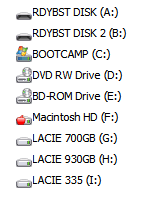
I have two Hard Drive Docks for external drives. Just recently...last couple of weeks...I've noticed that every time I change one of these external drives (movies, music, etc.) for another one it changes the drive letter and makes the old one unavailable until I've rebooted my system.
Before the computer would simply recognize the new drive and assign the same letter to it. But now it cycles through all the available drive letters until none are available and then the drive will not show up in my Computer...but does show up in Computer Management but without an assigned letter.
Also, if I turn off the hard drive dock and leave the same hard drive in it and then turn this back on it will give the drive a new drive letter. This is passing strange to my way of thinking
Anyone out there with an idea of what might be going on here??
Thanks
I have two Hard Drive Docks for external drives. Just recently...last couple of weeks...I've noticed that every time I change one of these external drives (movies, music, etc.) for another one it changes the drive letter and makes the old one unavailable until I've rebooted my system.
Before the computer would simply recognize the new drive and assign the same letter to it. But now it cycles through all the available drive letters until none are available and then the drive will not show up in my Computer...but does show up in Computer Management but without an assigned letter.
Also, if I turn off the hard drive dock and leave the same hard drive in it and then turn this back on it will give the drive a new drive letter. This is passing strange to my way of thinking
Anyone out there with an idea of what might be going on here??
Thanks
My Computer
At a glance
Windows 7 Ultimate 64 bit
- OS
- Windows 7 Ultimate 64 bit