| | Welcome to Windows 7 Forums. Our forum is dedicated to helping you find solutions with any problems, errors or issues you are experiencing with Windows 7. The Windows 7 forum also covers news and updates and has an extensive Windows 7 tutorial section that covers a wide range of tips and tricks. | Windows 7 - Right Click Context Menu - Eject USB Device?
|
04-17-2010
|
#1 | | |
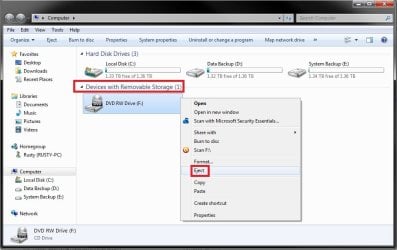
Right Click Context Menu - Eject USB Device? EDITED: Original Question: How can I add the eject/safely remove choice back into the explorer context menu?
New Question:
Ok well now I want to ask a different question. Does anyone know how to properly edit the registry to add such a key. When I'm in the devices & printers window the option is available via right click. Therefore, I searched for eject in the registry and found an entry in the shell section of DeviceDisplayObject which is the controller (I hope) for that Devices & Printers window. I'm assuming this is the correct key.
It's located at:
HKEY_CLASSES_ROOT\DeviceDisplayObject\AllItems\Shell\Windows.Eject
Now I've attempted to copy that and move it to places such as the global context menu area (ROOT\*\Shell\) and (ROOT\Drive\shell\). However, no matter where I add it it won't work. Maybe something in the shellex line below it is required as well, I don't know. Maybe I'm just cloning it wrong.
If anyone has experience give it a try. NOTE: I don't want to open the menu for ejecting a disk, I want the right click item to actually eject the disk. Also, I know how to create a shortcut to open the ejection menu.
Last edited by notsograymatter; 04-18-2010 at 12:30 PM..
| My System Specs | | System Manufacturer/Model Number Apple Macbook Pro (April 2009) OS W7 Ult. x64 | OS X CPU Intel Mobile Core 2 Duo 2.93Ghz [T9800 Penryn] Motherboard NVIDIA nForce 730i Rev. B1 [Mac-F2268EC8 (U2E1)] Memory 4096MB Samsung DDR3 Dual Channel [PC3-8500F 1066Mhz] Graphics Card NVIDIA GeForce 9600M GT 512MB [G96M Rev. C1] Sound Card SB X-Fi Surround 5.1 USB | Onboard Realtek (Disabled) Monitor(s) Displays Acer x223wbd 22" | Apple Anti-Glare 17" (Disabled) Screen Resolution {Current} 1440x900 {Acer} 1680x1050 {Apple} 1920x1200 Keyboard Logitech G-15v2 [PN 920-000379] Mouse Logitech G-9 [PN 910-000338] PSU Magsafe Case Aluminum/Unibody (MBP52) Cooling 2 x 6000 RPM Fans Hard Drives {Internal}
Seagate Momentus 320GB 2.5" 7200RPM [ST9320421AS]
{Externals}
LaCie 320GB USB 2.0 HDD [301284UR]
LaCie 750GB USB 2.0 FW400 eSATA HDD [301314U]
LaCie 1TB USB 2.0 HDD [301304UR] Internet Speed 12Mbps/2.5Mbps w/ 24Mbps Speed Boost [Comcast] Other Info Logitech X-540 Speakers [PN 970223-0122]
Sennheiser PC-151 Headset |
04-17-2010
|
#2 | | Windows 7 Ultimate 64bit, MS XP Mode, VBox, VMLite Workstation, VM Player 4.0 |
I used to unplug an external drive in Vista without the need to click on the safely remove icon. In 7 the prompting for missing device will be seen when not doing that for a flash drive however.
With or without clicking on the green icon in the system tray the drive letter to certain flash drives will still be maintained. If the brand like San Disk sees an automatic appearance when first plugged in with a small screen with the brand name on it then you click the safely remove option to stop the prompting. | My System Specs | | OS Windows 7 Ultimate 64bit, MS XP Mode, VBox, VMLite Workstation, VM Player 4.0 CPU AMD Phenom II X4 Deneb 3.4 Motherboard Gigabyte 790XTA-UD4 Memory Mushkin Enhanced DDR3 1600 8gb 1.5v-1.7v Graphics Card MSI Radeon 5750 1gb Sound Card Creative Labs X-Fi XtremeGamer Monitor(s) Displays 2 x Acer P191W 19" widesscreen Screen Resolution 1440x900 native Keyboard Microsoft Recusa Razor Mouse MS Trackball Explorer PSU Corsair 750TX Case Antec 900-2 - SSD compatible Cooling Zalman CNPS9900A Hard Drives WD Black Edition 1tb Sata 6.0 = 2
WD Black Edition 1tb Sata 3.0 = 2
WD 1tb Green Power sata = 2 1 external
usb flash drives = 8 Internet Speed 12mbps boost |
04-17-2010
|
#3 | | Vista and Windows7, sometimes Ubuntu and Fedora |
The way I understood it: Eject was for the card reader because on some system you cut the reader power off if you used "safely remove". For USB sticks and disks you were supposed to use "safely remove" which indeed was part of the Vista right click context menu. That would make sure that all data buffers were written to the device.
But you are right, in Windows 7 you have "Eject" for the cards, but no "Safely Remove" for the others. For that you have to go to the icon in the tray. | My System Specs | | System Manufacturer/Model Number HP, Dell, Gateway - 2 laptops and 2 desktops OS Vista and Windows7, sometimes Ubuntu and Fedora CPU from 1.6GHz Duo to 2.5GHz Quad Monitor(s) Displays 2x HP w2207 Keyboard with trackball - no mices Mouse terrible devices, who wants them Hard Drives 5x HDD, 2x SSD, 6x Externals Internet Speed DSL 6000 |
04-17-2010
|
#4 | | |
Whether it's called "Eject" or "Safely Remove", it'd be nice if I could add it to my context menu.
I want it there because once a HDD is ejected, it'll enter low power mode, then if I want to reconnect it, I can just fiddle with the usb plug. Granted I could always use the safely remove systray icon, but it's not as convenient for me.
BTW, My external HDDs don't enter low power mode when connected, or if they do they get interuppted and spin back up, it's much more reliable when the OS thinks they're disconnected. | My System Specs | | System Manufacturer/Model Number Apple Macbook Pro (April 2009) OS W7 Ult. x64 | OS X CPU Intel Mobile Core 2 Duo 2.93Ghz [T9800 Penryn] Motherboard NVIDIA nForce 730i Rev. B1 [Mac-F2268EC8 (U2E1)] Memory 4096MB Samsung DDR3 Dual Channel [PC3-8500F 1066Mhz] Graphics Card NVIDIA GeForce 9600M GT 512MB [G96M Rev. C1] Sound Card SB X-Fi Surround 5.1 USB | Onboard Realtek (Disabled) Monitor(s) Displays Acer x223wbd 22" | Apple Anti-Glare 17" (Disabled) Screen Resolution {Current} 1440x900 {Acer} 1680x1050 {Apple} 1920x1200 Keyboard Logitech G-15v2 [PN 920-000379] Mouse Logitech G-9 [PN 910-000338] PSU Magsafe Case Aluminum/Unibody (MBP52) Cooling 2 x 6000 RPM Fans Hard Drives {Internal}
Seagate Momentus 320GB 2.5" 7200RPM [ST9320421AS]
{Externals}
LaCie 320GB USB 2.0 HDD [301284UR]
LaCie 750GB USB 2.0 FW400 eSATA HDD [301314U]
LaCie 1TB USB 2.0 HDD [301304UR] Internet Speed 12Mbps/2.5Mbps w/ 24Mbps Speed Boost [Comcast] Other Info Logitech X-540 Speakers [PN 970223-0122]
Sennheiser PC-151 Headset |
04-17-2010
|
#5 | | Vista and Windows7, sometimes Ubuntu and Fedora |

Quote: Originally Posted by Night Hawk I used to unplug an external drive in Vista without the need to click on the safely remove icon. In 7 the prompting for missing device will be seen when not doing that for a flash drive however.
With or without clicking on the green icon in the system tray the drive letter to certain flash drives will still be maintained. If the brand like San Disk sees an automatic appearance when first plugged in with a small screen with the brand name on it then you click the safely remove option to stop the prompting. Your approach is only halfway safe if you did not enable write caching (which I guess most people would do because of the performance gain). With write caching on, you could lose data. | My System Specs | | System Manufacturer/Model Number HP, Dell, Gateway - 2 laptops and 2 desktops OS Vista and Windows7, sometimes Ubuntu and Fedora CPU from 1.6GHz Duo to 2.5GHz Quad Monitor(s) Displays 2x HP w2207 Keyboard with trackball - no mices Mouse terrible devices, who wants them Hard Drives 5x HDD, 2x SSD, 6x Externals Internet Speed DSL 6000 |
04-17-2010
|
#6 | | Windows 7 Ultimate 64bit, MS XP Mode, VBox, VMLite Workstation, VM Player 4.0 |
At the time I simply plugged the drive in and upnplugged when first getting it to solve the XP detection problem while it still had the factory Fat volume on. That was a few times originally subsequently leaving it plugged in once reformatted until 7 came along!
Now it's no longer in the case but waiting to go back into the external casing or find another home. But write caching wasn't involved there. With the flash drives now being used the sys tray icon is simply clicked for the eject option.
The little green icon is still the same in 7 and should be used as a regualr habit to solve all problems with the external drives. Without any drive or device plugged in however the icon is not seen until you plug one in which I did to see that reappear. | My System Specs | | OS Windows 7 Ultimate 64bit, MS XP Mode, VBox, VMLite Workstation, VM Player 4.0 CPU AMD Phenom II X4 Deneb 3.4 Motherboard Gigabyte 790XTA-UD4 Memory Mushkin Enhanced DDR3 1600 8gb 1.5v-1.7v Graphics Card MSI Radeon 5750 1gb Sound Card Creative Labs X-Fi XtremeGamer Monitor(s) Displays 2 x Acer P191W 19" widesscreen Screen Resolution 1440x900 native Keyboard Microsoft Recusa Razor Mouse MS Trackball Explorer PSU Corsair 750TX Case Antec 900-2 - SSD compatible Cooling Zalman CNPS9900A Hard Drives WD Black Edition 1tb Sata 6.0 = 2
WD Black Edition 1tb Sata 3.0 = 2
WD 1tb Green Power sata = 2 1 external
usb flash drives = 8 Internet Speed 12mbps boost |
04-18-2010
|
#7 | | |
One of my problems with the safely eject systray icon is that when I have mutiple devices connected and eject one, I have to actually power the device down in order to eject another. In other words, I can't eject to low power mode and then fiddle with the connection to re-engage as I usually do. It's too bad that their isn't an application (atleast that I know of) that handles devices like Disk Utility on the MAC.
For those who don't know, disk utility allows you to mount and unmount partitions of external hard drives without affecting partitions on the same disk. OS X automatically mounts all partitions on a disk when it's initially connected, but with disk utility you can unmount 1 partition while keeping the other mounted and/or unmount all partitions and then mount them again 30 minutes later without having to cycle the power in the device. | My System Specs | | System Manufacturer/Model Number Apple Macbook Pro (April 2009) OS W7 Ult. x64 | OS X CPU Intel Mobile Core 2 Duo 2.93Ghz [T9800 Penryn] Motherboard NVIDIA nForce 730i Rev. B1 [Mac-F2268EC8 (U2E1)] Memory 4096MB Samsung DDR3 Dual Channel [PC3-8500F 1066Mhz] Graphics Card NVIDIA GeForce 9600M GT 512MB [G96M Rev. C1] Sound Card SB X-Fi Surround 5.1 USB | Onboard Realtek (Disabled) Monitor(s) Displays Acer x223wbd 22" | Apple Anti-Glare 17" (Disabled) Screen Resolution {Current} 1440x900 {Acer} 1680x1050 {Apple} 1920x1200 Keyboard Logitech G-15v2 [PN 920-000379] Mouse Logitech G-9 [PN 910-000338] PSU Magsafe Case Aluminum/Unibody (MBP52) Cooling 2 x 6000 RPM Fans Hard Drives {Internal}
Seagate Momentus 320GB 2.5" 7200RPM [ST9320421AS]
{Externals}
LaCie 320GB USB 2.0 HDD [301284UR]
LaCie 750GB USB 2.0 FW400 eSATA HDD [301314U]
LaCie 1TB USB 2.0 HDD [301304UR] Internet Speed 12Mbps/2.5Mbps w/ 24Mbps Speed Boost [Comcast] Other Info Logitech X-540 Speakers [PN 970223-0122]
Sennheiser PC-151 Headset |
04-18-2010
|
#8 | | |
Ok well now I want to ask a different question. Does anyone know how to properly edit the registry to add such a key. When I'm in the devices & printers window the option is available via right click. Therefore, I searched for eject in the registry and found an entry in the shell section of Device... I'm assuming this is the correct key.
It's located at:
HKEY_CLASSES_ROOT\DeviceDisplayObject\AllItems\Shell\Windows.Eject
Now I've attempted to clone that and move it to places such as the global context menu area (ROOT\*\Shell\) and (ROOT\Drive\shell\. However, no matter where I add it it won't work. Maybe something in the shellex line below it is required as well, I don't know. Maybe I'm just cloning it wrong.
If anyone has experience give it a try. | My System Specs | | System Manufacturer/Model Number Apple Macbook Pro (April 2009) OS W7 Ult. x64 | OS X CPU Intel Mobile Core 2 Duo 2.93Ghz [T9800 Penryn] Motherboard NVIDIA nForce 730i Rev. B1 [Mac-F2268EC8 (U2E1)] Memory 4096MB Samsung DDR3 Dual Channel [PC3-8500F 1066Mhz] Graphics Card NVIDIA GeForce 9600M GT 512MB [G96M Rev. C1] Sound Card SB X-Fi Surround 5.1 USB | Onboard Realtek (Disabled) Monitor(s) Displays Acer x223wbd 22" | Apple Anti-Glare 17" (Disabled) Screen Resolution {Current} 1440x900 {Acer} 1680x1050 {Apple} 1920x1200 Keyboard Logitech G-15v2 [PN 920-000379] Mouse Logitech G-9 [PN 910-000338] PSU Magsafe Case Aluminum/Unibody (MBP52) Cooling 2 x 6000 RPM Fans Hard Drives {Internal}
Seagate Momentus 320GB 2.5" 7200RPM [ST9320421AS]
{Externals}
LaCie 320GB USB 2.0 HDD [301284UR]
LaCie 750GB USB 2.0 FW400 eSATA HDD [301314U]
LaCie 1TB USB 2.0 HDD [301304UR] Internet Speed 12Mbps/2.5Mbps w/ 24Mbps Speed Boost [Comcast] Other Info Logitech X-540 Speakers [PN 970223-0122]
Sennheiser PC-151 Headset |
04-18-2010
|
#10 | | |
Yeah I know how to do that, I want the Eject/Safely remove item in the context menu because it's item specific. I can right click > eject a specific drive. The shortcut isn't any better than the stock systray icon
BTW: You don't need to download an external program to do that, you can just use the line: C:\Windows\System32\rundll32.exe shell32.dll,Control_RunDLL hotplug.dll | My System Specs | | System Manufacturer/Model Number Apple Macbook Pro (April 2009) OS W7 Ult. x64 | OS X CPU Intel Mobile Core 2 Duo 2.93Ghz [T9800 Penryn] Motherboard NVIDIA nForce 730i Rev. B1 [Mac-F2268EC8 (U2E1)] Memory 4096MB Samsung DDR3 Dual Channel [PC3-8500F 1066Mhz] Graphics Card NVIDIA GeForce 9600M GT 512MB [G96M Rev. C1] Sound Card SB X-Fi Surround 5.1 USB | Onboard Realtek (Disabled) Monitor(s) Displays Acer x223wbd 22" | Apple Anti-Glare 17" (Disabled) Screen Resolution {Current} 1440x900 {Acer} 1680x1050 {Apple} 1920x1200 Keyboard Logitech G-15v2 [PN 920-000379] Mouse Logitech G-9 [PN 910-000338] PSU Magsafe Case Aluminum/Unibody (MBP52) Cooling 2 x 6000 RPM Fans Hard Drives {Internal}
Seagate Momentus 320GB 2.5" 7200RPM [ST9320421AS]
{Externals}
LaCie 320GB USB 2.0 HDD [301284UR]
LaCie 750GB USB 2.0 FW400 eSATA HDD [301314U]
LaCie 1TB USB 2.0 HDD [301304UR] Internet Speed 12Mbps/2.5Mbps w/ 24Mbps Speed Boost [Comcast] Other Info Logitech X-540 Speakers [PN 970223-0122]
Sennheiser PC-151 Headset | Right Click Context Menu - Eject USB Device? | All times are GMT -5. The time now is 08:01 AM. |  |