Windows 7 Forums Search
Welcome to Windows 7 Forums. Our forum is dedicated to helping you find solutions with any problems, errors or issues you are experiencing with Windows 7. The Windows 7 forum also covers news and updates and has an extensive Windows 7 tutorial section that covers a wide range of tips and tricks.


Windows 7 - Help with fans.

 
04-22-2010   #11


Windows 7 Professional


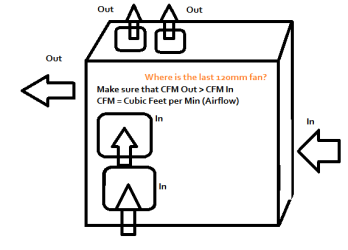
I totally agree with the above post, but want to add that if you don't put a fan in both of the side or top positions, you should fully cover the unused fan opening. If you don't, you risk the adjacent fan pulling or pushing the air from the closest opening causing a 'short circuit' and having no net effect on cooling.

My System SpecsSystem Spec
04-22-2010   #12


Windows 7 64Bit Ultimate Edition SP1


Quote   Quote: Originally Posted by notsograymatter View Post
Quote   Quote: Originally Posted by Dwarf View Post
The bottom side fan should also be drawing air into the case. The missing exhaust fan is the fan built in to the PSU itself. You should arrange for the case to be under negative air pressure with more air being exhausted than taken in. You should also have the side fans running slower than the front. The side fans are optional, but if you fit them they should be pulling air into the case. If you do fit them, you should also fit the top fans and have them exhausting air from the case.

See also this on a similar topic: Question from a test
What he said
Hmmmmmm, i think i have came across this setup before for this case when i having been browsing the web for data concerning my fan setup etc.

I shall give this a bash, thank you.
My System SpecsSystem Spec
04-22-2010   #13


Windows 7 64Bit Ultimate Edition SP1


Thanks everyone for all the info.
My System SpecsSystem Spec
.


04-22-2010   #14


XP Pro SP3 X86 / Win7 Pro X86


Quote   Quote: Originally Posted by rmw020 View Post
Thanks everyone for all the info.
Just one more little hint in passing...

If you wet your palm and hold it about an inch from your mouth and suck air in as hard as you can... what do you feel? Not much, eh?

Now repeat this execpt this time blow air out as gently as you possibly can... Oh WOW did you feel that?

Well... heatsinks and components react in pretty much the same way.

When thinking about case cooling, always think about how to get the most cool air into the hottest spots and how to get the resulting hot air out of the case, in the most efficient manner possible.
My System SpecsSystem Spec
Reply

 Help with fans. problems?


Thread Tools


Similar Threads for: Help with fans.
Thread Forum
Solved New Fans. Hardware & Devices
Fans Overclocking and Case Mods
Solved Help with my fans set up. Hardware & Devices
Solved Hey Fans Overclocking and Case Mods
help with fans Overclocking and Case Mods


All times are GMT -5. The time now is 12:37 PM.


Windows 7 Forums is an independent web site and has not been authorized,
sponsored, or otherwise approved by Microsoft Corporation.
"Windows 7" and related materials are trademarks of Microsoft Corp.
© Designer Media Ltd
  

1 2 3 4 5 6 7 8 9 10 11 12 13 14 15 16 17 18 19 20 21 22 23 24 25 26 27 28 29 30