Windows 7 Forums Search
Welcome to Windows 7 Forums. Our forum is dedicated to helping you find solutions with any problems, errors or issues you are experiencing with Windows 7. The Windows 7 forum also covers news and updates and has an extensive Windows 7 tutorial section that covers a wide range of tips and tricks.


Windows 7 - Help with fans.


04-22-2010   #1


Windows 7 64Bit Ultimate Edition SP1


Help with fans.

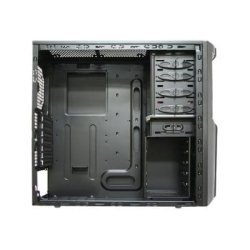
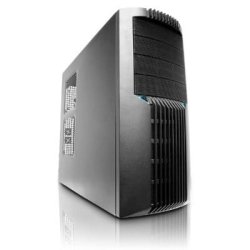
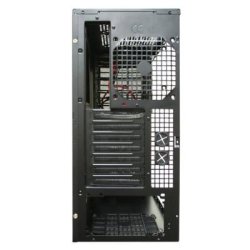
Have alook at the case pictures, can you please tell me which way i should have all the fans.???????????

A 120mm can be installed a front, 2 x 120 mm on the side and 140mm maximum on top of case.

The case is
NZXT Beta Evo


Black Metal Edition (BEVO-001BK)

Attached Thumbnails
Help with fans.-41a6oodotpl._ss400_.jpg   Help with fans.-41nxgth0izl._ss400_.jpg   Help with fans.-41vvos6zh-l._ss400_.jpg   Help with fans.-51of4qzrbil._ss400_.jpg  
My System SpecsSystem Spec
04-22-2010   #2


W7 Ult. x64 | OS X


Kind of an odd arrangement with the side fan slots.

Anyway, what you want is to have more air going in than out. That'll give you a negative pressure rig which is better for cooling than a positive or neutral pressure rig. It'll drag the air out quickly and get it out of the corners and such.

Therefore ()...

Front Fan = Input Air
Side Fans = Input Air
Back = Output Air
Top Fans = Output Air

Speeds: (N x Speed of Front Fan)

Front: 1
Side: 0.75
Back: 1.2
Top: 1

Basically you want your outgoing fans to be spinning a little faster than your incoming fans. You might be able to keep the top fan at the same speed as the front due to it being bigger. They could also work at the same speed if the CFM rating was higher on the output fans.

Here's a good explanation:
http://www.xoxide.com/computer-cooling.html

Last edited by notsograymatter; 04-22-2010 at 05:34 AM..
My System SpecsSystem Spec
04-22-2010   #3


Windows 7 64Bit Ultimate Edition SP1


Will the top side fan blowing air out not affect cpu fan?????????
My System SpecsSystem Spec
.


04-22-2010   #4


W7 Ult. x64 | OS X


It'll pull air from the CPU faster I believe. If you're worried about that you could always go with the newer Corsair H50 water cooler for the CPU but there are much better rated products. Zalman have good fans, I saw a benchmark a while back can't remember when or where.

EDIT: Your best bet is to set up your fans so that you have air coming in from the front and leaving through the back, either at the top or both at the top and bottom.

Either way, that link explains a good way to test your setup if you can see inside the case which you can't really but maybe through a slot or something covered w/ plastic. What you'd do is set up your fans and get them running, then let a little smoke into the case, if it leaves quickly then you're good, if it stays in the case or circulates for a while then you need a different setup.

Last edited by notsograymatter; 04-22-2010 at 05:32 AM..
My System SpecsSystem Spec
04-22-2010   #5


Windows 7 64Bit Ultimate Edition SP1


What about to side intake, i back exhaust and two top exhausts, or even two top intakes. Thanks for the info.
My System SpecsSystem Spec
04-22-2010   #6


W7 Ult. x64 | OS X


Ok I just looked up your case on tiger direct and this is what you've got for fans:

Quote:
120mm Fan Ports: 6

140mm Fan Ports: 2
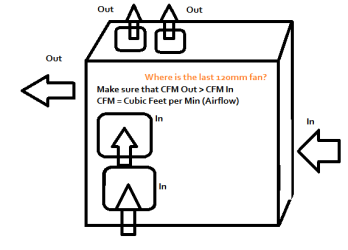
As mentioned, just look at that diagram on the link and try to set something up thats similar. You want negative pressure and you want distributed cooling. In other words, if you can have something like:

If you use all the fan ports, have 4 coming in and 4 going out. Have the top fans going out, the front fan coming in, the bottom side fan in and the top side fan in, the back fan out. Not sure where the last fan is but have that coming in I guess. Just make sure that the out fans are a bit bigger and/or spinning a bit faster. In other words you want a larger CFM (Cubic Feet /Min) for the out fans than the in fans.

Last edited by notsograymatter; 04-22-2010 at 05:32 AM..
My System SpecsSystem Spec
04-22-2010   #7


Windows 7 64Bit Ultimate Edition SP1


I have only rtoom for fans, one front, two for the side, one for the back and two top fans.
My System SpecsSystem Spec
04-22-2010   #8


W7 Ult. x64 | OS X


You'll be fine with the above setup as long as the CFM out is higher than in but not so high that it doubles it or anything. Like I said, don't take my word for it, test with different setups. Just take the plating off your CD/DVD areas and put plastic on there to see if you're getting good airflow.

EDIT: If you only have one front fan you can make the side fans blow in. You should still have more airflow out than in because the top fans are bigger. Just make sure to check the CFM ratings and add up the totals.
My System SpecsSystem Spec
04-22-2010   #9


Vista SP2 HP 32-bit & Ult 64-bit W7 SP1 Pro 32-bit & 64-bit


The bottom side fan should also be drawing air into the case. The missing exhaust fan is the fan built in to the PSU itself. You should arrange for the case to be under negative air pressure with more air being exhausted than taken in. You should also have the side fans running slower than the front. The side fans are optional, but if you fit them they should be pulling air into the case. If you do fit them, you should also fit the top fans and have them exhausting air from the case.

See also this on a similar topic: Question from a test
My System SpecsSystem Spec
04-22-2010   #10


W7 Ult. x64 | OS X


Quote   Quote: Originally Posted by Dwarf View Post
The bottom side fan should also be drawing air into the case. The missing exhaust fan is the fan built in to the PSU itself. You should arrange for the case to be under negative air pressure with more air being exhausted than taken in. You should also have the side fans running slower than the front. The side fans are optional, but if you fit them they should be pulling air into the case. If you do fit them, you should also fit the top fans and have them exhausting air from the case.

See also this on a similar topic: Question from a test
What he said
Attached Thumbnails
Help with fans.-fans.png  
My System SpecsSystem Spec
Reply

 Help with fans.


Thread Tools


Similar Threads for: Help with fans.
Thread Forum
Solved New Fans. Hardware & Devices
Fans Overclocking and Case Mods
Solved Help with my fans set up. Hardware & Devices
Solved Hey Fans Overclocking and Case Mods
help with fans Overclocking and Case Mods


All times are GMT -5. The time now is 06:14 PM.


Windows 7 Forums is an independent web site and has not been authorized,
sponsored, or otherwise approved by Microsoft Corporation.
"Windows 7" and related materials are trademarks of Microsoft Corp.
© Designer Media Ltd
  

1 2 3 4 5 6 7 8 9 10 11 12 13 14 15 16 17 18 19 20 21 22 23 24 25 26 27 28 29 30