|  | | |
27 Apr 2010
|
#1 | | windows 7 home premium 64bit |
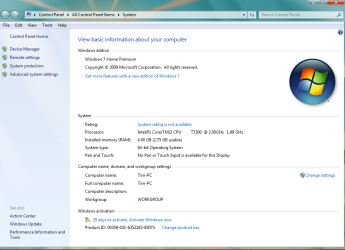
available ram Hi, I just did a fresh install of windows 7 home premium 64bit. I was running it before, but the system was cluttered. My system was running the 4GB of ram that I had before I did a fresh install, but now the system is only recognizing 2.75GB of said ram. Why would it be doing that if the total ram i can have on windows 7 hp64 is 16GB? Any help would be much appreciated. | My System Specs |
| OS windows 7 home premium 64bit |
27 Apr 2010
|
#2 | | Windows 7 Professional x64 Rednecksville |
Welcome! Make sure you actually installed the 64-bit version: System Type - 32-bit (x86) or 64-bit (x64)
Also make sure Windows is allowed to use all the RAM. Memory - Set Maximum Amount Used by Windows 7 | My System Specs | | System Manufacturer/Model Number Custom OS Windows 7 Professional x64 CPU Intel i7 2600K OC'd @ 4620 MHz Motherboard Asus P8Z68-V Pro Memory 16GB GSkill Sniper 2133 Mhz (4x4GB) Graphics Card EVGA GeForce GTX 480 SuperClocked+ Sound Card Realtek High Definition Audio Monitor(s) Displays 2x Acer S273HLbmii 27" Screen Resolution 2 x 1920x1080 Keyboard Logitech MK320 (wireless) Mouse Logitech MK320 (wireless) PSU Corsair HW Series 750w (modular) Case Cooler Master HAF 932 Advanced Blue Edition Cooling CM Hyper 212+ CPU cooler, 3x 230mm + 1x 140mm case fans Hard Drives 64GB Crucial M4 SSD
Storage: Hitachi 1TB 5400RPM, Samsung 1.5TB 5400RPM Internet Speed 30 Mb/s : 2 Mb/s |
27 Apr 2010
|
#3 | | windows 7 home premium 64bit |
I double checked and I am running the 64bit, and there is no max memory cap set in msconfig. | My System Specs | | OS windows 7 home premium 64bit |
27 Apr 2010
|
#4 | | Windows 7 Professional x64 Rednecksville |
Do you have an on-board video card that you are not using? If so, disable it in your BIOS.
Also check with SIW and see if it recognizes all your RAM. | My System Specs | | System Manufacturer/Model Number Custom OS Windows 7 Professional x64 CPU Intel i7 2600K OC'd @ 4620 MHz Motherboard Asus P8Z68-V Pro Memory 16GB GSkill Sniper 2133 Mhz (4x4GB) Graphics Card EVGA GeForce GTX 480 SuperClocked+ Sound Card Realtek High Definition Audio Monitor(s) Displays 2x Acer S273HLbmii 27" Screen Resolution 2 x 1920x1080 Keyboard Logitech MK320 (wireless) Mouse Logitech MK320 (wireless) PSU Corsair HW Series 750w (modular) Case Cooler Master HAF 932 Advanced Blue Edition Cooling CM Hyper 212+ CPU cooler, 3x 230mm + 1x 140mm case fans Hard Drives 64GB Crucial M4 SSD
Storage: Hitachi 1TB 5400RPM, Samsung 1.5TB 5400RPM Internet Speed 30 Mb/s : 2 Mb/s |
27 Apr 2010
|
#5 | | windows 7 home premium 64bit |
The SIW recognizes all of the ram, and the video cards. I have dual geforce8700 gt's that both have 512MB of ram. Would their ram cause the problem? I read about MMIO, would the mmio from the video cards cause this? | My System Specs | | OS windows 7 home premium 64bit |
27 Apr 2010
|
#6 | | Windows 7 Professional x64 Rednecksville |
The Shared Memory for video cards uses up RAM. I doubt your cards are using shared memory though.
I suggest a repair install. | My System Specs | | System Manufacturer/Model Number Custom OS Windows 7 Professional x64 CPU Intel i7 2600K OC'd @ 4620 MHz Motherboard Asus P8Z68-V Pro Memory 16GB GSkill Sniper 2133 Mhz (4x4GB) Graphics Card EVGA GeForce GTX 480 SuperClocked+ Sound Card Realtek High Definition Audio Monitor(s) Displays 2x Acer S273HLbmii 27" Screen Resolution 2 x 1920x1080 Keyboard Logitech MK320 (wireless) Mouse Logitech MK320 (wireless) PSU Corsair HW Series 750w (modular) Case Cooler Master HAF 932 Advanced Blue Edition Cooling CM Hyper 212+ CPU cooler, 3x 230mm + 1x 140mm case fans Hard Drives 64GB Crucial M4 SSD
Storage: Hitachi 1TB 5400RPM, Samsung 1.5TB 5400RPM Internet Speed 30 Mb/s : 2 Mb/s |
27 Apr 2010
|
#7 | | Win7 Ultimate SP1 x64 / Windows 8 Pro / Android Mauritius |

Quote: Originally Posted by bilobatedtimmo Hi, I just did a fresh install of windows 7 home premium 64bit. I was running it before, but the system was cluttered. My system was running the 4GB of ram that I had before I did a fresh install, but now the system is only recognizing 2.75GB of said ram. Why would it be doing that if the total ram i can have on windows 7 hp64 is 16GB? Any help would be much appreciated. Enable Memory Remap in your BIOS | My System Specs | | System Manufacturer/Model Number Custom Build OS Win7 Ultimate SP1 x64 / Windows 8 Pro / Android CPU Intel Core 2 Quad Q8200 OC'd 3.08GHz Motherboard Asus Rampage formula LGA775 Memory 8GB DDR2 900Mhz Graphics Card Zotac GTX 460OC 2GB GDDR5/Asus EN9600GT 1GB DDR3 PhyX Sound Card Supreme FX2 Monitor(s) Displays AOC 22' Screen Resolution 1680x1050 Keyboard Prolink keyboard Mouse Prolink optical mouse PSU Cooler Master GX 650W Cooling Cooler Master V6 + 3X fans Hard Drives 3X500GB hitachi, 2TB internal, 500GB Seagate FreeAgent, 640GB Samsung Internet Speed 1MiB/s Other Info 5.1 System + 2.1 System |
27 Apr 2010
|
#8 | | windows 7 home premium 64bit |
I did a repair install but the problem still persists, and i couldn't find any enable memory remap options in my bios. I do appreciate the suggestions from you guys though, thank you. | My System Specs | | OS windows 7 home premium 64bit |
27 Apr 2010
|
#9 | | Windows 7 Professional x64 Rednecksville |
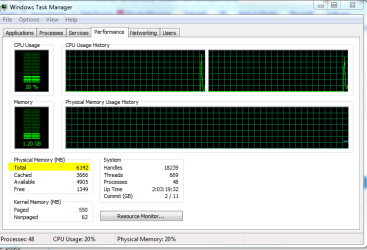
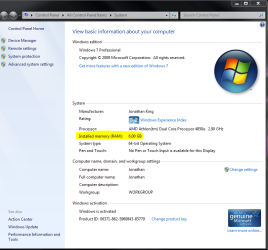
See if either of these reports the correct amount of RAM. I included both pics because I was not sure which method(s) you used. | My System Specs | | System Manufacturer/Model Number Custom OS Windows 7 Professional x64 CPU Intel i7 2600K OC'd @ 4620 MHz Motherboard Asus P8Z68-V Pro Memory 16GB GSkill Sniper 2133 Mhz (4x4GB) Graphics Card EVGA GeForce GTX 480 SuperClocked+ Sound Card Realtek High Definition Audio Monitor(s) Displays 2x Acer S273HLbmii 27" Screen Resolution 2 x 1920x1080 Keyboard Logitech MK320 (wireless) Mouse Logitech MK320 (wireless) PSU Corsair HW Series 750w (modular) Case Cooler Master HAF 932 Advanced Blue Edition Cooling CM Hyper 212+ CPU cooler, 3x 230mm + 1x 140mm case fans Hard Drives 64GB Crucial M4 SSD
Storage: Hitachi 1TB 5400RPM, Samsung 1.5TB 5400RPM Internet Speed 30 Mb/s : 2 Mb/s |
27 Apr 2010
|
#10 | | Windows 7 Ultimate 64bit Norfolk, VA |
what he may be seeing is this Installed Memory 4GB (2.75GB Usable)
I've seen it on one 64bit machine here on the forum but don't know if he was able to resolve the issue.
Normally you see that on a 32bit machine with 4GB installed, and varies between 2.75 and 3.5GB. | My System Specs | | System Manufacturer/Model Number HAL-9000 OS Windows 7 Ultimate 64bit CPU Intel i7 3770K Motherboard Asus Sabertooth Z77 Memory 16GB DDR3 1333 Corsair XMS3 Graphics Card XFX HD6950 2GB EyeFinity Sound Card Logitech G35 & Sennheiser PC135 & VIA HD Monitor(s) Displays 23" HP 2310e, 23" Samsung B2230, 21.5" Viewsonic Screen Resolution 5760x1080 Keyboard Logitech G15 and G13 Mouse Logitech G700 Gaming Mouse PSU Antec True Power New 650watt Case Cooler Master HAF-932 Cooling Corsair H60 Hydro Cooler, 3x 230mm Fans, 2x120mm Fan Hard Drives 16TB of Storage
128GB & 256GB Crucial M4 SSD's, 2X 1TB WD Black, 3x 2TB WD, 3x 2TB Samsung F4, 1.5TB Seagate, WD 500GB, Internet Speed 50/10 Mbit Other Info Speakers : Alesis M1 Active Mk2 Studio Monitors , APC RS 1200 UPS, HP 4500DN Color Laser, HP P1006 mono Laser, Kodak 8500 Dye-Sub, Epson 1280 inkjet, Epson Worforce 610 MFC All times are GMT -5. The time now is 08:25 PM. | |