| Windows 7: A Dream Of A Dual Monitor Display, Lend Me Your Brain? |
04 May 2010
|
#1 | | |
A Dream Of A Dual Monitor Display, Lend Me Your Brain? Background:
So last year I spent a large sum of money on what i thought would be my gaming computer. Shortly after purchasing the computer I starting doing less gaming and more graphic designing. I am trying to expand my knowledge of graphic design, as my fondness of it has become somewhat great in the past two or three years. It started with making avatars and such, etc... but I now find myself wanting to make decals and t-shirts designs. So the computer I once used for gaming I believe I will be using mainly for graphic design and occasional gaming. SO
On that note, I'd like to get a dual monitor display for my desktop that would be good for both games and graphic design, mainly graphic design. I've looked around quite a bit but I've heard different opinions and seen completely different things in graphic design magazines.
I wanted to put my question to the Windows 7 community, I've always been pointed in the right direction here and would like to continue that trend. SIDE NOTE: Newer Technology:
I know there will always be something bigger, better, and faster coming out on the market but when I originally built my desktop I chose a Mid-tower because I didn't want a High-tower due to the size etc... I recently got back from school so I have yet to set-up my desktop so I can't look at the specs but I know off the top of my head it has a EVGA Nvidia 9800 GX2 graphics card, 8G of DDR2 Corsair Dominator ram, two Western Digital Velociraptor Hardrives, and a Intel quad Core processor. Some of the hardware I forgot over time but if anyone knows...
Would there be any significant improvement if i were to upgrade my desktop? It's only been one year and i know DDR3 is becoming the new thing but what do you guys think? The graphics card hardly fits and blocks a decent amount of airflow since it is in a mid-tower but I have two Thermaltake LED smart fans that intake and exhaust the air that run from 1300 rpm to 2300. Its suppose to change if the temperature rises but i dono if I have it setup properly for it to do so, has to do with complication with a display I have. Sorry if it seems like I'm bragging, I'm just trying to give as much info as i can.
And if anyone knows why do graphic designers use macs versus windows? Just curious. HUGH THANKS!
-Lollies  | My System Specs |
| System Manufacturer/Model Number Self-Built OS Windows 7 Ultimate x64 CPU Intel Core 2 Extreme QX9650 @ 3.00GHz 1333FSB 12 Motherboard Asus Striker II Formula nForce 780i SLI Mainboard Memory 8G Corsair Dominator DDR2 Graphics Card None LoL Sound Card Creative Labs X-FI XtremeGamer 24-Bit PCI Sound Card Monitor(s) Displays None LoL Screen Resolution None LoL Keyboard None LoL Mouse None LoL PSU Corsair AX850 Case Corsair Graphite 600T Cooling Corsair H70 Hard Drives 2 Western Digital Raid-0 10,000 RPM Velociraptor's Internet Speed Download: 14.95 MB/s Upload: 2.88 MB/s Other Info 32" LG LCD TV
Astro A40 Audio System
Logitech Z-2300 Speakers
Microsoft Xbox 360 Slim
Rosewill External Enclosure |
04 May 2010
|
#2 | | Windows 7 Professional 64 Northwestern Pennsylvania |
Price range, then we can start from there. | My System Specs | | System Manufacturer/Model Number self built OS Windows 7 Professional 64 CPU i7 860 Motherboard ASUS P7P55D-E Pro /onboard SATA 6Gb/s USB 3.0 Memory 8GB Corsair CMX4GX3M2A1600C9 DDR3 1600 Graphics Card (2) Nvidia EVGA GTX 470 SLI Sound Card Onboard VIA VT1828S 8 channels Monitor(s) Displays ASUS VW266H 25.5" HDMI Widescreen LCD and HP vs19 LCD 19" Screen Resolution 1920 x 1200 : 1280 X 1024 dual Keyboard Saitek Mouse Microsoft Optical comfort mouse 3000 PSU COOLER MASTER Silent Pro 1000W Case LIAN LI Lancool PC-K62 Cooling Prolimatech Megahalems with Scythe "ULTRA KAZE" 120 Hard Drives Intel X25-M 80GB SSD (boot)
Seagate Barracuda 80GB
Western Digital Caviar Black 500GB
Asus DRW-24B1ST/BLK/B/AS Internet Speed Comcast Ultra tier 30/5 |
04 May 2010
|
#3 | | |

Quote: Originally Posted by Sanvean Price range, then we can start from there.  I've put some thought into it, not a lot.
I don't need like some crazy 3D LED display even though I would thoroughly enjoy that. I'm honestly willing to go up to a grand but it seems like something like that might be a bit over kill for my current capabilities.
If that helps? | My System Specs | | System Manufacturer/Model Number Self-Built OS Windows 7 Ultimate x64 CPU Intel Core 2 Extreme QX9650 @ 3.00GHz 1333FSB 12 Motherboard Asus Striker II Formula nForce 780i SLI Mainboard Memory 8G Corsair Dominator DDR2 Graphics Card None LoL Sound Card Creative Labs X-FI XtremeGamer 24-Bit PCI Sound Card Monitor(s) Displays None LoL Screen Resolution None LoL Keyboard None LoL Mouse None LoL PSU Corsair AX850 Case Corsair Graphite 600T Cooling Corsair H70 Hard Drives 2 Western Digital Raid-0 10,000 RPM Velociraptor's Internet Speed Download: 14.95 MB/s Upload: 2.88 MB/s Other Info 32" LG LCD TV
Astro A40 Audio System
Logitech Z-2300 Speakers
Microsoft Xbox 360 Slim
Rosewill External Enclosure System Manufacturer/Model Number Self-Built OS Windows 7 Ultimate x64 CPU Intel Core 2 Extreme QX9650 @ 3.00GHz 1333FSB 12 Motherboard Asus Striker II Formula nForce 780i SLI Mainboard Memory 8G Corsair Dominator DDR2 Graphics Card None LoL Sound Card Creative Labs X-FI XtremeGamer 24-Bit PCI Sound Card Monitor(s) Displays None LoL Screen Resolution None LoL Keyboard None LoL Mouse None LoL PSU Corsair AX850 Case Corsair Graphite 600T Cooling Corsair H70 Hard Drives 2 Western Digital Raid-0 10,000 RPM Velociraptor's Internet Speed Download: 14.95 MB/s Upload: 2.88 MB/s Other Info 32" LG LCD TV
Astro A40 Audio System
Logitech Z-2300 Speakers
Microsoft Xbox 360 Slim
Rosewill External Enclosure |
05 May 2010
|
#5 | | |
1) Your computer is fine for all your graphic needs. Corel, CS5, most softwares I know will run perfectly with your setup. I don't think turning it into a money sink will do any good.
2) On the note of dual monitors: if what you design is decals and t-shirts, your gaming monitor will do great for design, too. If you plan to do print or web design, things change a bit, because these subjects require greater color accuracy of your monitor, and, you guessed, this comes at the price of speed and gaming performance. What I advise is if you plan to go into professional design for print and web, get a design LCD (LED-lit, IPS or whatever the technology of the hour is for this field) and a fast LCD for gaming (TN). If you don't look that far, just go with your gaming LCD and when you get your eye trained to the point that you can spot color defficiency, go for the second one.
On the Mac vs PC issue, I think it's just a trend, like Adobe is more popular than Corel: if there are enough designers to use Mac, then their 'apprentices' will be also accustomed to it, and so the trend builds. Technically I see no gain on either one, it's just a matter of personal preference and industry compliance. It's like "Why do we drive right?" Well, because right looked good to the first drunk drivers and there was no debate. But you are always free to move to England and drive left | My System Specs | | OS 7 CPU Athlon 2 X4 630 (2.8 GHz) Motherboard Asus M4A79XTD EVO Memory 4 x 2Gb DDR3 1333 Graphics Card Gigabyte HD4550 Sound Card ATI HD onboard Monitor(s) Displays 2x Samsung Screen Resolution 1680x1050, 1280x1024 Keyboard Microsoft forever; will someone include a trackball in it? Mouse Microsoft; has 2 buttons and is affraid of cats. PSU Chieftec 450W Case Chieftec Cooling Plenty Hard Drives 3 x Seagate Barracuda 500G Raid 0 Internet Speed Long way from dial-up Other Info My computer likes Dali |
05 May 2010
|
#6 | | |
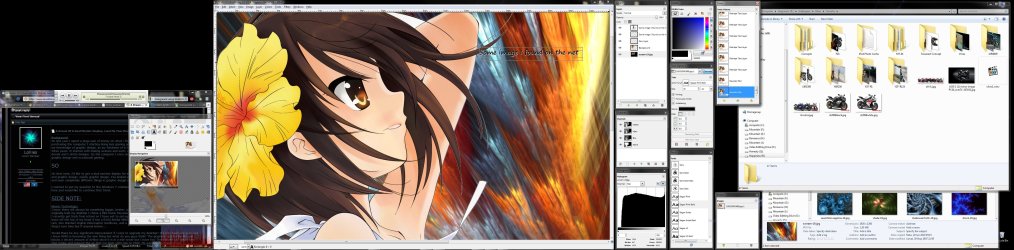
Lollies, if you work with graphics - a dual monitor setup will HELP A LOT. I use 3 Monitors setup (2x 24" and 1x 15"). I can't help but to feel cramped when I'm forced to use single monitor systems. Let's say you use Photoshop a lot, adding the second monitor will help in how many "active" windows you can have at the same time. What I mean by "active" windows is : those Windows that you need to access at any given time, it must not be overshadowed by another window, like pallets in Photoshop, and your assets explorer Window. Here's what I mean (I use GIMP for this example): The left hand monitor is for "monitors/controllers", like iTunes mini window, sound card dashboard app, clock, bandwidth monitor, etc, the middle monitor is the main workplace, the right hand monitor is for asset management, pallets, etc... This way you can work MUCH easier, and more efficient too IMHO.
As for Mac/PC debate for graphic designer, I have to say that I like Apple Mac OS X's "Document focused" window system instead of "Application focused" window system used by Microsoft. In MacOS, you are focused to the task at hand, Photoshop isn't constrained by it's "window", because when Photoshop is active, your "main menu bar" is filled with Photoshop's menu items. If Finder (Explorer's equivalent in Mac" is active, the "main menu bar" is filled with Finder's menu items, Photoshop's menu item is replaced. On the desktop OTOH, you can still see Photoshop's documents open, yet the pallets is hidden so that it doesn't get in the way. MacOS's window management approach is by far more effective for document focused workflow.
zzz2496 | My System Specs | | System Manufacturer/Model Number Self Built OS Windows7 Ultimate 64bit CPU Intel Core 2 Quad Q6600 Motherboard Abit IN9-32X-MMAX Memory DDR2 Adata 4GB Graphics Card Nvidia GeForce GTX 285 1024 and Nvidia GeForce 8800GT 512 Sound Card Asus Xonar HDAV 1.3 Monitor(s) Displays Dell 2407WFP and BenQ 2400v and Philips 150v3 Screen Resolution 3840x1200 and 1024x768 Keyboard MicrosoftNaturalKeyboard 4000/Apple Alu keyboard/Dinovo mini Mouse Logitech G5/MarbleMouseTrackball/PerformanceMX/SpacePilotPRO PSU Corsair TX 850W Case Cooler Master HAF932 Cooling Arctic Cooling Freezer Extreme and plenty of fans... Hard Drives 2 WDC 1TB
1 WDC 1.5TB
1 WDC 640GB
1 WDC 320GB
1 Seagate 200GB Internet Speed 1.5Mbps down/384Kbps up Other Info APC SURT 1000XL
Logitech Z-560
Wiimote
Mikrotik Router
Linksys (now Cisco) SD2008 8 port Gigabit switch
Linksys WRT54G (acting as AP)
Apple wireless Aluminium keyboard
Apple Magic Mouse
Xbox360 wired controller |
05 May 2010
|
#7 | | |
Right you are. I only saw the "need for a good design display" part of the problem. Still, just for dabbling in design, it's hardly necessary. | My System Specs | | OS 7 CPU Athlon 2 X4 630 (2.8 GHz) Motherboard Asus M4A79XTD EVO Memory 4 x 2Gb DDR3 1333 Graphics Card Gigabyte HD4550 Sound Card ATI HD onboard Monitor(s) Displays 2x Samsung Screen Resolution 1680x1050, 1280x1024 Keyboard Microsoft forever; will someone include a trackball in it? Mouse Microsoft; has 2 buttons and is affraid of cats. PSU Chieftec 450W Case Chieftec Cooling Plenty Hard Drives 3 x Seagate Barracuda 500G Raid 0 Internet Speed Long way from dial-up Other Info My computer likes Dali |
05 May 2010
|
#8 | | |

Quote: Originally Posted by dynu Right you are. I only saw the "need for a good design display" part of the problem. Still, just for dabbling in design, it's hardly necessary. Pardon me...?
Once you have a multi monitor setup, "it's hardly necessary" will become "absolutely necessary"
zzz2496 | My System Specs | | System Manufacturer/Model Number Self Built OS Windows7 Ultimate 64bit CPU Intel Core 2 Quad Q6600 Motherboard Abit IN9-32X-MMAX Memory DDR2 Adata 4GB Graphics Card Nvidia GeForce GTX 285 1024 and Nvidia GeForce 8800GT 512 Sound Card Asus Xonar HDAV 1.3 Monitor(s) Displays Dell 2407WFP and BenQ 2400v and Philips 150v3 Screen Resolution 3840x1200 and 1024x768 Keyboard MicrosoftNaturalKeyboard 4000/Apple Alu keyboard/Dinovo mini Mouse Logitech G5/MarbleMouseTrackball/PerformanceMX/SpacePilotPRO PSU Corsair TX 850W Case Cooler Master HAF932 Cooling Arctic Cooling Freezer Extreme and plenty of fans... Hard Drives 2 WDC 1TB
1 WDC 1.5TB
1 WDC 640GB
1 WDC 320GB
1 Seagate 200GB Internet Speed 1.5Mbps down/384Kbps up Other Info APC SURT 1000XL
Logitech Z-560
Wiimote
Mikrotik Router
Linksys (now Cisco) SD2008 8 port Gigabit switch
Linksys WRT54G (acting as AP)
Apple wireless Aluminium keyboard
Apple Magic Mouse
Xbox360 wired controller |
05 May 2010
|
#9 | | Windows 7 Professional x64 Service Pack 1 Morecambe, Lancashire, England |
Dual monitors will help a lot with graphic design. I use dual monitors at the moment, and I'd never go back to single. It makes programming/coding about a million times easier and better to do. | My System Specs | | System Manufacturer/Model Number Custom Built OS Windows 7 Professional x64 Service Pack 1 CPU Intel Core i7 920 3.2GHz Motherboard ASUS Sabertooth x58 Memory 6GB XMS3 Corsair 1333MHz Graphics Card Zotac Nvidia Geforce GTX470 Sound Card ASUS Xonar DX/XD 7.1 Monitor(s) Displays Dell 24" S2409W + Dell 20" E207WFP Screen Resolution 1920x1080 + 1680x1050 Keyboard Logitech G11 Keyboard Mouse Logitech G5 Laser Mouse (2007 edition) PSU Corsair HX850 modular Case Coolermaster 690II Advanced Nvidia Edition Cooling Corsair H60 Hard Drives 1x 120GB OCZ Vertex 2E, 1x 750GB Western Digital Caviar Black, 1x 1TB Western Digital Caviar Green Internet Speed 16Mbps Other Info LG Blu-Ray player |
05 May 2010
|
#10 | | Windows 7 Professional 64 Northwestern Pennsylvania |
I have been using duals in graphics for about ten years and the thought of using a single monitor doesn't even enter the picture.
As Dynu stated, TN panels are the widely common type (cheap) and IPS which gives a wide viewing angle and accurate color reproduction (higher cost). The reason I asked about a budget initially, is due to the IPS option. Take a look over at Dell/Newegg and see what they have to offer in IPS panels.
If you are to do color critical work = IPS
General usage = TN (you can get very good results if calibrated)
My thoughts summed up:
Dual high grade TN panels (widescreen) to start. If your graphics take off, then reinvest in yourself and upgrade to dual (or more) IPS. You can even write them off as a business expense on your taxes... lol.
Last edited by Sanvean; 08 May 2010 at 12:44 AM..
| My System Specs | | System Manufacturer/Model Number self built OS Windows 7 Professional 64 CPU i7 860 Motherboard ASUS P7P55D-E Pro /onboard SATA 6Gb/s USB 3.0 Memory 8GB Corsair CMX4GX3M2A1600C9 DDR3 1600 Graphics Card (2) Nvidia EVGA GTX 470 SLI Sound Card Onboard VIA VT1828S 8 channels Monitor(s) Displays ASUS VW266H 25.5" HDMI Widescreen LCD and HP vs19 LCD 19" Screen Resolution 1920 x 1200 : 1280 X 1024 dual Keyboard Saitek Mouse Microsoft Optical comfort mouse 3000 PSU COOLER MASTER Silent Pro 1000W Case LIAN LI Lancool PC-K62 Cooling Prolimatech Megahalems with Scythe "ULTRA KAZE" 120 Hard Drives Intel X25-M 80GB SSD (boot)
Seagate Barracuda 80GB
Western Digital Caviar Black 500GB
Asus DRW-24B1ST/BLK/B/AS Internet Speed Comcast Ultra tier 30/5 A Dream Of A Dual Monitor Display, Lend Me Your Brain? problems? All times are GMT -5. The time now is 06:40 PM. | |