
Windows 7 Forums


Windows 7: Shared Memory Increased after CMOS Battery Change

04 May 2010   #1

Windows 7 Home Premium x64 SP1
McKinney, Texas
 
 
Shared Memory Increased after CMOS Battery Change

]Changed my CMOS battery and now my usable memory has decreased by 512MB and shared memory has increased by 512MB. All the BIOS setting haven't changed. Did a search of this site and tried suggested BIOS changes (decrease video memory) and still no luck. How do I get my usable memory back?

This use to say 3.5 usable.
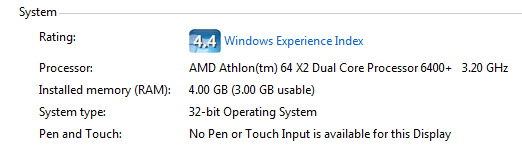
Shared Memory Increased after CMOS Battery Change-usable-memory.png

My System SpecsSystem Spec

04 May 2010   #2

Win 7 Ultimate x64
Etobicoke, Ontario


Have a good look through the bios for a setting called "Memory hole remapping" or something similar and if it is disabled, enable it.

Changing the battery can and usually will cause the bios to reset, and that is one setting that depending on the motherboard in most cases is set to disabled and needs to be enabled to use/see more than 4 GB of ram in 64 bit.
My System SpecsSystem Spec
04 May 2010   #3

Windows 7 Home Premium x64 SP1
McKinney, Texas


I'm afraid the BIOS on this Dell is pretty limited. No such memory hole setting in the BIOS. Only memory related is the video memory size setting, which can be set to 16, 32, 64, 128, 256.
My System SpecsSystem Spec
.


04 May 2010   #4

Win 7 Ultimate x64
Etobicoke, Ontario


Just realized that you are running 32 bit Windows. One thing I can tell you is that your video card (8500 GT) has its own memory on it and uses/takes nothing from system ram. This should help explain 4 GB on 32 bit,

Coding Horror: Dude, Where's My 4 Gigabytes of RAM?

In your case right off the bat you are going to lose 512 MB due to the video card, with the rest of the hardware taking the rest. There is a god possibility that with changing the battery it caused the bios to reset, and enable/re-enable a setting or two for something on the motherboard that was disabled and hence the decrease in available ram.

By chance is the onboard video still enabled even with the video card? If so see if there is the option to disable it, and if not and you haven't already set the memory for it as low as it will go.
My System SpecsSystem Spec
04 May 2010   #5

Windows 7 Home Premium x64 SP1
McKinney, Texas


Problem solved. Upgraded to Windows 7 64bit and added another 4GB of memory.
My System SpecsSystem Spec
04 May 2010   #6

win 7 ultimate
nottingham


Quote   Quote: Originally Posted by jeffro75 View Post
Problem solved. Upgraded to Windows 7 64bit and added another 4GB of memory.
that's one of the best ways of solving a problem
My System SpecsSystem Spec
04 May 2010   #7

Windows 7 x64 Ultimate
San Diego


Ha yeah

I would have guessed that the problem was related to a built in video controller which you could (and probably had) turned off in the BIOS before the batter change which may have reset your BIOS to defaults.
My System SpecsSystem Spec
Reply

 Shared Memory Increased after CMOS Battery Change problems?


Thread Tools


Similar help and support threads for: Shared Memory Increased after CMOS Battery Change
Thread Forum
Solved Battery Meter shows CMOS battery not charging Hardware & Devices
Hello guys. I would like to know how to change shared video memory. Graphic Cards
How to change a graphics card shared memory? Graphic Cards
Lost my CMOS battery Hardware & Devices
How to change the shared system memory in W7 Graphic Cards


All times are GMT -5. The time now is 04:55 PM.


Seven Forums Android App Seven Forums IOS App Follow us on Facebook

Windows 7 Forums is an independent web site and has not been authorized,
sponsored, or otherwise approved by Microsoft Corporation.
"Windows 7" and related materials are trademarks of Microsoft Corp.
© Designer Media Ltd
  

1 2 3 4 5 6 7 8 9 10 11 12 13 14 15 16 17 18 19 20 21 22 23 24 25 26 27 28 29 30 31 32