| Windows 7: CD/DVD Drive region, plz help |
14 May 2010
|
#1 | | Windows 7 Ultimate 32-bit |
CD/DVD Drive region, plz help hello all,
I have a Toshiba Tecra A9 series, I bought it 2007, it comes with a TEAC DV-W28ECT ATA CD/DVD Drive, so yesterday I installed Windvd 10, during the installation it asked me to specify my region, it set it to 1 , USA, ......,
so after the installation some CDs wont open, so what is the solution ? how can I rest the region ? my friend’s brother told me its done by updating or reinstalling the firmware, so can anybody tell how that is done ?
thx in advance
OS: 7 ultimate 32-bit | My System Specs |
| OS Windows 7 Ultimate 32-bit |
14 May 2010
|
#2 | | Windows 7 Pro 64 SP1 East Bay Area, CA |

Quote: Originally Posted by xcode18 hello all,
I have a Toshiba Tecra A9 series, I bought it 2007, it comes with a TEAC DV-W28ECT ATA CD/DVD Drive, so yesterday I installed Windvd 10, during the installation it asked me to specify my region, it set it to 1 , USA, ......,
so after the installation some CDs wont open, so what is the solution ? how can I rest the region ? my friend’s brother told me its done by updating or reinstalling the firmware, so can anybody tell how that is done ?
thx in advance
OS: 7 ultimate 32-bit Since you say "some" CD's wont open, If you change the region what are you going to do about the others?
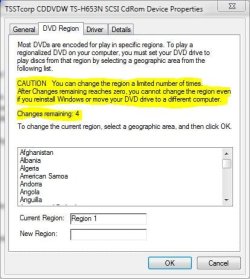
You can change the region in the properties of your cd/dvd drive, region tab, but since you can only do this a limited number of times I would look at all other possible reasons why some of them wont open first. | My System Specs | | Computer type PC/Desktop System Manufacturer/Model Number Compaq sr5410f case OS Windows 7 Pro 64 SP1 CPU AMD X2 4450E @ 2.3 ghz Motherboard Biostar MCP6P M2+ Memory 4.0 g Graphics Card Nvidia GeForce 9600 GT , 512mb Sound Card onboard Monitor(s) Displays auria eq2367 Screen Resolution 1920 x 1080 Keyboard logitech wave cordless Mouse logitech LX8 cordless laser mouse PSU 250 watts Case Compaq Cooling couple fans Hard Drives 1 tb Hitachi HDT721010SLA scsi, 500 gb external Internet Speed comcast hi speed 19 dn 8 up Antivirus Microsoft Security Essentials Browser IE10 Other Info Laptop specs: HP g7-1365dx /
CPU: AMD A6-3420M APU with Radeon(tm) HD Graphics /
RAM: Crucial 8Gb (2x4Gb) /
SSD: Crucial M4-CT128M4SSD2 ATA Device/ FW 000F /
GFX: AMD Radeon HD 6520G /
OS: Microsoft Windows 7 Professional 64-bit 7601 Multiprocessor Free Service Pack 1 |
14 May 2010
|
#3 | | Windows 7 x64 pro/ Windows 7 x86 Pro/ XP SP3 x86 |
1) You have a relatively old drive. What your friend's brother told you was probably about hacked firmware which could make your dvd drive region free. But remember, it may also brick the drive. Also such firmware may or may not be available for your particular model.
What you can try is look for LEGIT upgrades to the firmware.
2) You can also try "DVD Region+CSS Free". DVD Region+CSS Free works in the background to make DVDs appear region free and unprotected. Free-Codecs.com :: Download DVD Region+CSS Free 5.9.8.5 and DVD Region+CSS Free Lite 5.9.8.5 | My System Specs | | System Manufacturer/Model Number Too many to describe... OS Windows 7 x64 pro/ Windows 7 x86 Pro/ XP SP3 x86 |
14 May 2010
|
#4 | | Windows 7 Ultimate 32-bit |
thx all, DVD Region+CSS Free worked!!
one more thing, bill2, should I get a new drive ?? u said mine is kinda old | My System Specs | | OS Windows 7 Ultimate 32-bit |
14 May 2010
|
#5 | | Windows 7 x64 pro/ Windows 7 x86 Pro/ XP SP3 x86 |
I was just wondering whether Toshiba updates that drive's firmware any longer. Ya, dvd drives are pretty cheap these days, i know some people who keep one for each region...lol. But, as long as DVD region free does the job for you, it should be OK. Also, everytime you buy a cd, be sure to check its region. | My System Specs | | System Manufacturer/Model Number Too many to describe... OS Windows 7 x64 pro/ Windows 7 x86 Pro/ XP SP3 x86 OS Vista x64 / 7 X64 CPU E8400 Motherboard ASRock 1333 GLAN R2.0 Memory 2x1 gb 800mhz Graphics Card 9500gt 1gb Case Coolermaster Cooling Winpower 500w Hard Drives Maxtor 160gb-2mb cache |
14 May 2010
|
#7 | | Windows 7 x64 pro/ Windows 7 x86 Pro/ XP SP3 x86 |
Hmm....theres also a Windows 7 version of dvd43 which does the same thing and its free. DVD43 and DVD43 Plug-in - Download Sites | My System Specs | | System Manufacturer/Model Number Too many to describe... OS Windows 7 x64 pro/ Windows 7 x86 Pro/ XP SP3 x86 CD/DVD Drive region, plz help problems? All times are GMT -5. The time now is 07:40 AM. | |